12

inside my database I have a procedure called spGen2_tblIE_SchedProcess_Update.

when I run this script

select * from sys.objects
where name = 'spGen2_tblIE_SchedProcess_Update'

enter image description here

Inside the same database I have a table called tblIE_Step

when I run the following script

select * from sys.objects
where name = 'tblIE_Step'

enter image description here

then I want to see all the permissions of the objects.

when I check my stored procedure I run this script:

select 'Proc' = SCHEMA_NAME(p.schema_id)+'.'+p.name
    , 'Type' = per.state_desc, 'Permission' = per.permission_name
    , 'Login' = pri.name, 'Type' = pri.type_desc 
    , *
From sys.objects as p
left join sys.database_permissions as per on p.object_id = per.major_id
left join sys.database_principals as pri on per.grantee_principal_id = pri.principal_id
where p.object_id = 87671360

and I get the permissions:

enter image description here

But when I run the same for my table, I don't get anything:

select 'Proc' = SCHEMA_NAME(p.schema_id)+'.'+p.name
    , 'Type' = per.state_desc
    , 'Permission' = per.permission_name
    , 'Login' = pri.name, 'Type' = pri.type_desc 
    , *
From sys.objects as p
left join sys.database_permissions as per on p.object_id = per.major_id
left join sys.database_principals as pri on per.grantee_principal_id = pri.principal_id
where p.object_id = 389576426

enter image description here

I know there are logins and groups that belong to roles that are have db_reader and db_writer permissions. However, they are not showing here.

How can I change my script so that it would show me all the permissions for this table?

Marcello Miorelli
  • 17,274
  • 53
  • 180
  • 320

4 Answers4

10

I found a good script to see the permissions on a database object.

SELECT
  (
    dp.state_desc + ' ' +
    dp.permission_name collate latin1_general_cs_as + 
    ' ON ' + '[' + s.name + ']' + '.' + '[' + o.name + ']' +
    ' TO ' + '[' + dpr.name + ']'
  ) AS GRANT_STMT
FROM sys.database_permissions AS dp
  INNER JOIN sys.objects AS o ON dp.major_id=o.object_id
  INNER JOIN sys.schemas AS s ON o.schema_id = s.schema_id
  INNER JOIN sys.database_principals AS dpr ON dp.grantee_principal_id=dpr.principal_id
WHERE 1=1
    AND o.name IN ('YOUR TABLE NAME')      -- Uncomment to filter to specific object(s)
--  AND dp.permission_name='EXECUTE'    -- Uncomment to filter to just the EXECUTEs
ORDER BY dpr.name

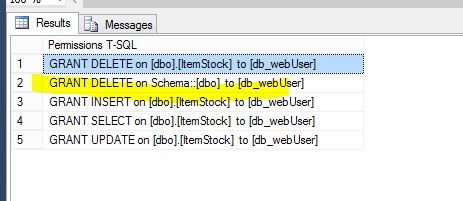
the script above works for a database object. however, when I add permissions on the schema where the db object is, the above script does not pick that up, for example:

grant delete on schema::dbo to [db_webUser] 
GO

so for that case I found this script here that caters for that as well:

-----------------------------------------------------------------------
-- http://schottsql.blogspot.co.uk/2011/02/quickly-script-permissions-in-sql-2005.html
-----------------------------------------------------------------------

SELECT state_desc + ' ' + permission_name + ' on ['+ ss.name + '].[' + so.name + '] to [' + sdpr.name + ']' COLLATE LATIN1_General_CI_AS as [Permissions T-SQL] FROM SYS.DATABASE_PERMISSIONS AS sdp JOIN sys.objects AS so ON sdp.major_id = so.OBJECT_ID JOIN SYS.SCHEMAS AS ss ON so.SCHEMA_ID = ss.SCHEMA_ID JOIN SYS.DATABASE_PRINCIPALS AS sdpr ON sdp.grantee_principal_id = sdpr.principal_id where 1=1 AND so.name = 'ItemStock'

UNION

SELECT state_desc + ' ' + permission_name + ' on Schema::['+ ss.name + '] to [' + sdpr.name + ']' COLLATE LATIN1_General_CI_AS as [Permissions T-SQL] FROM SYS.DATABASE_PERMISSIONS AS sdp JOIN SYS.SCHEMAS AS ss ON sdp.major_id = ss.SCHEMA_ID AND sdp.class_desc = 'Schema' JOIN SYS.DATABASE_PRINCIPALS AS sdpr ON sdp.grantee_principal_id = sdpr.principal_id where 1=1

order by [Permissions T-SQL] GO

when I run the script above I get the following result, which includes the permission on the schema that reflects on my table.

enter image description here

Marcello Miorelli
  • 17,274
  • 53
  • 180
  • 320
6

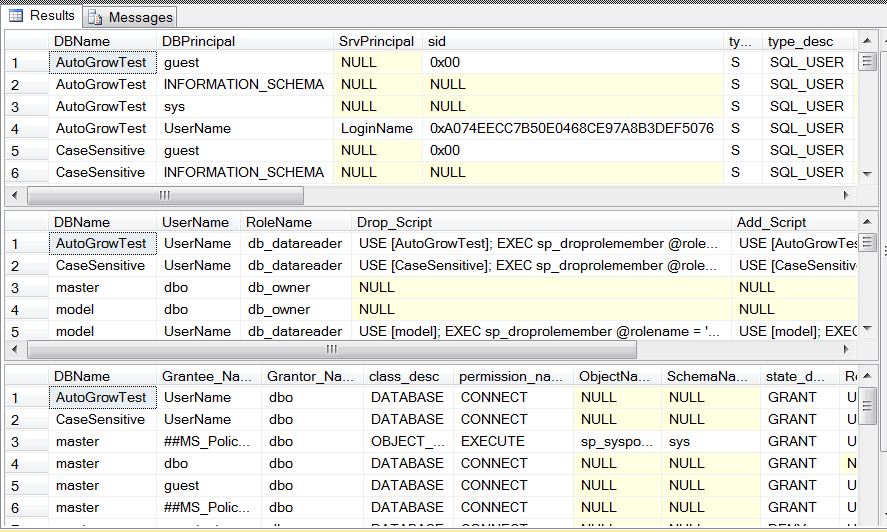
I've got a couple of stored procedures you can use to display all of the permissions for a given database. Either for a single user/principal or for all of them. sp_dbpermissions and sp_srvpermissions.

The output for sp_dbpermissions (sp_srvpermissions is the same at a server level) looks like this

enter image description here

Off the page are revoke/grant/deny commands as appropriate.

FYI the example I have here was run using 'ALL' for the database parameter so it's displaying the output for all of the databases not just one.

I primarily intended them as research tools so you will find parameters that let you search out permissions directly applied to a given object (similar to your query above) or members of a given role (and the permissions for that role) etc.

Note: Minion also has an enterprise edition that does a lot of detailed data collection on permissions that might very well give you what you want. It is however a paid program. (If you can talk your management into the expense it's probably worth it)

Kenneth Fisher
  • 24,307
  • 13
  • 63
  • 116
2

The whole point of roles like the db_datareader role is that you don't have to explicitly define read permissions for every person in that role for every object. So, you won't find a row in there for every user in the role. This is not a query, but you should essentially do this:

  1. Get all the users who have been explicitly granted access to that table, and for which a DENY/REVOKE does not exist.
  2. Get all the users who are members of any of the roles that implicitly grant read access to the given object (but again also check for explicit DENY/REVOKE).

Pseudo code (I'll update with real examples when I have time):

-- is user in role(s)? If so:
 -- does role have exec on procedure - include them
 -- does role have select on base table - include them
 -- does role have DENY/REVOKE on procedure - exclude them
 -- does role have DENY/REVOKE on table - exclude them

-- is user not in role(s)? Then:
 -- does user have exec on procedure - include them
 -- does user have select on base table - include them
 -- does user have DENY/REVOKE on procedure - exclude them
 -- does user have DENY/REVOKE on table - exclude them
Aaron Bertrand
  • 181,950
  • 28
  • 405
  • 624
0

I needed to do something very similar recently; my requirements were replicating permissions on tables in one SQL Server geodatabase to another using the ChangePrivileges tool in ArcPy which looks like this:

arcpy.management.ChangePrivileges(
    in_dataset=None,
    user=None,
    View=None,
    Edit=None)

Note "View" is equivalent to "SELECT" while "Edit" is "INSERT,UPDATE,DELETE". Also, this tool does not allow granularity of edit permissions; it's all or nothing.

I used the following SQL to generate the list of arguments to execute the tool:

SELECT DISTINCT
    S.name + '.' + T.name                               TABLE_NAME,
    UPPER(DBP.name)                                     GRANTEE,
    IIF(PV.permission_name IS NULL, 'AS_IS', 'GRANT')   VIEW_GRANT,
    IIF(PE.permission_name IS NULL, 'AS_IS', 'GRANT')   EDIT_GRANT
FROM SYS.tables T
INNER JOIN SYS.schemas S ON (T.schema_id = S.schema_id)
INNER JOIN SYS.database_permissions PV ON (
    T.object_id = PV.major_id
    AND PV.permission_name IN ('SELECT')
)
INNER JOIN SYS.database_principals DBP ON (
    PV.grantee_principal_id = DBP.principal_id
)
LEFT OUTER JOIN SYS.database_permissions PE ON (
    T.object_id = PE.major_id
    AND DBP.principal_id = PE.grantee_principal_id
    AND PE.permission_name IN ('INSERT', 'UPDATE', 'DELETE'))
ORDER BY TABLE_NAME, GRANTEE