21

I want to capitalize only the first letter of each word of each sentence in a SQL column.

For example, if the sentence is:

'I like movies'

then I need the output:

'I Like Movies'

Query:

declare @a varchar(15) 

set @a = 'qWeRtY kEyBoArD'

select @a as [Normal text],
upper(@a) as [Uppercase text],
lower(@a) as [Lowercase text],
upper(left(@a,1)) + lower(substring(@a,2,len(@a))) as [Capitalize first letter only]

Here I did upper, lower, and capitalize first letter only in my column (here I put just a random word).

Here are my results:

enter image description here

Is there any possibilities to do that?

Any possibilities to get results without using user defined function?

I need the output Qwerty Keyboard

Paul White
  • 94,921
  • 30
  • 437
  • 687
Marin Mohanadas
  • 478
  • 4
  • 7
  • 19

14 Answers14

28
declare @a varchar(30); 

set @a = 'qWeRtY kEyBoArD TEST<>&''"X';

select stuff((
       select ' '+upper(left(T3.V, 1))+lower(stuff(T3.V, 1, 1, ''))
       from (select cast(replace((select @a as '*' for xml path('')), ' ', '<X/>') as xml).query('.')) as T1(X)
         cross apply T1.X.nodes('text()') as T2(X)
         cross apply (select T2.X.value('.', 'varchar(30)')) as T3(V)
       for xml path(''), type
       ).value('text()[1]', 'varchar(30)'), 1, 1, '') as [Capitalize first letter only];

This first converts the string to XML by replacing all spaces with the empty tag <X/>. Then it shreds the XML to get one word per row using nodes(). To get the rows back to one value it uses the for xml path trick.

Mikael Eriksson
  • 22,295
  • 5
  • 63
  • 106
15

In SQL Server 2016 you can do this with R, eg

-- R capitalisation code stolen from here:
-- http://stackoverflow.com/questions/6364783/capitalize-the-first-letter-of-both-words-in-a-two-word-string

EXEC sp_execute_external_script
    @language = N'R',
    @script = N'
simpleCap <- function(x) {
  s <- strsplit(x, " ")[[1]]
  paste(toupper(substring(s, 1,1)), substring(s, 2),
        sep="", collapse=" ")
}             

OutputDataSet <- as.data.frame((sapply(as.vector(InputDataSet$xtext), simpleCap)))',
    @input_data_1 = N'SELECT LOWER(testString) xtext FROM dbo.testStrings'
WITH RESULT SETS ( ( properCase VARCHAR(50) NOT NULL ) );

Whether you should or not is a different question : )

wBob
  • 10,420
  • 2
  • 25
  • 44
15

Maybe I'm being silly but checking the below query I've written against some of the provided, this seems to be a bit more efficient (depending on indexing).

The code is a bit stupid, but isn't there a saying that if it looks stupid but it works then it's not stupid.

Begin

    Declare @text Varchar(30);

    Set @text = 'qWeRtY kEyBoArD TEST<>&''"X';

    Declare @1 Varchar(2)= ' a'
      , @2 Varchar(2)= ' b'
      , @3 Varchar(2)= ' c'
      , @4 Varchar(2)= ' d'
      , @5 Varchar(2)= ' e'
      , @6 Varchar(2)= ' f'
      , @7 Varchar(2)= ' g'
      , @8 Varchar(2)= ' h'
      , @9 Varchar(2)= ' i'
      , @10 Varchar(2)= ' j'
      , @11 Varchar(2)= ' k'
      , @12 Varchar(2)= ' l'
      , @13 Varchar(2)= ' m'
      , @14 Varchar(2)= ' n'
      , @15 Varchar(2)= ' o'
      , @16 Varchar(2)= ' p'
      , @17 Varchar(2)= ' q'
      , @18 Varchar(2)= ' r'
      , @19 Varchar(2)= ' s'
      , @20 Varchar(2)= ' t'
      , @21 Varchar(2)= ' u'
      , @22 Varchar(2)= ' v'
      , @23 Varchar(2)= ' w'
      , @24 Varchar(2)= ' x'
      , @25 Varchar(2)= ' y'
      , @26 Varchar(2)= ' z';

Set @text=' '+@text

    Select  LTrim(Replace(Replace(Replace(Replace(Replace(Replace(Replace(Replace(Replace(Replace(Replace(Replace(Replace(Replace(Replace(Replace(Replace(Replace(Replace(Replace(Replace(Replace(Replace(Replace(Replace(Replace(Lower(@text) ,
                                                              @1 , Upper(@1)) ,
                                                              @2 , Upper(@2)) ,
                                                              @3 , Upper(@3)) ,
                                                              @4 , Upper(@4)) ,
                                                              @5 , Upper(@5)) ,
                                                              @6 , Upper(@6)) ,
                                                              @7 , Upper(@7)) ,
                                                              @8 , Upper(@8)) ,
                                                              @9 , Upper(@9)) ,
                                                              @10 , Upper(@10)) ,
                                                              @11 , Upper(@11)) ,
                                                              @12 , Upper(@12)) ,
                                                              @13 , Upper(@13)) ,
                                                              @14 , Upper(@14)) ,
                                                              @15 , Upper(@15)) ,
                                                              @16 , Upper(@16)) ,
                                                              @17 , Upper(@17)) ,
                                                              @18 , Upper(@18)) ,
                                                              @19 , Upper(@19)) ,
                                                              @20 , Upper(@20)) ,
                                                            @21 , Upper(@21)) ,
                                                    @22 , Upper(@22)) , @23 ,
                                            Upper(@23)) , @24 , Upper(@24)) ,
                            @25 , Upper(@25)) , @26 , Upper(@26)));


end
Chris J
  • 259
  • 1
  • 2
10

Another option is to handle this via SQLCLR. There is even a method already available in .NET that does this: TextInfo.ToTitleCase (in System.Globalization). This method will Upper-Case the first letter of each word, and Lower-Case the remaining letters. Unlike the other proposals here, it also skips words that are in all upper-case, assuming them to be acronyms. Of course, if this behavior is desired, it would be easy enough to update any of the T-SQL suggestions to do this as well.

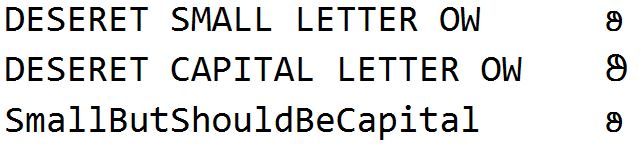
One benefit of the .NET method is that it can Upper-Case letters that are Supplementary Characters. For example: DESERET SMALL LETTER OW has an upper-case mapping of DESERET CAPITAL LETTER OW (both show up as boxes when I paste them into here), but the UPPER() function does not change the lower-case version to upper-case, even when the default Collation for the current Database is set to Latin1_General_100_CI_AS_SC. This seems consistent with the MSDN documentation which does not list UPPER and LOWER in the chart of functions that behave differently when using an _SC Collation: Collation and Unicode Support: Supplementary Characters.

SELECT N'DESERET SMALL LETTER OW' AS [Label], NCHAR(0xD801)+NCHAR(0xDC35) AS [Thing]
UNION ALL
SELECT N'DESERET CAPITAL LETTER OW' AS [Label], NCHAR(0xD801)+NCHAR(0xDC0D) AS [Thing]
UNION ALL
SELECT N'SmallButShouldBeCapital' AS [Label], UPPER(NCHAR(0xD801)+NCHAR(0xDC35)) AS [Thing]

Returns (enlarged so you can actually see the Supplementary Character):

Query result showing UPPER() not working with Supplementary Character

You can see the full (and current) list of characters that are lower-case and change to upper-case using the following search feature at Unicode.org (you can see the Supplementary Characters by scrolling down until you get to the "DESERET" section, or just hit Control-F and search for that word):

http://unicode.org/cldr/utility/list-unicodeset.jsp?a=%5B%3AChanges_When_Titlecased%3DYes%3A%5D

Though to be honest, this isn't a huge benefit since it is doubtful that anyone is actually using any of the Supplementary Characters that can be title-cased. Either way, here is the SQLCLR code:

using System.Data.SqlTypes;
using System.Globalization;
using Microsoft.SqlServer.Server;

public class TitleCasing
{
    [return: SqlFacet(MaxSize = 4000)]
    [Microsoft.SqlServer.Server.SqlFunction(IsDeterministic = true, IsPrecise = true)]
    public static SqlString TitleCase([SqlFacet(MaxSize = 4000)] SqlString InputString)
    {
        TextInfo _TxtInf = new CultureInfo(InputString.LCID).TextInfo;
        return new SqlString (_TxtInf.ToTitleCase(InputString.Value));
    }
}

Here is @MikaelEriksson's suggestion -- modified slightly to handle NVARCHAR data as well as skip words that are all upper-case (to more closely match the behavior of the .NET method) -- along with a test of that T-SQL implementation and of the SQLCLR implementation:

SET NOCOUNT ON;
DECLARE @a NVARCHAR(50);

SET @a = N'qWeRtY kEyBoArD TEST<>&''"X one&TWO '
         + NCHAR(0xD801)+NCHAR(0xDC28)
         + N'pPLe '
         + NCHAR(0x24D0) -- ⓐ  Circled "a"
         + NCHAR(0xFF24) -- D  Full-width "D"
         + N'D u'
         + NCHAR(0x0308) -- ̈  (combining diaeresis / umlaut)
         + N'vU'
         + NCHAR(0x0308) -- ̈  (combining diaeresis / umlaut)
         + N'lA';
SELECT @a AS [Original];

SELECT STUFF((
       SELECT N' '
              + IIF(UPPER(T3.V) <> T3.V COLLATE Latin1_General_100_BIN2, 
                    UPPER(LEFT(T3.V COLLATE Latin1_General_100_CI_AS_SC, 1))
                    + LOWER(STUFF(T3.V COLLATE Latin1_General_100_CI_AS_SC, 1, 1, N'')),
                    T3.V)
       FROM (SELECT CAST(REPLACE((SELECT @a AS N'*' FOR XML PATH('')), N' ', N'<X/>')
                    AS XML).query('.')) AS T1(X)
       CROSS APPLY T1.X.nodes('text()') AS T2(X)
       CROSS APPLY (SELECT T2.X.value('.', 'NVARCHAR(70)')) AS T3(V)
       FOR XML PATH(''), TYPE
       ).value('text()[1]', 'NVARCHAR(70)') COLLATE Latin1_General_100_CI_AS_SC, 1, 1, N'')
                AS [Capitalize first letter only];

SELECT dbo.TitleCase(@a) AS [ToTitleCase];

Query result showing output of T-SQL XML code and ToTitleCase via SQLCLR

Another difference in behavior is that this particular T-SQL implementation splits on only spaces, whereas the ToTitleCase() method considers most non-letters to be word separators (hence the difference in handling of the "one&TWO" part).

Both implementations handle combining sequences correctly. Each of the accented letters in "üvÜlA" are comprised of a base letter and a combining diaeresis / umlaut (the two dots above each letter), and they are correctly converted to the other case in both tests.

Finally, one unexpected disadvantage to the SQLCLR version is that in coming up with various tests, I found a bug in the .NET code related to its handling of the Circled Letters (which has now been reported on Microsoft Connect — UPDATE: Connect has been moved to /dev/null -- literally -- so I might need to resubmit this if the problem still exists). The .NET library treats the Circled Letters as word separators, which is why it does not turn the "ⓐDD" into "Ⓐdd" as it should.


FYI

A pre-done SQLCLR function encapsulating the TextInfo.ToTitleCase method mentioned above is now available in the Free version of SQL# (which I wrote) as String_ToTitleCase and String_ToTitleCase4k.

Solomon Rutzky
  • 70,048
  • 8
  • 160
  • 306
6

As an alternative to Mikael Eriksson's answer, you could consider using the proprietary T-SQL handling of variable setting in multi-row select statements.

In SQL Server, when a variable is being set as part of a SELECT statement, each row will execute an iteration of the set logic.

Folks often use this method for concatenating strings, though it's unsupported and there are some officially documented issues with it. The official problem relates to particular ORDER BY characteristics, and we don't need that here, so perhaps it's a safe option.

Here, we iterate over the 26 letters of the alphabet and replace them with an upper case version if they are preceded by a space. (We prep the string initially by capitalizing the first letter and making the rest lower case, as you did in your question.)

The SQL is a little complex because it requires the use of a Tally Table-- a table of numbers-- to generate the 26 iterations of replacing that it's doing. You can make a handy inline table-valued user defined function (TVF) to produce that table of numbers or you could even use a physical table.

A drawback of this option is that it can't be part of an inline TVF as it needs to involve setting a variable. So if you wanted to apply this method to a column of your output, you would need to wrap it into a multi-statement TVF or a scalar user defined function.

However, its query plan is much simpler and it is probably significantly faster than the XML method. You could argue it's easier to understand, too (especially if you have your own tally table).

DECLARE
    @a VARCHAR(15) = 'qWeRtY kEyBoArD';

SELECT
    @a = UPPER(LEFT(@a,1)) + LOWER(SUBSTRING(@a,2,LEN(@a)));

WITH TallyTableBase AS
(
    SELECT
        0 AS n
    FROM    (VALUES(0),(0),(0),(0),(0),(0),(0),(0),(0),(0)) AS t(n)
)
SELECT
    @a = REPLACE(@a, ' ' + CHAR(n.n), ' ' + CHAR(n.n))
FROM        (
                SELECT      TOP 26 ROW_NUMBER() OVER (ORDER BY (SELECT 1)) + 64 AS n
                FROM        TallyTableBase a
                CROSS JOIN  TallyTableBase b
            ) AS n;

SELECT
    @a AS [NewValue];

(I tested this using a much larger string and it was about 6ms vs 14ms for the XML solution.)

There are a number of additional limitations with this solution. As written, it assumes a case insensitive collation, though you could eliminate that issue by specifying a collation or running LCASE on the search term, at the cost of some performance. It also only addresses standard ASCII letters and relies on their placement in the character set, so it would do nothing with ñ.

Riley Major
  • 1,965
  • 4
  • 19
  • 37
3

Assuming you are only looking to capitalize words following a space, here is an another way you could do it.

DECLARE @String VARCHAR(1000)
SET @String = 'qWeRtY kEyBoArD tEst'

/*
Set the string to all lower case and
add a space at the beginning to ensure
the first letter gets capitalized
in the CTE
*/
SET @String = LOWER(' ' + @String)  

/*
Use a Tally "Table" as a means of
replacing the letter after the space
with the capitalize version of the
letter
*/
;WITH TallyTable
AS
(
    SELECT TOP 1000 ROW_NUMBER() OVER (ORDER BY (SELECT NULL)) as N
    FROM master.sys.all_columns a CROSS JOIN master.sys.all_columns b

)
SELECT @String = REPLACE(@String,SUBSTRING(@String,CHARINDEX(' ',@String,N), 2),UPPER(SUBSTRING(@String,CHARINDEX(' ',@String,N), 2)))
FROM TallyTable
WHERE CHARINDEX(' ',@String,N) <> 0

--Remove the space added to the beginning of the string earlier
SET @String = RIGHT(@String,LEN(@String) - 1)
TLaV
  • 151
  • 1
1

Might not be bullet-proof but I hope it's a helpful contribution to this thread.

DECLARE @t VARCHAR(50) = 'the quick brown fox jumps over the lazy dog', @i INT = 0

DECLARE @chk VARCHAR(1)

WHILE @i <= LEN(@t)
BEGIN
    SELECT @chk=SUBSTRING(@t,@i,1)
        IF @chk = CHAR(32)
        BEGIN
            SET @t = STUFF(@t,@i+1,1,UPPER(SUBSTRING(@t,@i+1,1)))
        END
    SET @i=@i+1
END
PRINT @t
Simon Jones
  • 145
  • 8
0

Below is the procedure I used in a Firebird database to do this. Probably can be cleaned up a lot but it got the job done for me.

set term ~;

Create Procedure EachWordCap

As

Declare Variable lcaption varchar(33);
Declare Variable lcurrentpos integer;
Declare Variable lstringlen integer;
begin
    for select ' ' || trim(lower(imagedata.imagename)) from imagedata
    where imagedata.imagename is not null and imagedata.imagename != ''
    into :lcaption
    do 
    begin
        lcurrentpos = 0;
        lstringlen = char_length(lcaption);
        while (lcurrentpos != 1) do
        begin
            lcurrentpos = position(' ', lcaption, iif(lcurrentpos = 0, 1,lcurrentpos)) + 1 ;
            lcaption = left(lcaption,lcurrentpos - 1) || upper(substring(lcaption from lcurrentpos for 1)) || right(lcaption,lstringlen - lcurrentpos);
        end
        --Put what you want to do with the text in here
    end
end~
set term ;~
0

Recursive CTEs are quite good for this sort of thing.

Probably not particularly efficient for large operations, but does allow for this kind of operation in a pure SQL select statement:

declare @a varchar(100) 

set @a = 'tHe qUiCk bRoWn FOX jumps   OvEr The lAZy dOG';

WITH [CTE] AS (
  SELECT CAST(upper(Left(@a,1)) + lower(substring(@a,2,len(@a))) AS VARCHAR(100)) AS TEXT,
         CHARINDEX(' ',@a) AS NEXT_SPACE
  UNION ALL
  SELECT CAST(Left(TEXT,NEXT_SPACE) + upper(SubString(TEXT,NEXT_SPACE+1,1)) + SubString(TEXT,NEXT_SPACE+2,1000) AS VARCHAR(100)),
         CHARINDEX(' ',TEXT, NEXT_SPACE+1)
  FROM [CTE]
  WHERE NEXT_SPACE <> 0
)

SELECT TEXT
FROM [CTE]
WHERE NEXT_SPACE = 0

Output:

The Quick Brown Fox Jumps   Over The Lazy Dog
Jerb
  • 606
  • 3
  • 9
0

I like this version. It is simple, and can be used to create a function, you just have to have the right version of SQL Server:

WITH words
AS (
    SELECT upper(left(Value, 1)) + lower(substring(Value, 2, len(Value))) AS word
    FROM STRING_SPLIT('Lorem ipsum dolor sit amet.', ' ')
    )
SELECT STRING_AGG(words.word, ' ')
FROM words
Tony Hinkle
  • 8,062
  • 1
  • 24
  • 46
Cristi
  • 1
0

Building on the @ChrisJ solution, here's a simple inline table-valued-function that should improve performance. You can add additional REPLACEs to handle special characters - punctuation or control characters - as fits your needs. This is running much better than the (admittedly cool) CTE solutions (per PlanExplorer, top row is CTE, bottom is REPLACE):

enter image description here

CREATE FUNCTION fSelectInitialCaps(@InputString VARCHAR(MAX))
RETURNS TABLE
AS
RETURN
/*  Example usage:

    SELECT TOP(100)
        c.Company
        , company.OutputString
    FROM dbo.Contacts c
        CROSS APPLY dbo.fSelectInitialCaps(c.Company) company
    WHERE CHARINDEX(' ', c.Company) > 0;
*/
SELECT [OutputString] = 
    LTrim(Replace(Replace(Replace(Replace(Replace(Replace(Replace(Replace(Replace(Replace(Replace(Replace(Replace(Replace(Replace(Replace(Replace(Replace(Replace(Replace(Replace(Replace(Replace(Replace(Replace(Replace(Lower(' ' + @InputString) ,
        ' a', Upper (' A')) ,
        ' b', Upper (' B')) ,
        ' c', Upper (' C')) ,
        ' d', Upper (' D')) ,
        ' e', Upper (' E')) ,
        ' f', Upper (' F')) ,
        ' g', Upper (' G')) ,
        ' h', Upper (' H')) ,
        ' i', Upper (' I')) ,
        ' j' , Upper(' J')) ,
        ' k' , Upper(' K')) ,
        ' l' , Upper(' L')) ,
        ' m' , Upper(' M')) ,
        ' n' , Upper(' N')) ,
        ' o' , Upper(' O')) ,
        ' p' , Upper(' P')) ,
        ' q' , Upper(' Q')) ,
        ' r' , Upper(' R')) ,
        ' s' , Upper(' S')) ,
        ' t' , Upper(' T')) ,
        ' u' , Upper(' U')) ,
        ' v' , Upper(' V')) , 
        ' w' , Upper(' W')) , 
        ' x' , Upper(' X')) ,
        ' y' , Upper(' Y')) , 
        ' z' , Upper(' Z')))
;
GO
Russell Fox
  • 199
  • 1
  • 5
0

...years later... you should try a tally table for stuff like this - remember that SQL is built on set theory...it wants to play with sets... You want to capitalize each character in a string when the character in question happens to be the first character in a word within a string. So first you need to break the string into a set. This is where the tally table becomes useful because you can instantiate a table via a cte. A few other considerations. SQL doesn't know what a word is unless you signify the word and this is where things get tricky. Should you assume that the preceding character is always a space? What about the first character? What about those instances where you have hyphens-between-the-words or those instances where you have under_scores?
You can create a function where you mark these explicitly in the text which is fine depending on your needs but doesn't scale in a lot of different scenarios.
Because everyone forgets the m-dash. anyway...

This was my approach: step 1 - use a cte to instantiate a tally table so i can break the string up into a table with each character in the string getting its own record.

step 2 - put everything in lower case so i can easily tell the engine what to upsize using the unicode function

step 3 - check to see if the first character of the entire string is a letter

step 4 - contractions are like curve balls in the dirt let's not forget those

step 5 - set everything else to lower case before wrapping back up into a string

create function [dbo].[tvf_CapsizeEachWord] (
@OriginalString varchar(8000)
)

returns table with schemabinding

return

with tally (n) as ( -- create a 8000 record tally table so that each charcacter has is parsed to a row -- concat a space onto the beggining of the string because we are going to use it as an indicator later -- also limit the tally table based on the length of the incoming string select top (len(@OriginalString)) -- incase you tried to trick me by adding a space at the beginning of the string row_number() over(order by (select null)) -- use rownumber function to be used as the sequencer later from (values (0), (0), (0), (0), (0), (0), (0), (0)) as a(n) --8 cross join (values(0), (0), (0),(0), (0), (0), (0), (0), (0), (0)) as b(n) --80 cross join (values(0), (0), (0),(0), (0), (0), (0), (0), (0), (0)) as c(n) --800 cross join (values(0), (0), (0),(0), (0), (0), (0), (0), (0), (0)) as d(n) --8000 ) select Capsized = ( select ''+capsize from ( select n , capsize = case when n = 1 and unicode(lower(substring(@OriginalString, n, 1))) between 97 and 122 -- unicode mapping for a through z then upper(substring(@OriginalString, n, 1)) when substring(@OriginalString, n-1, 1) = '''' -- Don'T cap the character after an apostrophe then lower(substring(@OriginalString, n, 1)) when unicode(lower(substring(@OriginalString, n, 1))) between 97 and 122 -- check to see if the character is a trhough z and unicode(lower(substring(@OriginalString, n-1, 1))) not between 97 and 122 -- and the preceding character is not a letter then upper(substring(@OriginalString, n, 1)) -- upsize it else lower(substring(@OriginalString, n , 1)) -- everything else lower case end from tally ) as caps order by n -- make sure you put the string back together in the proper order for xml path(''), type).value('.', 'VARCHAR(8000)'); go

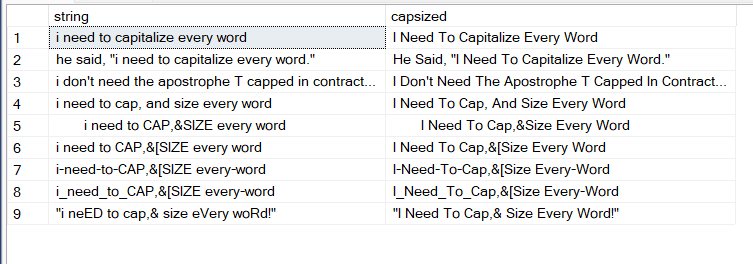
then to test the function we can decalre a table variable and insert some different strings so you can see how it functions.

declare @tsttbl table (
string varchar(8000)
);
insert into @tsttbl (string)
values ('i need to capitalize every word')
, ('he said, "i need to capitalize every word."')
, ('i don''t need the apostrophe T capped in contraction words i Don''t not want them lower cased')
, ('i need to cap, and size every word')
, ('       i need to CAP,&SIZE every word')
, ('i need to CAP,&[SIZE every word')
, ('i-need-to-CAP,&[SIZE every-word')
, ('i_need_to_CAP,&[SIZE every-word')
, ('"i neED to cap,& size eVery woRd!"');

select string, caps.capsized from @tsttbl as tst cross apply dbo.tvf_CapsizeEachWord(tst.string) as caps

sample capsize

this will fail to have the desired effect on instances where your string is a structured like a quote within a quote block - where you would typically use singles quotes to wrap around a block of text when someone is quoting someone else. Anyway, play around with it.

stecyk
  • 11
  • 3
-2
DECLARE @someString NVARCHAR(MAX) = 'In this WHILE LOOP example' 

DECLARE @result NVARCHAR(MAX) =Upper(SUBSTRING(@someString, 1, 1))

DECLARE @index INT =2 

WHILE LEN(@someString)>@index

BEGIN

SET @result= @result+CASE WHEN CHARINDEX(' ',@someString,@index)<>0 THEN LOWER(SUBSTRING(@someString, @index, CHARINDEX(' ',@someString,@index)-@index+1)) +Upper(SUBSTRING(@someString, CHARINDEX(' ',@someString,@index)+1, 1)) ELSE  LOWER(SUBSTRING(@someString,@index, LEN(@someString) )) END

SET @index=CASE WHEN CHARINDEX(' ',@someString,@index)<>0 THEN CHARINDEX(' ',@someString,@index)+2 ELSE  LEN(@someString)+1  END

 END

SELECT  @result 

I hope would help...

Kin Shah
  • 62,545
  • 6
  • 124
  • 245
-3

Test Data

declare @word varchar(100)
with good as (select 'good' as a union select 'nice' union select 'fine')
select @word = (SELECT TOP 1 a FROM good ORDER BY NEWID())

Implementation

select substring(Upper(@word),1,1) + substring(@word, 2, LEN(@word))
András Váczi
  • 31,778
  • 13
  • 102
  • 151