I am setting up log-shipping from server1 to server2.
there are many databases on server1 and I want to automate the process.
I have already done a few databases manually, while I am working on the automating process.
First question is:
How can I easily find out which databases are already set up in the log-shipping and which ones are not?
Currently to get a list of databases not yet on log-shipping I am doing the following:
    if object_id('tempdb.dbo.#log_shipping_monitor ') is not null
       drop table #log_shipping_monitor
create table #log_shipping_monitor
(
    status bit null
    ,is_primary bit not null default 0
    ,server sysname
    ,database_name sysname
    ,time_since_last_backup int null
    ,last_backup_file nvarchar(500) null
    ,backup_threshold int null
    ,is_backup_alert_enabled bit null
    ,time_since_last_copy int null
    ,last_copied_file nvarchar(500) null
    ,time_since_last_restore int null
    ,last_restored_file nvarchar(500) null
    ,last_restored_latency int null
    ,restore_threshold int null
    ,is_restore_alert_enabled bit null
    ,ts timestamp not null
    ,primary key (is_primary, server, database_name)
    ,unique (ts)
)


insert into #log_shipping_monitor
([status]
,[is_primary]
,[server]
,[database_name]
,[time_since_last_backup]
,[last_backup_file]
,[backup_threshold]
,[is_backup_alert_enabled]
,[time_since_last_copy]
,[last_copied_file]
,[time_since_last_restore]
,[last_restored_file]
,[last_restored_latency]
,[restore_threshold]
,[is_restore_alert_enabled])

exec master.dbo.sp_executesql    @stmt=N'exec sp_help_log_shipping_monitor'
                                ,@params=N'@verbose bit'
                                , @Verbose=0
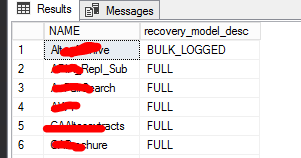
SELECT d.NAME, d.recovery_model_desc
  FROM sys.databases d
where d.name not in
         (
            select l.database_name
            from #log_shipping_monitor l
            where l.[server] = @@SERVERNAME
      )
  and d.database_id > 5
  and d.state_desc = 'ONLINE'

order by d.name
this is working fine and gives me the following result: