32

I have a database where I load files into a staging table, from this staging table i have 1-2 joins to resolve some foreign keys and then insert this rows into the final table (which has one partition per month). I have around 3.4 billion rows for three months of data.

What is the fastest way to get these rows from staging into the final table ? SSIS Data Flow Task (that uses a view as source and has fast load active) or an Insert INTO SELECT .... command ? I tried the Data Flow Task and can get around 1 billion rows in around 5 hours (8 cores / 192 GB RAM on the server) which feels very slow to me.

nojetlag
  • 2,927
  • 9
  • 34
  • 42

2 Answers2

27

One common approach:

  1. Disable / drop indexes / constraints on target table.
  2. INSERT dbo.[Target] WITH (TABLOCKX) SELECT ...
  3. With credit to JNK of course, you can do the above in batches of n rows, which can reduce the strain on the transaction log, and of course means that if some batch fails, you only have to-start from that batch. I blogged about this (while in reference to deletes, the same basic concepts apply) here: http://www.sqlperformance.com/2013/03/io-subsystem/chunk-deletes
  4. Re-enable / re-create indexes / constraints on target table (and perhaps you can defer some of those, if they are not necessary for all operations, and it is more important to get the base data online quickly).

If your partitions are physical and not just logical, you may gain some time by having different processes populate different partitions simultaneously (of course this means you can't use TABLOCK/TABLOCKX). This assumes that the source is also suitable for multiple processes selecting without overlapping / locking etc., and making that side of the operation even slower (hint: create a clustered index on the source that suits the partitioning scheme on the destination).

You may also consider something a lot more primitive, like BCP OUT / BCP IN.

I don't know that I would jump to SSIS to help with this. There are probably some efficiencies there, but I don't know that the effort justifies the savings.

Aaron Bertrand
  • 181,950
  • 28
  • 405
  • 624
12

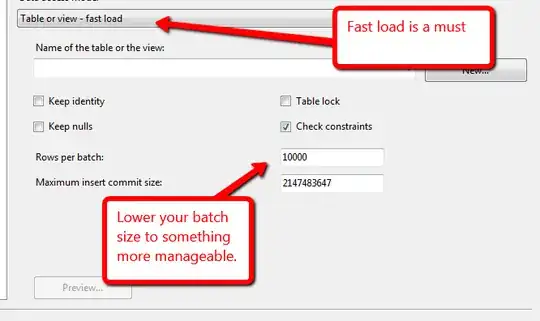
Looking at your problem from an SSIS perspective I feel the reason this may have taken so long is that you didn't have batching on. This can lead to too many rows filling the SSIS pipeline and can hinder your SSIS performance as a result. What you need to do is alter your rows per batch setting and possibly your maximum insert commit size. Now what you set this too will depend on the amount of memory available to your SSIS server? What the disk speed of your SQL Server instance is? The best way to do this is test. Lets for example use 10,000. This will send a batch to the server 10,000 at time thus keeping your pipeline from overfilling and will help run this process faster. These settings are set in your OLEDB destination.

OLEDB Destination

If it is an issue you can also add an execute SQL task before and after to do as @AaronBertrand suggests and remove/re add any indexes or constraints to the table.

Zane
  • 3,530
  • 3
  • 25
  • 45