MyOSM Public Hospital Mapping Campaign
Purpose
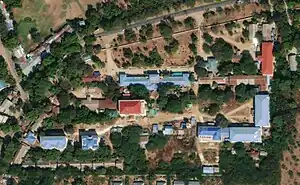
Health facilities such as hospitals and clinics are vital facilities for communities and serve as key landmarks. CDE Myanmar has kindly granted myOSM permission to use the Public Hospitals in Myanmar as of 2020 dataset as a reference for mapping hospital and clinic locations, along with their names and size classification, in OpenStreetMap (OSM). In December 2024, myOSM piloted the mapping of hospitals using the above-mentioned dataset in combination with satellite imagery to enhance OSM’s health facility data. Where visible, we also aim to map related features such as hospital grounds and building footprints. myOSM calls this mapping campaign "Public Hospital Mapping".
Campaign start date: 4-Apr-2025
Campaign end date: 24-Apr-2025
Total number of hospital facilities added or improved: 1126~ facilities
.jpg)
Data Sources
Primary dataset: CDE Myanmar (2024): Public Hospitals in Myanmar as of 2020, version Oct. 16, 2024, shared via MIMU Geonode
Description of the dataset: Approximate center point location dataset of most (over 1100) public hospitals/hospital grounds in Myanmar as of 2020. Released by CDE Myanmar in 2024 based on publicly available reference lists and local knowledge and improving geographic coordinates using mostly large-scale satellite. This data does not include other health facilities such as private hospital, religious hospital, clinic etc.
Dataset license: MIMU Data License (MIMU), myOSM obtained the explicit permission to use this dataset for this OSM mapping campaign from CDE Myanmar in 2024.
Known Limitations
The source dataset is primarily based on a 2020 reference list of public hospitals, enhanced with local knowledge and high-resolution satellite imagery. It does not reflect the current operational status of each hospital—such as whether it is still active or has relocated—and does not contain detailed information about the services offered. The only available proxy is the hospital’s classification by number of beds.
Private hospitals and clinics were not included in the mapping campaign due to the lack of suitable reference data available to myOSM.
Mapping Processes
Software used: QGIS & JOSM
There are many steps involved in public hospital mapping processes.
- Data Downloading Processes
- Download "health_facilities_myanmar2020_v20241016" shapefile:  https://geonode.themimu.info/layers/geonode%3Ahealth_facilities_myanmar2020_v20241016 which is hospital point data.
- Cleaning Processes
- Removing unnecessary & modified field name in GIS software using "QGIS"
- Data Importing using OpenData plugin & modified "key" - "Tags" in JOSM
- Changing field name to OSM acceptable format
- The following tags are currently used for hospital location point mapping
- name field "name of hospital in Mynmar-Burmese language"
- name:my field "same field as name"
- name:en field "name of hospital in English language"
- beds field "number of hospital beds"
- pcode field "Myanmar township place code"
- amenity field "hospital"
- source field "Importing non-sensitive public hospital data from MIMU, ESRI", Tips: If you want to filter in JOSM use this source field.

eg. Hospital Tags used by myOSM
- Using "TODO list" plugins for step-by-step checking in JOSM
- Checking hospital one by one through ToDo list in JOSM. There are two main steps involved, which are checking hospital feature are correctly position in hospital building & are there any old hospital features.
- Step1) Repositioning hospital if needed
- Step2) If old hospital features with existing field were found, used the old hospital features as our main geometry feature and copy our tags into combine one.
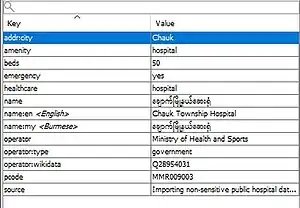
eg. Hospital Tags Combine with New & Old tags
- Checking hospital one by one through ToDo list in JOSM. There are two main steps involved, which are checking hospital feature are correctly position in hospital building & are there any old hospital features.
- Digitizing & modifying key features in JOSM
- Digitized hospital compound as "amenity=hospital" & building footprint as "building=hospital" & "building=yes". See more on this page [Building Mapping Myanmar]
- Upload to OSM by using the Changeset #myOSM#Importing non-sensitive public hospital data from MIMU, ESRI #adding building footprint inside hospital compound and standardize as OSM tags and system. Tips: Use this changeset to check in OSMcha.
Challenges
There are two main challenges during public hospital mapping.
- Can't locate hospital location in available imagery option (such as Bing,ESRI & Mapbox imagery). Found this challenge 5 out of 100 hospitals. less than 5%.
- Available imagery is very old in some rural area, so in the imagery hospital is not establish yet, but in google Imagery already existed. Found <1% chance.
- How we solved these challenges for future uses, used additional tags as "fixme=yes" & recorded hospital name & pcode in myOSM database. Only recorded the point feature & leave the building footprint and hospital compound.