uMap/Guide/Define who can edit my uMap
Determining the users who can change the map depends on whether the owner is an anonymous user or a registered user.
The procedure is equal for both, but the options are different.
Procedure:
- Step 1: Start edit with

- Step 2: Select Update permissions and editors

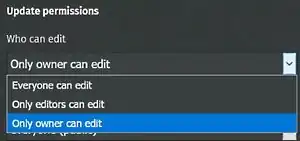
- Step 3: Select option Who can edit and select one of the options.
Registered user
- Everyone can edit:
- Only editors can edit: The owner and selected editors may edit. See Add editors
- Only owner can edit: Only the owner is allowed to edit.

Anonymous user
- Everyone can edit:
- Only editable with secret edit link. The link is shown in the field below.
- Step 5: Save the map.