Ok so I finally found an answer and I wish to share it with you guys.
My guess is that the creators created the compressed file from an expanded image by mistake.
The fact that the compressed file is nearly 1.1 GB, compared to 8.1 GB of the extracted files, proves this. Empty space will compress to a couple of bytes. If there were additional packages, there would have been a noticeable size disparity between the two images.
Shrinking the image
$ sudo modprobe loop # to enable loopback
$ sudo losetup -f  #request a new loopback device

#This will return the path to a free loopback device.this is /dev/loop0 for me

$ sudo losetup /dev/loop0 ubuntu-mate-16.04-desktop-armhf-raspberry-pi.img
$ sudo partprobe /dev/loop0
$ sudo gparted /dev/loop0
Now a separate window will show up with /dev/loop0 .. you will see two mounted partitions a boot and a root partition.
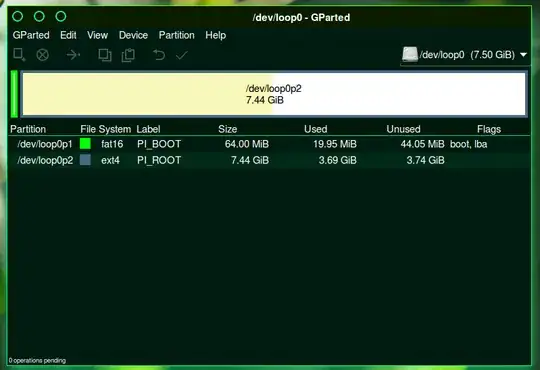
In my case the root partition had about 3.74 GB unused space, so right click on root and click resize and reduce the free space to about 10-20MB then click apply.
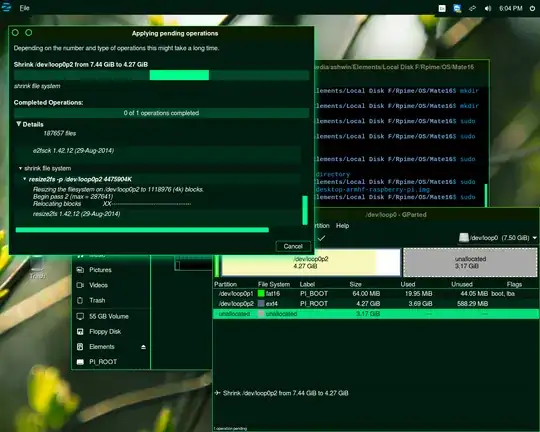
Now we don't need the loopback-device anymore, so lets unload it:
$ sudo losetup -d /dev/loop0
Deleting unallocated part
$ fdisk -lu ubuntu-mate-16.04-desktop-armhf-raspberry-pi.img
Here is a sample output:
 $ fdisk -lu ubuntu-mate-16.04-desktop-armhf-raspberry-pi.img Disk
 ubuntu-mate-16.04-desktop-armhf-raspberry-pi.img: 7.5 GiB, 8053063680
 bytes, 15728640 sectors Units: sectors of 1 * 512 = 512 bytes Sector
 size (logical/physical): 512 bytes / 512 bytes I/O size
 (minimum/optimal): 512 bytes / 512 bytes Disklabel type: dos Disk
 identifier: 0xd882991d

 Device                                            Boot  Start      End
 Sectors  Size Id Type
 ubuntu-mate-16.04-desktop-armhf-raspberry-pi.img1 *      2048   133119
 131072   64M  c W95 FAT3
 ubuntu-mate-16.04-desktop-armhf-raspberry-pi.img2      133120 11487231
 11354112  5.4G 83 Linux
Then truncate the partition:
$ truncate --size=$[(11487231+1)*512] ubuntu-mate-16.04-desktop-armhf-raspberry-pi.img
Note the number 11487231 in the above command depends on what your output for fdisk is.
Now you should be ready with the image!


