55

Lately, we've become aware of a TCP connection issue that is mostly limited to mac and Linux users who browse our websites.

From the user perspective, it presents itself as a really long connection time to our websites (>11 seconds).

We've managed to track down the technical signature of this problem, but can't figure out why it is happening or how to fix it.

Basically, what is happening is that the client's machine is sending the SYN packet to establish the TCP connection and the web server receives it, but does not respond with the SYN/ACK packet. After the client has sent many SYN packets, the server finally responds with a SYN/ACK packet and everything is fine for the remainder of the connection.

And, of course, the kicker to the problem: it is intermittent and does not happen all the time (though it does happen between 10-30% of the time)

We are using Fedora 12 Linux as the OS and Nginx as the web server.

Screenshot of wireshark analysis
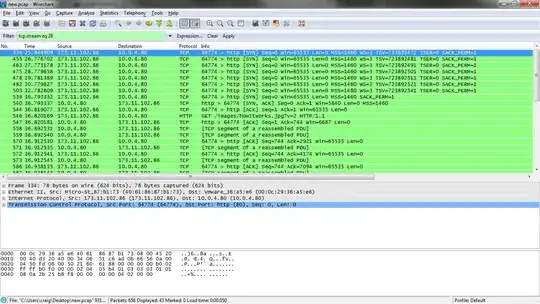
Screenshot of wireshark analysis

Update:

Turning off window scaling on the client stopped the issue from happening. Now I just need a server side resolution (we can't make all the clients do this) :)

Final Update:

The solution was to turn off both TCP window scaling and TCP timestamps on our servers that are accessible to the public.

9 Answers9

17

We had this exact same problem. Just disabling TCP timestamps solved the problem.

sysctl -w net.ipv4.tcp_timestamps=0

To make this change permanent, make an entry in /etc/sysctl.conf.

Be very careful about disabling the TCP Window Scale option. This option is important for providing maximum performance over the internet. Someone with a 10 megabit/sec connection will have a suboptimal transfer if the round trip time (basically same as ping) is more than 55 ms.

We really noticed this problem when there were multiple devices behind the same NAT. I suspect that the server might have been confused seeing timestamps from Android devices and OSX machines at the same time since they put completely different values in the timestamp fields.

mcdizzle
  • 281
16

In my case the following command has fixed the problem with missing SYN/ACK replies from the Linux server:

sysctl -w net.ipv4.tcp_tw_recycle=0

I think this is more appropriate than disabling TCP timestamps, since TCP timestamps can be useful for high performance (PAWS, window scaling, etc).

The documentation on the tcp_tw_recycle explicitly states that it is not recommended to enable it, as many NAT routers preserve timestamps and this can cause PAWS (Protection Against Wrapping Sequence) to activate, as timestamps from the same source IP address can become inconsistent.

   tcp_tw_recycle (Boolean; default: disabled; since Linux 2.4)
          Enable fast recycling of TIME_WAIT sockets.  Enabling this
          option is not recommended for devices communicating with the
          general Internet or using NAT (Network Address Translation).
          Since some NAT gateways pass through IP timestamp values, one
          IP can appear to have non-increasing timestamps.  See RFC 1323
          (PAWS), RFC 6191.
lav
  • 361
5

Just wondering, but why for the SYN packet (frame #539; the one that was accepted), the WS and TSV fields are missing in the "Info" column?

WS is TCP Window Scaling and TSV is Timestamp Value. Both of them are found under tcp.options field and Wireshark still should show them if they are present. Maybe Client TCP/IP stack resent different SYN packet on 8th attempt and that was the reason why it was suddenly acknowledged?

Could you provide us with frame 539 internal values? Does the SYN/ACK always comes for a SYN packet that does not have WS enabled?

4

We just ran into the exact same problem (really took quite a while to pin it to server not sending syn-ack).

"The solution was to turn off tcp windows scaling and tcp timestamps on our servers that are accessible to the public."

sysadmin1138
  • 135,853
Alex Li
  • 41
3

The missing SYN/ACK could be caused by too low limits of your SYNFLOOD protection on firewall. It depends on how many connections to your server user creates. Using spdy would reduce the number of connections and could help in situation where turning net.ipv4.tcp_timestamps off does not help.

brablc
  • 631
2

To carry on what Ansis has stated, I've seen issues like this when the firewall doesn't support TCP Windows Scaling. What make/model firewall is between these two hosts?

joeqwerty
  • 111,849
1

This is the behavior of a listening TCP socket when its backlog is full.

Ngnix allows the backlog argument to listen to be set in the configuration: http://wiki.nginx.org/HttpCoreModule#listen

listen 80 backlog=num

Try setting num to something larger than the default, like 1024.

I provide no guarantee that a full listen queue is actually your problem, but this is a good first thing to check.

akramer
  • 566
1

I just discovered that Linux TCP clients change their SYN packet after 3 tries, and remove the Window Scaling option. I guess the kernel developers figured that this is a common cause of connection failure in the Internet

It explains why these clients manage to connect after 11 seconds ( the window-less TCP SYN happens after 9 seconds in my brief test with default settings )

0

I had a similar problem, but in my case it was the TCP checksum that was wrongly computed. The client was behind a veth and running ethtool -K veth0 rx off tx off did the trick.