17

I am running sql 2008 r2 and the db was working fine and fast for last 3 years untill about 3 months ago we added ntext field on very active and used table. Now we are starting to get out of server space because of the huge expanding size of this table.

I read that shrinking ,we do not want to loose the indexing of db because it was working fast for years and we do not want to get fragmentation expending.

We decided to delete that field and all its values: Is there a way to delete the ntext field and all its values and release space without removing indexing ,without shrinking, without loosing db performance?

I am attaching the db size query output to show you size expanding of last 5 months.

enter image description here

user1021182
  • 173
  • 1
  • 1
  • 5

4 Answers4

14

We decided to delete that field and all its values: Is there a way to delete the ntext field and all its values and release space without removing indexing ,without shrinking, without loosing db performance?

I would recommend to use (from BOL : )

DBCC CLEANTABLE
(
    { database_name | database_id | 0 }
    , { table_name | table_id | view_name | view_id }
    [ , batch_size ]
)
[ WITH NO_INFOMSGS ]

DBCC CLEANTABLE reclaims space after a variable-length column is dropped. A variable-length column can be one of the following data types: varchar, nvarchar, varchar(max), nvarchar(max), varbinary, varbinary(max), text, ntext, image, sql_variant, and xml. The command does not reclaim space after a fixed-length column is dropped.

!! CAUTION !! (use a careful batch size - its advisable to use this parameter if your table is massive):

DBCC CLEANTABLE runs as one or more transactions. If a batch size is not specified, the command processes the whole table in one transaction and the table is exclusively locked during the operation. For some large tables, the length of the single transaction and the log space required may be too much. If a batch size is specified, the command runs in a series of transactions, each including the specified number of rows. DBCC CLEANTABLE cannot be run as a transaction inside another transaction.

This operation is fully logged.

A simple repro will prove that DBCC CLEANTABLE is better than SHRINKING (and no worry of fragmentation :-)

-- clean up
drop table dbo.Test

-- create test table with ntext column that we will drop later create table dbo.Test ( col1 int ,col2 char(25) ,col3 ntext );

-- insert 1000 rows of test data declare @cnt int;

set @cnt = 0;

while @cnt < 1000 begin select @cnt = @cnt + 1;

insert dbo.Test (
    col1
    ,col2
    ,col3
    )
values (
    @cnt
    ,'This is a test row # ' + CAST(@cnt as varchar(10)) + 'A'
    ,REPLICATE('KIN', ROUND(RAND() * @cnt, 0))
    );

end
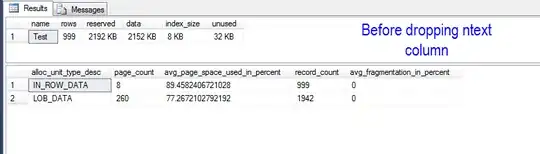

enter image description here

enter image description here

--drop the ntext column
ALTER TABLE dbo.Test DROP COLUMN col3 ;
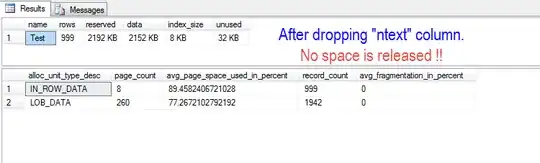
enter image description here

enter image description here

--reclaim the space from the table
-- Note that my table is only having 1000 records, so I have not used a batch size
-- YMMV .. so find a maintenance window and you an appropriate batch size 
-- TEST TEST and TEST before implementing in PROD.. so you know the outcome !!
DBCC CLEANTABLE('tempdb', 'dbo.Test') ;
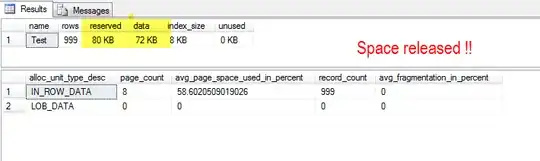

enter image description here

enter image description here

Kin Shah
  • 62,545
  • 6
  • 124
  • 245
6

For most parts I'm referencing Paul Randall's Inside the storage engine blog series.

The only way to reclaim unused space from database files in SQLServer is using the DBCC SHRINK command which reallocates data within the database files freeing pages and after removing them from the Global Allcation map removes them from the database file. This operation is slow, creates fragmentation within the database and is even slower when dealing with LOB pages as those are stored as linked lists within the database files.

Since you are dropping the NTEXT column you will have to wait for the ghost cleanup process to drop the data before shrinking.

Now having lots of free space in the database files will actually do you no harm, if you have the disk space, backup compression will take care of the free space within the files.

If you absolutely want to make the files smaller you can create a new filegroup with the database and make it the default and then move the tables into the new filegroup but this can take time and cause downtime. I have used the technique explained here by Bob Pusateri with good results.

Spörri
  • 4,734
  • 15
  • 28
4

Do you want to shrink the database files because you need that space for other databases/non DB files or because you are having problems with this database running out of space?

If it's the second then you may not have as big a problem as you think. If I'm correct your problem is when the database needs to grow to gain additional space for new data. Once you remove the column all of the space taken up by that column will be freed for new rows to be added to tables in the database. This means that it will be longer before your database needs to grow. In the mean time I would get some additional space for your data drive. Most databases do grow over time and it's nice to have a healthy margin of free space on the drive.

Kenneth Fisher
  • 24,307
  • 13
  • 63
  • 116
0

I would create a mirror table without the offending column, copy all data into this table, drop the original and then rename the mirror table.

port5432
  • 223
  • 1
  • 2
  • 7