Since you are using MySQL 5.1.73, you can blow away the ibdata1 file without worries.
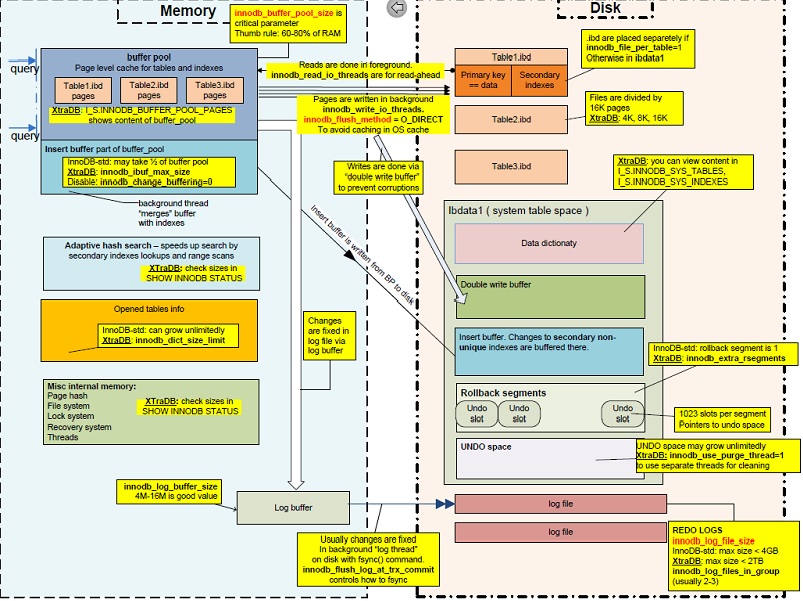
First, let's look inside ibdata1 (picture created by Percona CTO Vadim Tkachenko)
STEP 01 : Make sure there is no InnoDB
Run the following
SELECT
    table_schema,table_name,
    (data_length+index_length)/POWER(1024,3) table_sizegb
FROM information_schema.tables
WHERE
    engine='InnoDB' AND
    table_schema NOT IN ('information_schema','performance_schema','mysql');
If you get nothing, you can proceed.
If you do get something, either drop those tables, convert them to MyISAM, or mysqldump them to reload later.
Assuming datadir is /var/lib/mysql
You should add this to `my.cnf
[mysqld]
innodb_file_per_table=ON
This will allow future for CREATE TABLEs where you want .ibd files
STEP 03 : Flush everything from InnoDB
SET GLOBAL innodb_fast_shutdown = 0;
STEP 04 : Shutdown mysql
service mysql stop
STEP 05 : Delete ibdata and the redo logs
cd /var/lib/mysql
rm -rf ibdata1
rm -rf ib_logfile0
rm -rf ib_logfile1
STEP 06 : Start mysql
service mysql start
This will regenerate ibdata1, ib_logfile0, and ib_logfile1
NOTE: MyISAM tables are completely unaffected. Why ?
Suppose you have a table mytable in the mydb database.
The files for that one table are the following:
/var/lib/mysql/mydb/mytable.frm/var/lib/mysql/mydb/mytable.MYD/var/lib/mysql/mydb/mytable.MYI
The InnoDB file ibdata1 is usually located in /var/lib/mysql. Therefore, all MyISAM tables are safely tucked away in their respect database folders.
CAVEAT for MyISAM only users
If you know for a certainty that you will never use InnoDB, you could add this parameter to my.cnf
[mysqld]
skip-innodb
That way, when you start up mysqld in STEP 06, the process will not regenerate ibdata1, ib_logfile0, and ib_logfile1.
CAVEAT FOR MySQL 5.6/5.7 users
In MySQL 5.6, there are 5 tables in the mysql schema (/var/lib/mysql/mysql) that are InnoDB. MySQL 5.7 has 19.
Just run this query to see what those tables are
SELECT table_name FROM information_schema.tables
WHERE engine='InnoDB' and table_schema='mysql';
See my old post InnoDB: Error: Table "mysql"."innodb_table_stats" not found after upgrade to mysql 5.6 and the MySQL Documentation.
In this instance, you would mysqldump the mysql schema, blow away the InnoDB files, and manually delete the .ibd file in /var/lib/mysql/mysql. Then, reload the mysql schema from that dump.