6

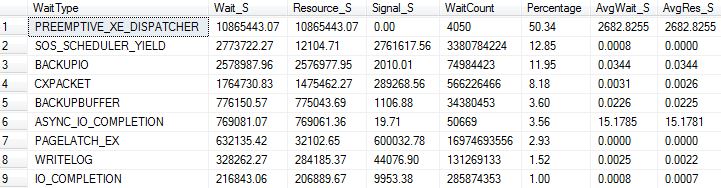
Our production server (2012, VM + SAN) has 32 GB of RAM, the database size is ~80GB. The application uses TempDB heavily - disk is hit ~100 MBps both reads & writes. Seeing tons of SQL compilations/sec .. 95% of all batch requests are compilations.

Ideally would like to increase the RAM to 64GB or 128GB, but need to 'prove' to team that it's required.

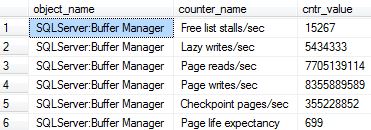
Buffer Cache Hit Ratio (BCHR) is 99.9%, but Page Life Expectancy (PLE) is only ~400.
What's the explanation for this ?
I though PLE & BCHR had a linear relationship (i.e. they increase or decrease together)

On other VMs with larger databases and lot more RAM, both BCHR & PLE are high.

Current wait stats and perf counters enter image description here enter image description here
d-_-b
  • 1,184
  • 1
  • 12
  • 25

2 Answers2

9

BCHR can be very misleading due to read-ahead:

The Database Engine supports a performance optimization mechanism called read-ahead. Read-ahead anticipates the data and index pages needed to fulfill a query execution plan and brings the pages into the buffer cache before they are actually used by the query. This allows computation and I/O to overlap, taking full advantage of both the CPU and the disk.[link]

You are very likely seeing the impact of read-ahead filling the buffer cache pre-emptively, which distorts the BCHR counter. Excellent and very in-depth article from Jonathan Kehayias titled Great SQL Server Debates: Buffer Cache Hit Ratio covers this.

Mark Storey-Smith
  • 31,860
  • 9
  • 90
  • 125
2

PLE just tells you how long the oldest page has been stored in memory before being evicted due to memory pressure. It could be that you have a high frequency of little queries that hit cache and perhaps a large one that flushes out the cache and requires them to recache. Without having additional data this looks like an environment that perhaps is split between heavy tables (reporting?) and OLTP. Or something where you just have a lot of little queries but for some reason the cache is just being pushed out hard and fast.

You mention it's virtual, if it's VMWare, do you have the balloon driver enabled? If so it can cause this issue. Is SQL Server using all the memory allocated? I'm not sure if you can do this in your environment but you can test further with 'lock pages in memory' but not advised if this is a heavily used prod box without additional testing.

Ali Razeghi - AWS
  • 7,566
  • 1
  • 26
  • 38