from this question: Find out what columns are in a trace file
there is this script
--  Gets all Events for a given trace id
SELECT a.[EventID], b.[name] AS [Even Name], a.[ColumnID], c.[name] AS [Column Name], d.[name] AS [Category]
FROM fn_trace_geteventinfo(<trace ID>) AS a --<<Put the trace ID you are interested in
    INNER JOIN sys.trace_events AS b ON a.EventID = b.Trace_Event_ID
    INNER JOIN sys.trace_columns AS c ON a.ColumnID = c.Trace_Column_ID
    INNER JOIN sys.trace_categories AS d ON b.Category_ID = d.Category_ID
ORDER BY a.[EventID], a.[ColumnID]
that shows all the columns of a trace, due to the DMV sys.trace_columns
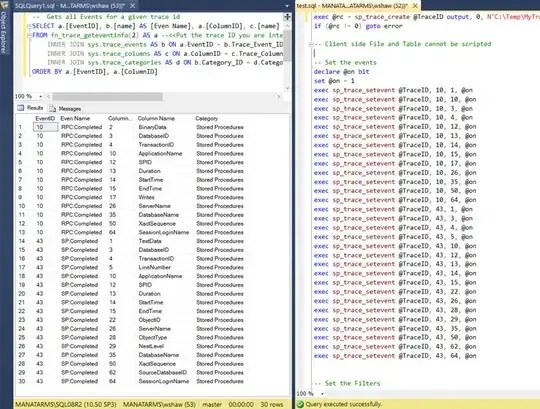
I have put in place a server side trace with the following filters:
(this is part of the script)
-- Set the Filters
declare @intfilter int
declare @bigintfilter bigint

exec sp_trace_setfilter @TraceID, 10, 0, 7, N'SQL Server Profiler - 53e0541a-7b74-4fce-bcac-9255e79a6372'
exec sp_trace_setfilter @TraceID, 34, 1, 6, N'udpProductTaxRateGet'
exec sp_trace_setfilter @TraceID, 34, 1, 6, N'udpProductBulletPointSelectByTier1NoteTypeCode'
exec sp_trace_setfilter @TraceID, 35, 1, 6, N'US16AUTPProduct'
-- Set the trace status to start
exec sp_trace_setstatus @TraceID, 1

-- display trace id for future references
select TraceID=@TraceID
When I run this query now, I can see what columns are there, and exactly how the filters would work.
------------------------------------------------------------
-- what filters are set on @traceid
-- and how they are working
-- marcelo miorelli sql server 2005 - 8-8-2016
------------------------------------------------------------
declare @traceid int
select @traceid = 2
select a.[columnid]

     ,c.[type_name]
     ,c.[name] as [Column Name]

     ,[ @comparison_operator ] = CASE A.comparison_operator
                                     WHEN 0 THEN '= (Equal)'
                                     WHEN 1 THEN '<> (Not Equal)'
                                     WHEN 2 THEN '> (Greater Than)'
                                     WHEN 3 THEN '< (Less Than)'
                                     WHEN 4 THEN '>= (Greater Than Or Equal)'
                                     WHEN 5 THEN '<= (Less Than Or Equal)'
                                     WHEN 6 THEN 'LIKE'
                                     WHEN 7 THEN 'NOT LIKE'
                                     ELSE 'NOT SURE'
                               END
     ,a.value
     ,[ @logical_operator ]    = CASE A.LOGICAL_OPERATOR
                                     WHEN  1 THEN 'OR'
                                     ELSE         'AND'
                                 END
 from fn_trace_getfilterinfo( @traceid ) a
    INNER JOIN sys.trace_columns AS c ON a.ColumnID = c.Trace_Column_ID
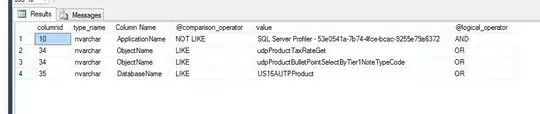
--[ @logical_operator = ] logical_operator
--Specifies whether the AND (0) or OR (1) operator is applied.
--logical_operator is int, with no default.


