For large tables I would definitely work with T-SQL or Powershell rather than the wizard - clunky UIs that run all kinds of background things and take over-protective locks do not have a great track record. For example, this wizard actually offers an option to generate Powershell:
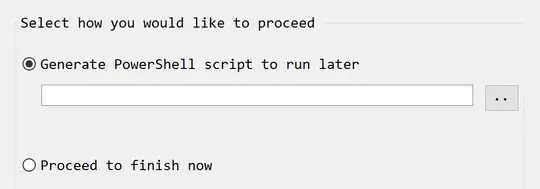
I would do that. Here is what it produces:
# Generated by SQL Server Management Studio at 9:10 PM on 2/22/17

Import-Module SqlServer
# Load reflected assemblies

[reflection.assembly]::LoadwithPartialName('System.Data.SqlClient') | Out-Null
[reflection.assembly]::LoadwithPartialName('Microsoft.SQLServer.SMO') | Out-Null
[reflection.assembly]::LoadwithPartialName('Microsoft.SQLServer.ConnectionInfo') | Out-Null

# Set up connection and database SMO objects

$sqlConnectionString = 'Data Source=SERVER\INSTANCE;Integrated Security=True;MultipleActiveResultSets=False;Encrypt=False;TrustServerCertificate=True;Packet Size=4096;Application Name="Microsoft SQL Server Management Studio"'
$sqlConnection = New-Object 'System.Data.SqlClient.SqlConnection' $sqlConnectionString
$serverConnection = New-Object 'Microsoft.SqlServer.Management.Common.ServerConnection' $sqlConnection
$smoServer = New-Object 'Microsoft.SqlServer.Management.Smo.Server' $serverConnection
$smoDatabase = $smoServer.Databases['DatabaseName']

# If your encryption changes involve keys in Azure Key Vault, uncomment one of the lines below in order to authenticate:
#   * Prompt for a username and password:
#Add-SqlAzureAuthenticationContext -Interactive

#   * Enter a Client ID, Secret, and Tenant ID:
#Add-SqlAzureAuthenticationContext -ClientID '<Client ID>' -Secret '<Secret>' -Tenant '<Tenant ID>'

# Change encryption schema

$encryptionChanges = @()

# Add changes for table [dbo].[TableName]
$encryptionChanges += New-SqlColumnEncryptionSettings -ColumnName dbo.TableName.ColumnName -EncryptionType Deterministic -EncryptionKey ColumnKey

Set-SqlColumnEncryption -ColumnEncryptionSettings $encryptionChanges -InputObject $smoDatabase
Now, this still might take a long time; I haven't done thorough benchmarks on encrypting existing data. But you won't run out of memory (this error was because of SSMS limitations, not SQL Server's).
I looked quickly and, while it is easy to generate T-SQL scripts for creating master and column keys, I don't know of a way to run ALTER TABLE. This passes syntax checks:
ALTER TABLE dbo.TableName
ALTER COLUMN ColumnName varchar(11)
        COLLATE  Latin1_General_BIN2 ENCRYPTED WITH (COLUMN_ENCRYPTION_KEY = ColumnKey,
        ENCRYPTION_TYPE = DETERMINISTIC ,
        ALGORITHM = 'AEAD_AES_256_CBC_HMAC_SHA_256');
However it fails at runtime with:
Msg 206, Level 16, State 2
Operand type clash: varchar is incompatible with varchar(11) encrypted with (encryption_type = 'DETERMINISTIC', encryption_algorithm_name = 'AEAD_AES_256_CBC_HMAC_SHA_256', column_encryption_key_name = 'ColumnKey', column_encryption_key_database_name = 'DatabaseName') collation_name = 'Latin1_General_BIN2'


