29

Question:

I have a script with around 45 thousand insert from select statements. When I try and run it, I get an error message stating that I have run out of memory. How can I get this script to run?

Context:

  1. Added some new data fields to make an app play nice with another app the client uses.
  2. Got a spreadsheet of data from the client full of data that mapped current data items to values for these new fields.
  3. Converted spreadsheet to insert statements.
  4. If I only run some of the statements it works but the entire script does not.
  5. No. There are no typos.

If there is a different way I should be loading this data feel free to chastise me and let me know.

Nick Chammas
  • 14,810
  • 17
  • 76
  • 124
spaghetticowboy
  • 425
  • 1
  • 4
  • 9

6 Answers6

18

The maximum batch size for SQL Server 2005 is 65,536 * Network Packet Size (NPS), where NPS is usually 4KB. That works out to 256 MB. That would mean that your insert statements would average 5.8 KB each. That doesn't seem right, but maybe there are extraneous spaces or something unusual in there.

My first suggestion would be to put a "GO" statement after every INSERT statement. This will break your single batch of 45,000 INSERT statements into 45,000 separate batches. This should be easier to digest. Be careful, if one of those inserts fails you may have a hard time finding the culprit. You might want to protect yourself with a transaction. You can add those statements quickly if your editor has a good search-and-replace (that will let you search on and replace return characters like \r\n) or a macro facility.

The second suggestion is to use a Wizard to import the data straight from Excel. The wizard builds a little SSIS package for you, behind the scenes, and then runs that. It won't have this problem.

Darin Strait
  • 2,075
  • 10
  • 10
14

BULK INSERT or bcp seem more appropriate options than 45,000 insert statements.

If you need to stick with the insert statements, I would consider a few options:

A: Use transactions and wrap batches of 100 or 500 or 1000 statements in each one to minimize the impact on the log and the batch. e.g.

BEGIN TRANSACTION;
INSERT dbo.table(a, ...) SELECT 1, ...
INSERT dbo.table(a, ...) SELECT 2, ...
...
INSERT dbo.table(a, ...) SELECT 500, ...
COMMIT TRANSACTION;
GO

BEGIN TRANSACTION;
INSERT dbo.table(a, ...) SELECT 1, ...
INSERT dbo.table(a, ...) SELECT 2, ...
...
INSERT dbo.table(a, ...) SELECT 500, ...
COMMIT TRANSACTION;
GO

B: Instead of individual insert statements, use UNION ALL for 100 or 500 statements at a time, e.g.

INSERT dbo.table(a, ...)
SELECT 1, ...
UNION ALL SELECT 2, ...
...
UNION ALL SELECT 500, ...
GO

INSERT dbo.table(a, ...)
SELECT 501, ...
UNION ALL SELECT 502, ...
...
UNION ALL SELECT 1000, ...
GO

I've left error handling out for brevity, but the point is that I would never try to send a single batch of 45,000 individual statements to SQL Server.

Aaron Bertrand
  • 181,950
  • 28
  • 405
  • 624
9

I am not sure why you are getting the out of memory error, but there is an easier approach.

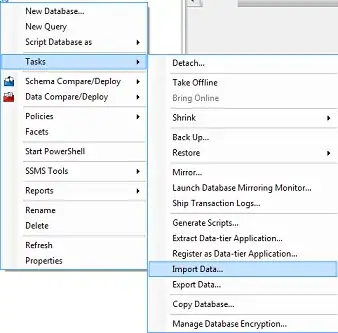
If you can export the data from the spreadsheet into a delimited format (e.g. csv) you can use the data import wizard in SSMS to insert the data for you:

SSMS import data task.

Nick Chammas
  • 14,810
  • 17
  • 76
  • 124
datagod
  • 7,141
  • 4
  • 38
  • 58
0

Using multiple SqlBulkCopy, create a temp table. Insert new data into the temp table, then merge the data in the temp table into the existing one. Example using the C# SqlBulkCopy.WriteToServer Method (DataTable). Hope it helps

Marco
  • 3,720
  • 5
  • 25
  • 31
Hung Vu
  • 101
  • 1
0

Yes we could do that, I tried with a BCP (Bulk Copy Program) approach in order to avoid an OutOfMemory issue.

Note: Tried on SQL Server 2014.

In BCP, first we need to export the Source database data to bcp file (in local directory folder) and then need to import that bcp file to the destination database.

enter image description here

Below are the cake walk steps:

Note:

a) Make sure empty table is present in the Destination database

b) Make sure Temp folder is present in C drive

  1. Create a bat file named as Export_Data.bat with the command shown below:

    bcp.exe [Source_DataBase_Name].[dbo].[TableName] OUT "C:\Temp\TableName.bcp" -S "Computer Name" -U "SQL Server UserName" -P "SQL Server Password" -n -q 
    

    pause

  2. Run that bat file, as a result of that a bcp file will get generated in Temp folder

  3. Then Create a another bat file named as Import_Data.bat with the following command:

    bcp.exe [Destination_DataBase_Name].[dbo].[TableName] IN "C:\Temp\TableName.bcp" -S "Computer Name" -U "SQL Server UserName" -P "SQL Server Password" -n -q 
    

    Pause

And here we go!

Kms
  • 101
  • 2
-1

I had a similar issue with SSMS years ago when I had large bulk INSERTs to populate a temp table from data provided in a Excel file.

I revised my statements to end with a semicolon. The problem went away.Such as:

INSERTs with statement terminators

Paul White
  • 94,921
  • 30
  • 437
  • 687
Frank
  • 1