Problem with this message is that none of the databases use any encryption.
That is probably true :) However, that's not what the error is saying...
"This database is encrypted by database master key, you need to provide valid password when adding it to the availability group."
The error is saying, in plain English: You have a databases that has, inside of it, a database master key. That database master key is encrypted using a password. I need you to give me that password so that I can decrypt any objects that might be encrypted using it.
Here is a super quick repro to give you the "message":
CREATE DATABASE PasswordTest;
GO

USE PasswordTest;
GO

CREATE MASTER KEY ENCRYPTION BY PASSWORD = ‘$up3r$tr0ng’
GO
SMSS isn't saying it can't use the database, it's asking for the password to open the master key.
What's the fix?
You have a few options, but here are the best two:
- Click to the right of the message, you can actually put in the password and the wizard will let you continue without issue (since it can now open the master key).
- If you're not using the master key... Drop It.
It turned out that database did have master key.
Yes, as the error specified. This was not in doubt :)
screenshots in my initial question are from the very same 2012 instance. Why SSMS 2012 and 2014 wizard did not mention anything about master key, but SSMS 2016 wizard did?
It was added in SSMS 2016... Not sure what you were looking for here as items are added to new versions.
And also SSMS 2016 did not have any edit box to enter password.
I dunno - works in mine...
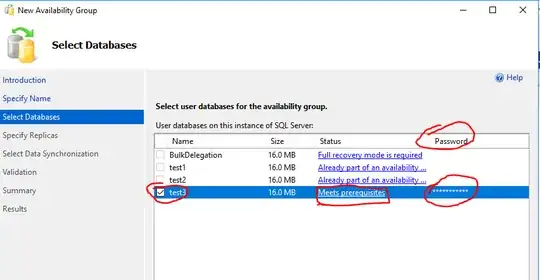
I know exactly what you refer to, but there is nothing there in my case, just empty space under "Password" column, which added to confusion. Do you think there might be a bug in SSMS 2016 or you have some explanation for this behavior?
See the screenshot above - I think it's working as intended, at least for me... It might not be intuitive, but it works.
The end result is the same. If you're not a fan of the GUI giving you grief then there is always PowerShell and T-SQL :) If you feel that this isn't working as intended or you don't like it, I'd ask you to post feedback on Connect.


