I'm just reading a book and in one of the examples I get notices:
- That the engine in the information_schema.table is null, how is that possible?
- Can I create tables without any engine??, is there any pro in that?
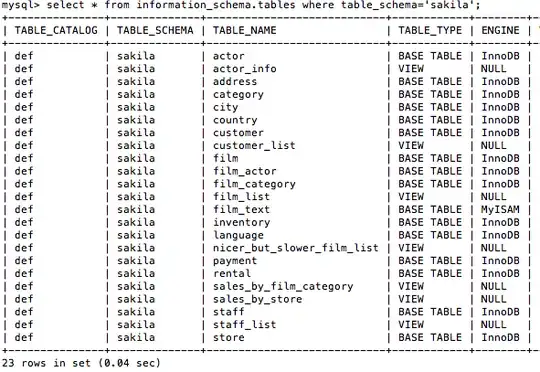
I'm just reading a book and in one of the examples I get notices:


I actually wrote a post back in July 2011 ( Modify DEFINER on Many Views ) about how to access views for modification.
It is a fact that when the storage engine is NULL, it is always a View.
The actual definition of the View is
MySQL 5.1/5.5
mysql> desc information_schema.views;
+----------------------+--------------+------+-----+---------+-------+
| Field                | Type         | Null | Key | Default | Extra |
+----------------------+--------------+------+-----+---------+-------+
| TABLE_CATALOG        | varchar(512) | NO   |     |         |       |
| TABLE_SCHEMA         | varchar(64)  | NO   |     |         |       |
| TABLE_NAME           | varchar(64)  | NO   |     |         |       |
| VIEW_DEFINITION      | longtext     | NO   |     | NULL    |       |
| CHECK_OPTION         | varchar(8)   | NO   |     |         |       |
| IS_UPDATABLE         | varchar(3)   | NO   |     |         |       |
| DEFINER              | varchar(77)  | NO   |     |         |       |
| SECURITY_TYPE        | varchar(7)   | NO   |     |         |       |
| CHARACTER_SET_CLIENT | varchar(32)  | NO   |     |         |       |
| COLLATION_CONNECTION | varchar(32)  | NO   |     |         |       |
+----------------------+--------------+------+-----+---------+-------+
10 rows in set (0.02 sec)
MySQL 5.0
mysql> desc information_schema.views;
+-----------------+--------------+------+-----+---------+-------+
| Field           | Type         | Null | Key | Default | Extra |
+-----------------+--------------+------+-----+---------+-------+
| TABLE_CATALOG   | varchar(512) | YES  |     | NULL    |       |
| TABLE_SCHEMA    | varchar(64)  | NO   |     |         |       |
| TABLE_NAME      | varchar(64)  | NO   |     |         |       |
| VIEW_DEFINITION | longtext     | NO   |     | NULL    |       |
| CHECK_OPTION    | varchar(8)   | NO   |     |         |       |
| IS_UPDATABLE    | varchar(3)   | NO   |     |         |       |
| DEFINER         | varchar(77)  | NO   |     |         |       |
| SECURITY_TYPE   | varchar(7)   | NO   |     |         |       |
+-----------------+--------------+------+-----+---------+-------+
8 rows in set (0.00 sec)
To see what the view definition is for sakila.actor_info you can either run
SELECT * FROM information_schema.views
WHERE table_schema='sakila' AND table_name='actor_info'\G
or
SHOW CREATE VIEW sakila.actor_info\G
I thought I'd add something interesting. Based on some testing I found that the engine is NULL for MyISAM tables if they are corrupted:
mysql> repair table TEST.test_myisam;
^CCtrl-C -- sending "KILL QUERY 10" to server ...
Ctrl-C -- query aborted.
+---------------------+--------+----------+------------------------------+
| Table               | Op     | Msg_type | Msg_text                     |
+---------------------+--------+----------+------------------------------+
+---------------------+--------+----------+------------------------------+
2 rows in set (0.37 sec)

mysql> select table_type, engine, table_rows from information_schema.tables where table_schema = 'TEST' and table_name = 'test_myisam';
+------------+--------+------------+
| table_type | engine | table_rows |
+------------+--------+------------+
| BASE TABLE | NULL   |       NULL |
+------------+--------+------------+
1 row in set, 1 warning (0.00 sec)

mysql> show warnings;
+---------+------+----------------------------------------------------------------------------------------+
| Level   | Code | Message                                                                                |
+---------+------+----------------------------------------------------------------------------------------+
| Warning |  144 | Table './TEST/test_myisam' is marked as crashed and last (automatic?) repair failed |
+---------+------+----------------------------------------------------------------------------------------+
1 row in set (0.00 sec)
This was done on 5.6.21.
I also tested corrupting the data file manually with something like
echo "1" >> /path/to/db/TEST/test_myisam.MYD
and then doing:
mysql> check table TEST.test_myisam;
+------------------+-------+----------+---------------------------------------------------------+
| Table            | Op    | Msg_type | Msg_text                                                |
+------------------+-------+----------+---------------------------------------------------------+
| TEST.test_myisam | check | warning  | Size of datafile is: 41943042       Should be: 41943040 |
| TEST.test_myisam | check | error    | got error: 127 when reading datafile at record: 2097152 |
| TEST.test_myisam | check | error    | Corrupt                                                 |
+------------------+-------+----------+---------------------------------------------------------+
3 rows in set (0.28 sec)
which yields the same result:
mysql> select table_type,engine, table_rows from information_schema.tables where table_schema = 'TEST' and table_name = 'test_myisam';
+------------+--------+------------+
| table_type | engine | table_rows |
+------------+--------+------------+
| BASE TABLE | NULL   |       NULL |
+------------+--------+------------+
1 row in set, 1 warning (0.00 sec)

