3

I am trying to migrate our SSRS 2008R2 server to a fresh install of SSRS 2016.

I am using ReportSync and have managed to get connect to both servers OK. I created a test folder with a test report on the 2008 server and have migrated that fine to the 2016 server.

The problem is arising when I am trying to migrate the Data Sources folder.

As you can see from the screen shot, there is not plus symbol next to this folder, suggesting it is empty, yet when I browse the folder using the Reports Manager in Internet Explorer, I can see the Data Sources there. Furthermore, we have a Data Source in the Datasets folder (don't ask!) and when I expand that folder out in ReportSync, I cannot see this Data Source.

The credentials I have used in the ReportSync tool are the same as I am browsing the webpage with and this is a domain account. The account is in the BUILTIN\Administrators group which has "Content Manager" role on the Data Sources folder
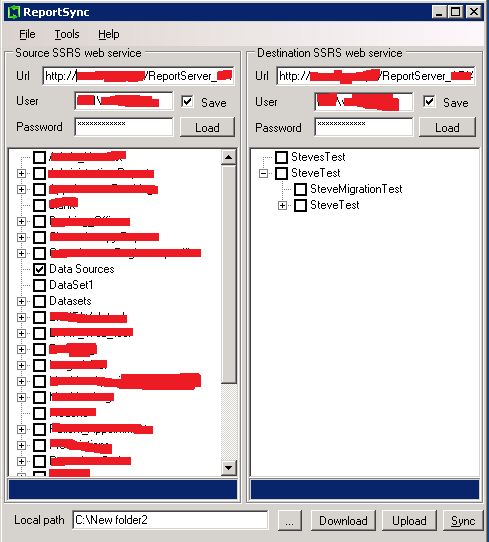
enter image description here

SE1986
  • 2,142
  • 4
  • 30
  • 61

1 Answers1

4

Thanks to McNets for the heads up on the map DataSources option. To solve the problem I had to:

  • Load up both servers as per the image in the question
  • Select Tools > Map DataSources
  • I was getting a runtime error at this point this was stopped by creating a datasource on the target server and clicking the "Load" buttons again in ReportSync
  • The resulting window shows all the source server datasources with a dropdown list next to each allowing selection of the target server data sources
  • Recreated all source server data sources on target server (including all the details - connection strings, authentication etc...
  • Using the map datasources option, assign each source server data source to the relevant target server data source
  • Click set
  • Click sync at the bottom of the main window

The test report I created now opens

SE1986
  • 2,142
  • 4
  • 30
  • 61