I am trying to delete a principal from the database but can't because it owns a schema. When I go to edit the user, however, the box to uncheck schema is blue and unremovable.
How can I remove the principal from these schemas?
I am trying to delete a principal from the database but can't because it owns a schema. When I go to edit the user, however, the box to uncheck schema is blue and unremovable.
How can I remove the principal from these schemas?


The T-SQL way works. Thanks to http://zarez.net/?p=179 I found the SSMS way to do this (UI).
To change the schema owner from Sql Server Management Studio:
Expand your database -> Security -> Schemas
In the Object Explorer Details you can see a list of the schemas and the owners:
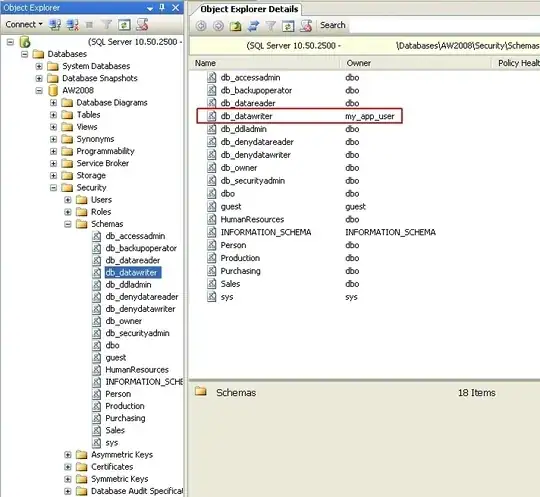
If you don't know what schema(s) the User owns, check the properties of the User.
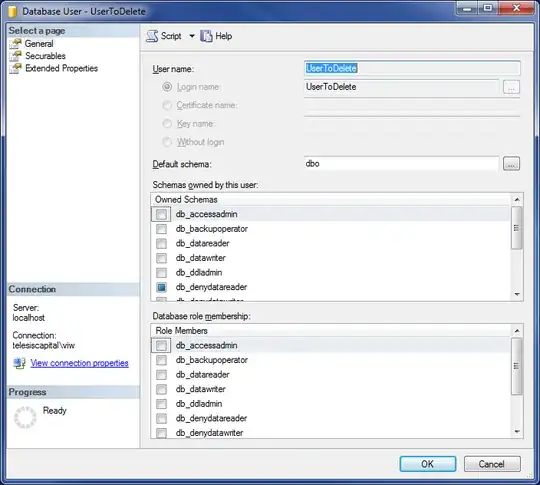
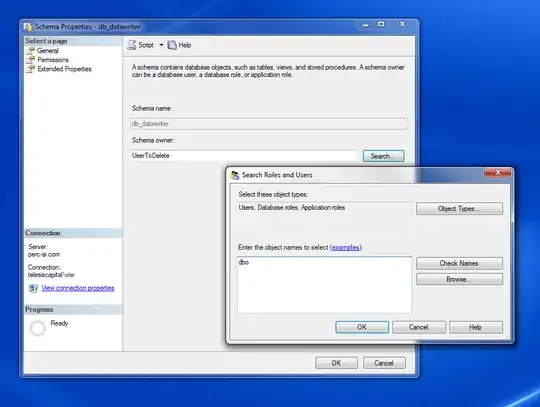
Open up the properties of the schema that the User owns, and click "Search" to find a new owner. If you don't know the new owner, you can "Browse" for one.
Properites -> Search -> Browse
and you can change the schema owner to dbo (or whoever is most appropriate).

Try the T-SQL to do this:
alter authorization
on schema::YourSchemaName
to dbo
go
drop user TheUserYouWantToDelete
go
You can't drop a principal that is a schema owner, so the ALTER AUTHORZATION changes the owned schema (I used YourSchemaName but obviously substitute that with the owned schema in your database) to dbo (likewise, you can change ownership to whatever principal you need in your environment).
That will allow you to drop the previously-schema-owning user (for example purposes I used TheUserYouWantToDelete, but that'll be the now non-owner that you want to drop).
Simplified, authorization = ownership. If you could delete the user that owns the schema, the schema wouldn't be valid, because the owner no longer exists. Imagine you could delete a customer who has placed an order. What does the CustomerID in the Orders table mean if there is no longer a Customer that it points to? Where should I ship the order?
Sorry, my example wasn't well explained. We're not changing authorization to the dbo schema, we're changing authorization to the dbo principal. That could have been any database principal.

It has been already showed before that before dropping a user you need to reassign any schema it might own to dbo as per the example below:
alter authorization
on schema::YourSchemaName_Ownedby_TheUserYouWantToDelete
to dbo
go
drop user TheUserYouWantToDelete
go
However, sometimes the user you want to delete has more than one schema assigned to it. You can find all the schemas owned by a particular user by using this script:
  SELECT S.*
       ,[the schema ownwer]=dp.name
       ,dp.type_desc
FROM SYS.schemas S
INNER JOIN SYS.database_principals dp
       ON S.principal_id = dp.principal_id

Just a note:
In the example above the user mathura\radhe has several schemas including db_owner although this user is NOT the db owner of this database in particular.
Below is a partial view of the script I use to get ready to drop a user in a database.
There are other things to consider - as they're not included in this script:
  SELECT   THE_SERVER      = @@SERVERNAME
      ,THE_DATABASE    = QUOTENAME(DB_NAME())
      ,THE_USER        = QUOTENAME(dp.name)
      ,IS_ORPHAN       = dp.IS_ORPHAN
      ,[DROP_USER]     =
       'USE ' + QUOTENAME(DB_NAME()) +
       '; DROP USER [' + dp.name
        + '] '
      ,[RESET_SCHEMA]  =
      'USE ' + QUOTENAME(DB_NAME()) +
      ';' + dp.THE_SCHEMAS  +
      ';'
      ,[RESET_ROLE]    =
      'USE ' + QUOTENAME(DB_NAME()) +
      ';' + dp.THE_ROLES +
      ';'
FROM
  (SELECT
  [NAME]               = dp.name
 ,IS_ORPHAN            = CASE WHEN (sp.sid is null

                         AND c.sid is null

                         AND a.sid is null)
                         THEN 1 ELSE 0 END
 ,THE_SCHEMAS          = STUFF((

             SELECT N';'+ N'ALTER AUTHORIZATION ON SCHEMA::' +
             CAST (QUOTENAME(s.name) as sysname) + SPACE(1) + 'TO [dbo]'
                                    FROM sys.schemas s
                                    WHERE s.principal_id = dp.principal_id
                                    FOR XML PATH ('')),1,1,'')
 ,THE_ROLES         = STUFF((

             SELECT N';'+ N'ALTER AUTHORIZATION ON ROLE::' +
             CAST (QUOTENAME(k.name) as sysname) + SPACE(1) + 'TO [dbo]'
                                    FROM sys.database_principals k
                                    WHERE k.[type]='R'
                                     AND k.owning_principal_id = dp.principal_id
                                    FOR XML PATH ('')),1,1,'')
FROM sys.database_principals dp
 LEFT OUTER JOIN sys.server_principals sp
              ON dp.sid = sp.sid
 LEFT OUTER JOIN sys.certificates c
              ON dp.sid = c.sid
 LEFT OUTER JOIN sys.asymmetric_keys a
              ON dp.sid = a.sid
WHERE 1=1
 AND dp.type in ('U', 'S', 'C', 'K')
 AND dp.principal_id > 4
        /0..4 are system users which will be ignored/
 AND NOT (dp.type = 'S'
         AND LEN(dp.sid) = 28)
        /to filter out the valid db users without login/) dp

 WHERE dp.name = 'mathura\radhe'

then I copy the script generated on the RESET_SCHEMA column:
USE [sgdragnet];
ALTER AUTHORIZATION ON SCHEMA::[mathura\radhe] TO [dbo];
ALTER AUTHORIZATION ON SCHEMA::[radhe] TO [dbo];
ALTER AUTHORIZATION ON SCHEMA::[mathura] TO [dbo];
ALTER AUTHORIZATION ON SCHEMA::[KRISHNA] TO [dbo];
ALTER AUTHORIZATION ON SCHEMA::[db_owner] TO [dbo];
ALTER AUTHORIZATION ON SCHEMA::[db_securityadmin] TO [dbo];
and the other columns also contain significant info. hope this helps
