0

I made a select query which returned about 20 million rows. Memory usage jumped from 300MB to 3.x GB.

How can I release the additional memory for this database after the query is done, without restarting the SQL process?
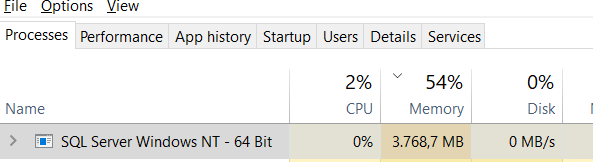

enter image description here


enter image description here

I tried:

DBCC DROPCLEANBUFFERS
DBCC FREEPROCCACHE
Declare @dbid int = db_ID() 
DBCC FLUSHPROCINDB (22)
DBCC FREESYSTEMCACHE ('Comments')
DBCC FREESESSIONCACHE

But it only decreases memory usage by 300MB.

Legends
  • 204
  • 1
  • 3
  • 11

1 Answers1

3

Paul White wrote a response to the question What's a good way to get SQL Server to release memory to the operating system on a dev machine?. This approach IS at the instance level, but that may be acceptable for your situation.

Quoting Paul:

I routinely increase and decrease the max server memory configuration option for the SQL Server 2005-2016 instances running on my laptop (with lock pages in memory enabled). Has never caused me any problems, and memory always seems to be released quickly.

With that in mind and referencing Server Memory Server Configuration Options, it would seem that you could simply invoke the following T-SQL once to reduce the memory and then again to increase the memory by modifying the max memory value:

sp_configure 'show advanced options', 1;  
GO  
RECONFIGURE;  
GO  
sp_configure 'max server memory', 4096;  
GO  
RECONFIGURE;  
GO  
Scott Hodgin - Retired
  • 24,062
  • 2
  • 29
  • 52