21

I'm having trouble finding answers with various Internet and Google searches for MySQL Workbench issue I'm experiencing.

I have not found any answers on how to make this work again.

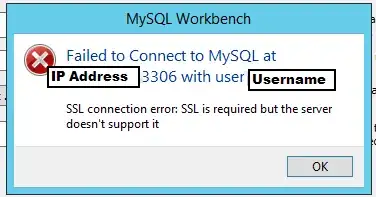
Here's the MySQL Workbench error I'm having issues troubleshooting which I need help

mysql workbench failed to connect at localhost:3306 with user root ssl connection error: ssl is required but the server doesn't support it

Peter Mortensen
  • 349
  • 2
  • 10
morgansbyers
  • 383
  • 1
  • 3
  • 6

8 Answers8

23

At least in MySQL Workbench community edition 8.0.27 no Use SSL option is not available. You could define useSSL parameter described in previous answer, in the Advance tab:

enter image description here

21

Configure MySQL Workbench to not require SSL encryption

If you get the MySQL Workbench error of "SSL connection error: SSL is required but the server doesn't support it" then you likely just need to change a setting that's defined within the MySQL Connections within MySQL Workbench.
enter image description here

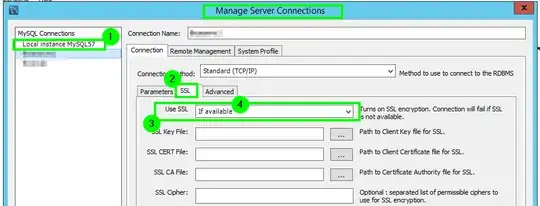
From the MySQL Connections screen click on the little wrench icon enter image description here to the right to bring up Manage Server Connections window.

enter image description here

From the Manage Server Connections window click on the "MySQL Connection" that is giving you this error, then from the SSL tab you will want to ensure the Use SSL field has a value of If available so it only uses SSL if it's available or else it'll connect without SSL encryption.
enter image description here

Press the Test Connection option from the bottom of the Manage Server Connections window after you make the to confirm the error goes away.


Continued Trouble

Update: Firstly, downgrading to version 8.0.26 brings back the No and If available options for the Use SSL field. They're removed in version 8.0.27. You can find older versions here of MySQL Workbench here: MySQL Product Archives

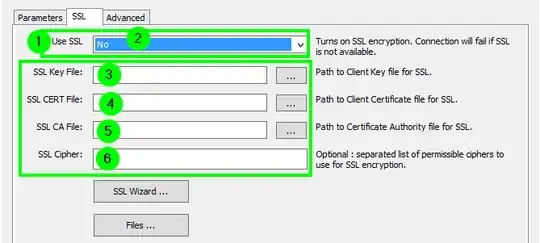
If you continue to have trouble you might set the Use SSL field to a value of No and also ensure all the SSL fields below that are blank and then test the connection again.
enter image description here

IT Thug Ninja
  • 2,378
  • 16
  • 18
17

You can bring back the old SSL options in 8.0.27:

  • Close MySQL Workbench
  • Go to you MySQL Workbench install folder (p.e. C:\Program Files\MySQL\MySQL Workbench 8.0 CE)
  • open the file modules/data/mysql_rdbms_info.xml
  • replace all occurrences of
    • >2|Require,3|Require and Verify CA,4|Require and Verify Identity
    • with >0|No,1|If available,2|Require,3|Require and Verify CA,4|Require and Verify Identity

Now you have the old options back: enter image description here

fehrlich
  • 273
  • 2
  • 6
6

In workbench 8.0.27 if under the SSL tab you don't see the option No, edit file $HOME/.mysql/workbench/connections.xml, look for the connection that you want to disable ssl, and find <value type="int" key="useSSL">2</value> set it to 0, that will disable ssl for that connection.

cl0ne
  • 103
  • 3
ManKino
  • 61
  • 1
  • 1
5

add useSSL=0 in advanced tab

add useSSL=0 in advanced tab this worked for me in win 10

Mo Zakaria
  • 51
  • 1
  • 1
1

windows10, Workbench 8.0.27
close the MySQL Workbench (important, otherwise it will overwrite the edit)
in ~\AppData\Roaming\MySQL\Workbench\connections.xml
set <value type="int" key="useSSL">0</value> and save.

DO not touch the Edit Connections for this connection, it would overwrite the 0 by a 2

Kurt
  • 21
  • 2
1

A bug in MySQL Workbench 8.0.27. Fixed for 8.0.28 whenever that gets released. Details at link.

tgn
  • 11
  • 2
-1

i was facing same problem since last 3 days but i realize that if new version of workbench don't have NO/IF AVAILABLE option but we can solve it through go to ADVANCE and write on others: useSSL=0 and remain keep same.
It will solve but with attention/warning.