You can prevent a stored procedure from running more often than every "x" seconds using a table to keep track of the last run-time of the given procedure.
Create a table to store the last-run-time:
CREATE TABLE dbo.ProcControl
(
    ProcName sysname NOT NULL
        CONSTRAINT PK_ProcControl
        PRIMARY KEY
        CLUSTERED
    , LastExecution datetime NOT NULL
);
INSERT INTO dbo.ProcControl (ProcName, LastExecution)
VALUES (N'dbo.TestProc', '2017-01-01 00:00:00')
GO
Create a test stored procedure:
CREATE PROCEDURE dbo.TestProc
AS
BEGIN
    SET NOCOUNT ON;
    IF NOT EXISTS (
        SELECT 1
        FROM dbo.ProcControl pc
        WHERE pc.ProcName = N'dbo.TestProc'
            AND pc.LastExecution >= DATEADD(SECOND, -5, GETDATE())
            )
    BEGIN
        /*
            run the code you want to run at most every 5 seconds.
        */
        SELECT Result = 'This is a result'
            , [Timestamp] = GETDATE();
        UPDATE dbo.ProcControl
        SET LastExecution = GETDATE()
        WHERE ProcName = N'dbo.TestProc';
    END
END
GO
Here, we run the proc twice in quick succession; the first iteration returns a valid result, the second iteration does not. Then we wait for 6 seconds, and run the procedure again, which in-turn returns a result :
DECLARE @returnVal int;
EXEC @returnVal = dbo.TestProc;
PRINT @returnVal;
EXEC @returnVal = dbo.TestProc;
PRINT @returnVal;
WAITFOR DELAY '00:00:06';
EXEC @returnVal = dbo.TestProc;
PRINT @returnVal;
The results:
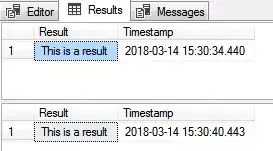
Cleanup:
IF OBJECT_ID(N'dbo.ProcControl', N'U') IS NOT NULL
DROP TABLE dbo.ProcControl;
IF OBJECT_ID(N'dbo.TestProc', N'P') IS NOT NULL
DROP PROCEDURE dbo.TestProc;
GO
Would I suggest doing this? Absolutely not!
What if you have two customers using the site at the same time? The first customer will get results, the second customer may not. Also, writing into the dbo.ProcControl table unnecessarily may reduce performance, and might become a central bottleneck.
Re-architect your website to use caching and only make calls to the database when data is needed from it.


