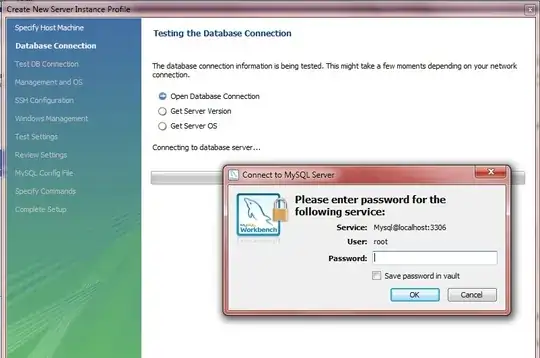
You will need to give root@localhost a password
Since you just installed mysql, you are running with default settings, this means you have no my.cnf. You will have to create one.
Run the following at a DIS Prompt
cd C:\Program Files\MySQL\MySQL Server 5.5
dir *.ini
There, you will see sample .ini files. Let's pick my-small.ini
net stop mysql
cd C:\Program Files\MySQL\MySQL Server 5.5
copy my-small.ini my.ini
cd data
del ib*
notepad my.ini
Once you open notepad, add this under the [mysqld] header
[mysqld]
skip-grant-tables
Close notepad and Save my.ini
Next, run these lines
net start mysql
mysql (hit enter)
You will get a mysql prompt. Now run this:
mysql> UPDATE mysql.user SET PASSWORD=PASSWORD('mysecretpassword') WHERE user='root' AND host='localhost';
exit
Back at the DOS Prompt, do this:
net stop mysql
notepad my.ini
Once Notepad is open, delete the line skip-grant-tables from my.ini
Close notepad and Save my.ini
net start mysql
Once mysql is back up, test the password at the DOS prompt
mysql -uroot -p (hit enter)
Password: (type mysecretpassword and hit enter)
If you get the mysql prompt, CONGRATULATIONS !!! You installed a password for root@localhost
Go back to MySQL Workbench and user mysecretpassword as the password
Give it a Try !!!