How can you view the IP addresses of active MongoDB Atlas connections?
As per MongoDB documentation here the IP address has been added in Atlas cluster will appears under the Check the IP Whitelist section under the Security tab.
For example in screenshot It has been chosen as IP Whitelist as Any to Any ( i.e IP address is 0.0.0.0/0). If you shall chose your current IP address in IP Whitelist then it will show your current Public IP address.
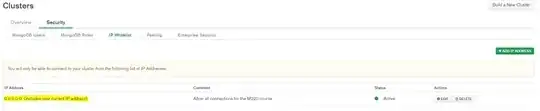
After Edit
Suppose that during the Security IP Whitelist configuration time,I have been added my IP Address through the ADD IP Address button as it's appear on the right top corner of the Cluster window screen such as

After adding my Public IP (37.186.35.171/32)is appears like that

And the status of the connection is shows as ACTIVE status. Even I have logged two times from the Atlas cluster and again login to the cluster as it's always IP Address is appearing as 37.186.35.171/32. Which I have been red highlighted through arrow in the screenshot.


