There is 3 NumaNodes and 12 CPU's in them. 6 of them was checked.
Yesterday, i have checked all of them (12 CPU's) and after that
performance issues started.
Processor affinity
You should look into these affinity settings, disabling / enabling these binds specific schedulers to specific cores. I would not advise to manually change these unless you absolutely know what you are doing.
More on setting processor affinity here and here.
If you must do this, look into enabling traceflag 8002 as a startup parameter and restarting SQL Server. This way the schedulers are not bound to cores in a 1 on 1 relationship.
The easier solution is letting SQL Server handle the affinity.
You can do this by right clicking the instance name in Object explorer in SSMS and checking the boxes next to Automatically set processor affinity mask for all processors and Automatically set I/O affinity mask for all processors.
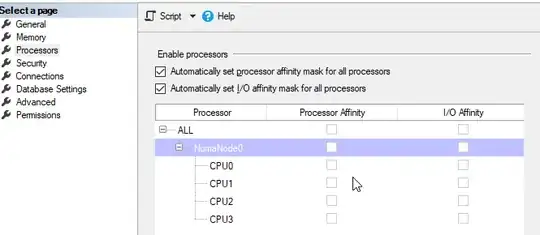
Here is the result: cost threshold for parallelism 5 max degree of
parallelism 0
Maxdop & CTFP
You should try changing these settings, these are the default settings and not recommended in most cases. An idea / starting point could be to start with setting cost threshold for parallelism to 50.
How to change this can be found here
Setting Max degree of parallelism to 4 could be a starting point. How to change this can be found here.
Prevent worker splits
I would not set my maxdop higher than the least amount of cores per node configured with processor affinity, as to try to not go cross numa.
But this is harder to force than only changing CTFP & maxdop as you can read in a part of this blogpost by Joe Obbish.
...This plan won’t work if any of the following occur:
- Any query runs with a query level MAXDOP hint other than 0, 1, 10, or
- Any query is downgraded in MAXDOP but still runs in parallel.
- A parallel stats update happens. The last time I checked these run with a query level MAXDOP hint of 16.
- Something else unexpected happens ...
In the same post, the most reliable method as to not go cross node:
The most reliable method by far is to have a single hard NUMA node, so
if you have a VM that fits into a single socket of a VM host and you
care about performance then ask your friendly VM administrator for
some special treatment.
Source
Max memory setting for hard numa.
You should also look into setting your max memory leaving some for the OS and divisible by 3 for Hard-NUMA.
Since you are on SQL Server 2012 standard edition, the max amount of memory for your buffer pool = 64 but you could set more for the rest of the caches.
More on that here
Upgrading to at least SQL Server 2014 standard edition will give you the ability to use 128GB for the buffer pool, but I would advise to to a higher version than 2014.
An idea could be capping at 98304MB = 96GB of max memory.
Configuration commands:
EXEC sys.sp_configure N'cost threshold for parallelism', N'50'
GO
EXEC sys.sp_configure N'max degree of parallelism', N'4'
GO
EXEC sys.sp_configure N'max server memory (MB)', N'98304'
GO
RECONFIGURE WITH OVERRIDE
GO
Remember to monitor your queries and act accordingly after changing these settings. If some of these settings do not improve your situation, tweak them.
Getting help in the future
If there are other issues with certain queries, adding the actual query plan & as much information to a different question will help in getting answers faster. You should also check with the infrastructure team if any of these cores are overcommitted.
There should normally not be a reason to set your affinity to use 6 cores if you could use 12 dedicated cores (as you are within 4 sockets / 24 cores for your standard licensing).


