1

I'm trying to connect to a MSSQL server in our office from my local desktop using HeidiSQL. I am able to connect to this server with both SQL Server Management Studio and ODBC with no problems. The connection uses integrated Windows authentication. I installed the MS OLE DB SQL 18.2.2.0 x64 driver. My settings in HeidiSQL are:

network type: Microsoft SQL Server (named pipe)

library: MSOLEDBSQL

hostname: <server>\<instance>

use windows authentication is checked

every time I try to connect I get:

SQL Error (0): SQL Server Network Interfaces: Server doesn't support requested protocol [xFFFFFFFF] Login timeout expired

It doesn't tell me what protocol is being used, and I don't see any options to change it. Does "protocol" in this case refer to the library?

Is there some way to change the protocol in Heidi?

raphael75
  • 244
  • 4
  • 18

2 Answers2

2

Try following:

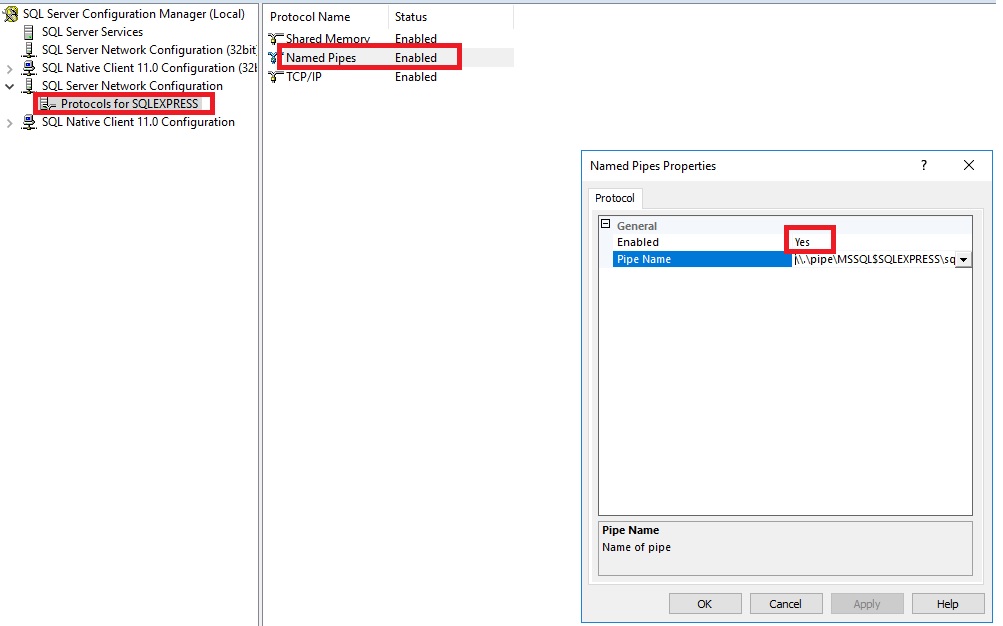
  1. Enable Named pipes visa configuration manager enter image description here

  2. Restart particular SQL Service

  3. Have a look at SQL log (recent entries after restart), it must state the named pipe is ready without any error (as showed screenshot below) enter image description here

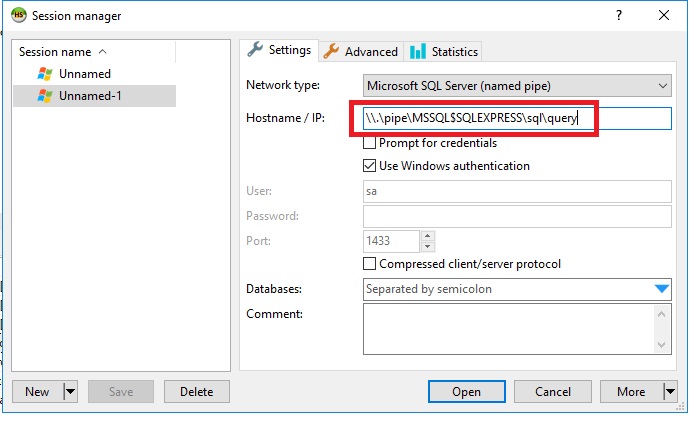
  4. If SQL error log looks good, try again with named pipe, make sure the hostname match with named pipe (configured in step:1)
    enter image description here

If still no luck, you may proceed with TCP/IP protocol, just make sure you are able to do telnet localhost 1433 to be sure the TCP/IP is enable and ready for connections. If any issue, you can follow Step 1 and 2 for enabling TCP/IP, and add a New Rule at Windows Firewall to accept incoming connections on SQL Port# (default: 1433).

Additional steps for custom port configuration

Shekar Kola
  • 2,477
  • 2
  • 10
  • 24
1

To use named pipes it needs to be enabled on the server. You can check and enable this on the system with SQL Server installed by opening the SQL Server Configuration Manager software and checking the SQL Server Network Configuration section. You can see how to do that here.

Give connecting a go using TCP/IP. The SQL Server Configuration manager will show you if that's enabled too. Then you can try connecting with the hostname and Windows Authentication. TCP/IP. Hopefully HeidiSQL hasn't changed too much from the images used in that link.

As an alternative to Heidi, should you need it, SQL Server Management Studio is perfectly suited to all things MSSQL. It's also free!

KevH
  • 544
  • 3
  • 11