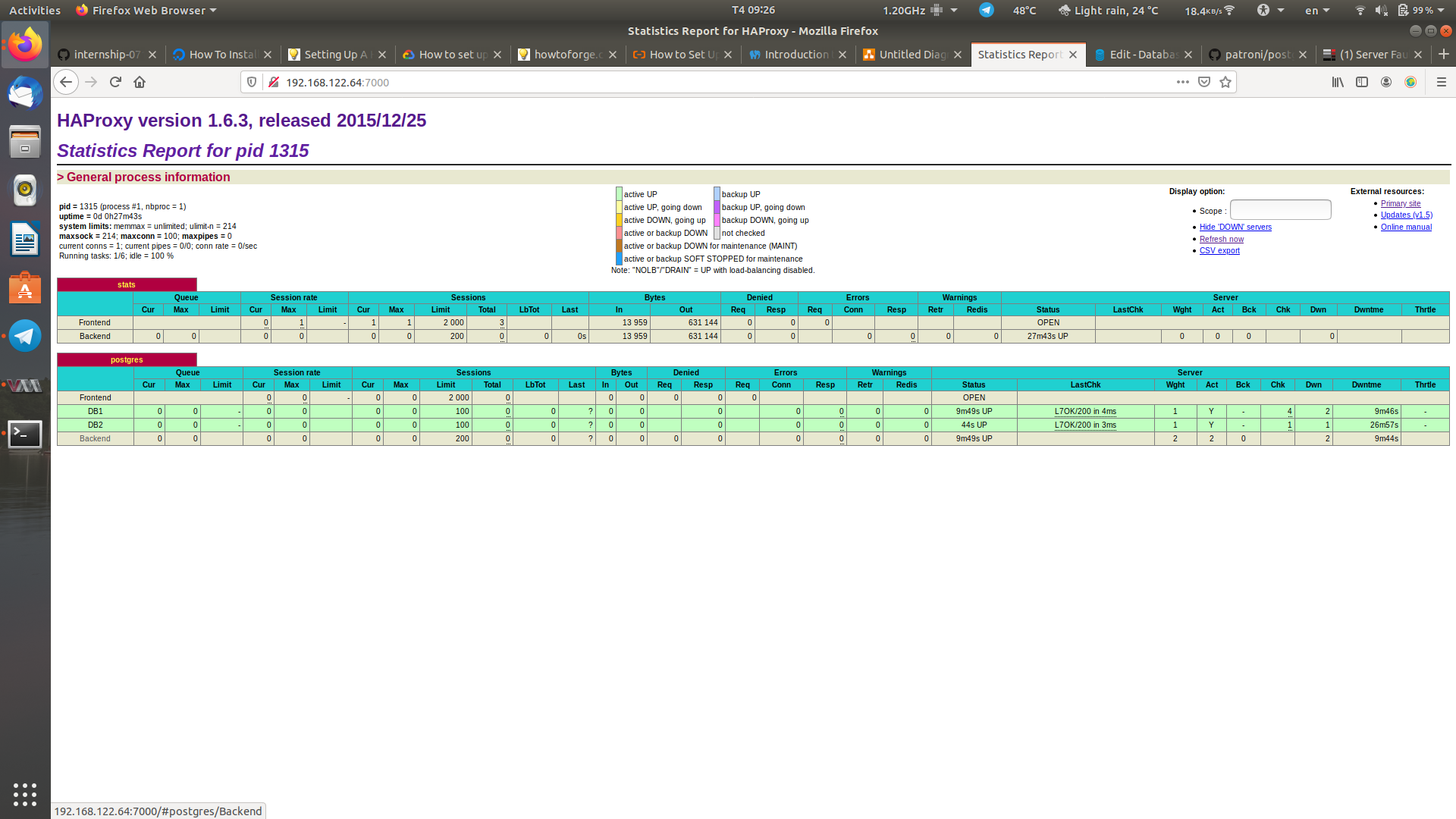
I follow this guide to set up an lab for Postgres HA.
I follow exactly the guide (change the IP address in my case), after all it all work though on Postgres server 1
But when come to Postgres server 2 patroni.yml setup
The guide said on both Postgres server have the same patroni.yml setup, but when restart the patroni service
This problems happened server1
quanlm@DB1:~$ sudo service patroni status
● patroni.service - Runners to orchestrate a high-availability PostgreSQL
   Loaded: loaded (/etc/systemd/system/patroni.service; disabled; vendor preset: enabled)
   Active: active (running) since Tue 2019-11-12 07:35:33 UTC; 14min ago
 Main PID: 411 (patroni)
    Tasks: 12
   Memory: 77.6M
      CPU: 4.041s
   CGroup: /system.slice/patroni.service
           ├─411 /usr/bin/python3 /usr/local/bin/patroni /etc/patroni.yml
           ├─431 postgres -D /data/patroni --config-file=/data/patroni/postgresql.conf --listen_addresses=192.168.122.77 --max_prepared_tran
           ├─435 postgres: postgres: checkpointer process
           ├─436 postgres: postgres: writer process
           ├─439 postgres: postgres: stats collector process
           ├─447 postgres: postgres: postgres postgres 192.168.122.77(49984) idle
           ├─455 postgres: postgres: wal writer process
           └─456 postgres: postgres: autovacuum launcher process

Nov 12 07:49:28 DB1 patroni[411]: 2019-11-12 07:49:28,533 INFO: no action.  i am the leader with the lock
Nov 12 07:49:38 DB1 patroni[411]: 2019-11-12 07:49:38,459 INFO: Lock owner: postgresql0; I am postgresql0
Nov 12 07:49:38 DB1 patroni[411]: 2019-11-12 07:49:38,536 INFO: no action.  i am the leader with the lock
Nov 12 07:49:48 DB1 patroni[411]: 2019-11-12 07:49:48,459 INFO: Lock owner: postgresql0; I am postgresql0
Nov 12 07:49:48 DB1 patroni[411]: 2019-11-12 07:49:48,544 INFO: no action.  i am the leader with the lock
Nov 12 07:49:58 DB1 patroni[411]: 2019-11-12 07:49:58,458 INFO: Lock owner: postgresql0; I am postgresql0
Nov 12 07:49:58 DB1 patroni[411]: 2019-11-12 07:49:58,548 INFO: no action.  i am the leader with the lock
Nov 12 07:50:08 DB1 patroni[411]: 2019-11-12 07:50:08,457 INFO: Lock owner: postgresql0; I am postgresql0
Nov 12 07:50:08 DB1 patroni[411]: 2019-11-12 07:50:08,539 INFO: no action.  i am the leader with the lock
Nov 12 07:50:19 DB1 patroni[411]: 2019-11-12 07:50:19,949 INFO: acquired session lock as a leader
Yeah server 1 was fine but on server 2
quanlm@DB2:~$ sudo service patroni status
● patroni.service - Runners to orchestrate a high-availability PostgreSQL
   Loaded: loaded (/etc/systemd/system/patroni.service; disabled; vendor preset: enabled)
   Active: failed (Result: exit-code) since Tue 2019-11-12 07:50:02 UTC; 2s ago
  Process: 9514 ExecStart=/usr/local/bin/patroni /etc/patroni.yml (code=exited, status=1/FAILURE)
 Main PID: 9514 (code=exited, status=1/FAILURE)

Nov 12 07:50:02 DB2 patroni[9514]:   File "/usr/lib/python3.5/socketserver.py", line 440, in __init__
Nov 12 07:50:02 DB2 patroni[9514]:     self.server_bind()
Nov 12 07:50:02 DB2 patroni[9514]:   File "/usr/lib/python3.5/http/server.py", line 138, in server_bind
Nov 12 07:50:02 DB2 patroni[9514]:     socketserver.TCPServer.server_bind(self)
Nov 12 07:50:02 DB2 patroni[9514]:   File "/usr/lib/python3.5/socketserver.py", line 454, in server_bind
Nov 12 07:50:02 DB2 patroni[9514]:     self.socket.bind(self.server_address)
Nov 12 07:50:02 DB2 patroni[9514]: OSError: [Errno 99] Cannot assign requested address
Nov 12 07:50:02 DB2 systemd[1]: patroni.service: Main process exited, code=exited, status=1/FAILURE
Nov 12 07:50:02 DB2 systemd[1]: patroni.service: Unit entered failed state.
Nov 12 07:50:02 DB2 systemd[1]: patroni.service: Failed with result 'exit-code'.
It not working after all.
I have allow remote connect for both server by edit listen_addresses = '*' on postgresql.conf and
host all all 0.0.0.0/0 md5
on pg_hba.conf
So when HAproxy go to work, when the 1st down, the 2nd server didn't go up.
The problems is surely on the patroni on server 2 but how to fix it?
Otherwise, are there any way around to HA postgresql server?
P/s: firewall settings
quanlm@DB1:~$ sudo ufw status
Status: inactive
quanlm@DB1:~$ sudo iptables -L
Chain INPUT (policy ACCEPT)
target     prot opt source               destination

Chain FORWARD (policy ACCEPT)
target     prot opt source               destination

Chain OUTPUT (policy ACCEPT)
target     prot opt source               destination
quanlm@DB2:~$ sudo ufw status
Status: inactive
quanlm@DB2:~$ sudo iptables -L
Chain INPUT (policy ACCEPT)
target     prot opt source               destination

Chain FORWARD (policy ACCEPT)
target     prot opt source               destination

Chain OUTPUT (policy ACCEPT)
target     prot opt source               destination
P/ss: my patroni.yml
quanlm@DB1:~$ cat /etc/patroni.yml
scope: postgres
namespace: /db/
name: postgresql0

restapi:
    listen: 192.168.122.77:8008
    connect_address: 192.168.122.77:8008

etcd:
    host: 192.168.122.156:2379

bootstrap:
    dcs:
        ttl: 30
        loop_wait: 10
        retry_timeout: 10
        maximum_lag_on_failover: 1048576
        postgresql:
            use_pg_rewind: true

    initdb:
    - encoding: UTF8
    - data-checksums

    pg_hba:
    - host replication replicator 127.0.0.1/32 md5
    - host replication replicator 192.168.122.77/0 md5
    - host replication replicator 192.168.122.240/0 md5
    - host all all 0.0.0.0/0 md5

    users:
        admin:
            password: admin
            options:
                - createrole
                - createdb

postgresql:
    listen: 192.168.122.77:5432
    connect_address: 192.168.122.77:5432
    data_dir: /data/patroni
    pgpass: /tmp/pgpass
    authentication:
        replication:
            username: replicator
            password: password
        superuser:
            username: postgres
            password: password
    parameters:
        unix_socket_directories: '.'

tags:
    nofailover: false
    noloadbalance: false
    clonefrom: false
    nosync: false
yes, on both server
Update#1
On patroni.yml
I have change name: postgresql0 -> name: postgresqp1
The rest api set to host IP '192.168.122.240'
But one the
postgresql:
    listen: 192.168.122.77:5432
    connect_address: 192.168.122.77:5432
this problems happened:
quanlm@DB2:~⟫ sudo service patroni status
● patroni.service - Runners to orchestrate a high-availability PostgreSQL
   Loaded: loaded (/etc/systemd/system/patroni.service; disabled; vendor preset: enabled)
   Active: active (running) since Wed 2019-11-13 02:17:16 UTC; 25s ago
 Main PID: 32363 (patroni)
    Tasks: 6
   Memory: 45.7M
      CPU: 6.326s
   CGroup: /system.slice/patroni.service
           ├─ 1014 postgres -D /data/patroni --config-file=/data/patroni/postgresql.conf --port=5432 --wal_level=hot_standby --max_wal_senders=10 --cluster
           └─32363 /usr/bin/python3 /usr/local/bin/patroni /etc/patroni.yml

Nov 13 02:17:39 DB2 patroni[32363]: 192.168.122.77:5432 - accepting connections
Nov 13 02:17:39 DB2 patroni[32363]: 192.168.122.77:5432 - accepting connections
Nov 13 02:17:39 DB2 patroni[32363]: 2019-11-13 02:17:39,940 INFO: Lock owner: postgresql0; I am postgresql1
Nov 13 02:17:39 DB2 patroni[32363]: 2019-11-13 02:17:39,940 INFO: does not have lock
Nov 13 02:17:39 DB2 patroni[32363]: 2019-11-13 02:17:39,940 INFO: establishing a new patroni connection to the postgres cluster
Nov 13 02:17:40 DB2 patroni[32363]: LOG:  could not bind IPv4 socket: Cannot assign requested address
Nov 13 02:17:40 DB2 patroni[32363]: HINT:  Is another postmaster already running on port 5432? If not, wait a few seconds and retry.
Nov 13 02:17:40 DB2 patroni[32363]: WARNING:  could not create listen socket for "192.168.122.77"
Nov 13 02:17:40 DB2 patroni[32363]: FATAL:  could not create any TCP/IP sockets
Nov 13 02:17:40 DB2 patroni[32363]: 2019-11-13 02:17:40,042 INFO: demoting self because i do not have the lock and i was a leader
and if i change to
postgresql:
    listen: 192.168.122.240:5432
    connect_address: 192.168.122.240:5432
this happened:
quanlm@DB2:~⟫ sudo service patroni status
● patroni.service - Runners to orchestrate a high-availability PostgreSQL
   Loaded: loaded (/etc/systemd/system/patroni.service; disabled; vendor preset: enabled)
   Active: active (running) since Wed 2019-11-13 02:18:57 UTC; 40s ago
 Main PID: 3785 (patroni)
    Tasks: 11
   Memory: 59.6M
      CPU: 770ms
   CGroup: /system.slice/patroni.service
           ├─3785 /usr/bin/python3 /usr/local/bin/patroni /etc/patroni.yml
           ├─3818 postgres -D /data/patroni --config-file=/data/patroni/postgresql.conf --max_replication_slots=10 --port=5432 --max_connections=100 --max_
           ├─3853 postgres: postgres: startup process   recovering 000000040000000000000006
           ├─3857 postgres: postgres: checkpointer process
           ├─3858 postgres: postgres: writer process
           ├─3859 postgres: postgres: stats collector process
           └─3916 postgres: postgres: postgres postgres 192.168.122.240(39576) idle

Nov 13 02:19:19 DB2 patroni[3785]:
Nov 13 02:19:24 DB2 patroni[3785]: FATAL:  could not start WAL streaming: ERROR:  replication slot "postgresql1" does not exist
Nov 13 02:19:24 DB2 patroni[3785]:
Nov 13 02:19:27 DB2 patroni[3785]: 2019-11-13 02:19:27,938 INFO: Lock owner: postgresql0; I am postgresql1
Nov 13 02:19:27 DB2 patroni[3785]: 2019-11-13 02:19:27,938 INFO: does not have lock
Nov 13 02:19:27 DB2 patroni[3785]: 2019-11-13 02:19:27,966 INFO: no action.  i am a secondary and i am following a leader
Nov 13 02:19:29 DB2 patroni[3785]: FATAL:  could not start WAL streaming: ERROR:  replication slot "postgresql1" does not exist
Nov 13 02:19:29 DB2 patroni[3785]:
Nov 13 02:19:34 DB2 patroni[3785]: FATAL:  could not start WAL streaming: ERROR:  replication slot "postgresql1" does not exist
Nov 13 02:19:34 DB2 patroni[3785]:
Update#2
After settings patroni.yml back to name: postgresql0
and change the
postgresql:
    listen: 192.168.122.240:5432
    connect_address: 192.168.122.240:5432
After reset the service both the DB are up now .... which I think not supose to be like that when setting an active-passive server for HA purpose... And they didnt repicate each others