I would like to use integrated security with my internal application which is all on a domain. Unfortunately, I've never been able to get this to work well. I would like to assign an entire Exchange (Active Directory) Group a role in SQL Server for read/write access to certain tables. That way I wouldn't have to create an operator whenever someone is hired or delete an operator whenever someone is fired. Is this possible? What steps would I take to do this?
Asked
Active
Viewed 1.5e+01k times

4 Answers
55
- Set the AD group as a Login.
"Login" means a SQL-Server-instance-level Login, not the AD concept of user/login.
In SQL Server speak, this is a "Server Level Principal" - Create a mapped User in your database.
You shouldn't really permission a User directly on tables.
"User" means SQL Database User, not the AD concept of user.
In SQL Server speak, this is a "Database Level Principal" - Add the User to a Role (also a "Database Level Principal")
- GRANT permissions to the Role on the tables (tables, procs, etc are "securables")
Sample script:
USE master
GO
CREATE LOGIN [MYDOMAIN\APPLICATION SUPPORT]
FROM WINDOWS
GO
USE mydb
GO
CREATE USER [MYDOMAIN\APPLICATION SUPPORT]
FROM LOGIN [MYDOMAIN\APPLICATION SUPPORT]
GO
CREATE ROLE rSupport
GO
EXEC sp_addrolemember 'rSupport', 'MYDOMAIN\APPLICATION SUPPORT'
GO
GRANT SELECT, INSERT,UPDATE, etc
ON Mytable
TO rSupport
sp_addrolemember is deprecated starting with SQL Server 2012, where ALTER ROLE should be used instead.


9
From marc_s answering "How to add Active Directory user group as login in SQL Server":
In SQL Server Management Studio, go to Object Explorer > (your server) > Security > Logins and right-click New Login:

Then in the dialog box that pops up, pick the types of objects you want to see (Groups is disabled by default - check it!) and pick the location where you want to look for your objects (e.g. use Entire Directory) and then find your AD group.
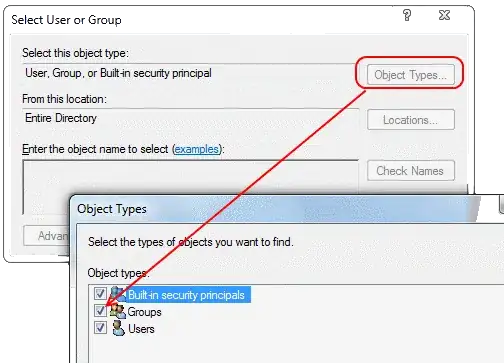
You now have a regular SQL Server Login - just like when you create one for a single AD user. Give that new login the permissions on the databases it needs, and off you go!
Any member of that AD group can now login to SQL Server and use your database.


4
Granting the permissions within SQL Server to an AD Group is relatively straightforward. It can be done either through T-SQL or Management Studio.
For instance, if you have an AD group called MYDOMAIN\APPLICATION SUPPORT, you would create the login at the server level,and then use mappings to individual databases to give slightly more granular permissions such as data reader.
Ideally, all application access should be through stored procedures*, so only execute permissions on those stored procedures in that database is required.
* From a security point of view, to allow a particular user to see some specific data, you could create a procedure and grant the user execute permission on that procedure, and nothing else. Allowing the user to query directly would mean giving select permission on all the tables involved. It's also easier to work with procedures, and easier to debug.
Stored procedures abstract table access away and limit access. To DBA types, it's like "let me see all your instance variables: I don't want to use methods, getters or setters".

Paul White
- 94,921
- 30
- 437
- 687

Peter Schofield
- 2,522
- 16
- 11
1
If the user is a member of a DOMAIN\SecurityGroup that has Sysadmin authority in SQL, then that will be used when accessing databases. Otherwise you need to look at what DOMAIN\SecurityGroup(s) have ben given authority in each database. If the user is a member of 2 SecurityGroups, with SecGroupA having select authority and SecGroupB having insert authority, then the user can select and insert.

Piyush Agrawal
- 11
- 1