history of the transaction log used space.
there are a few things to consider - if the database is involved in replication, the portion of the transaction in the log will be marked are reusable only after it has been replicated - talking about transactional replication.
one way to check what is preventing the transaction log from reusing its
select log_reuse_wait_desc, * from sys.databases
where log_reuse_wait_desc != 'NOTHING'

another thing is the volume of transactions and how long the transactions are. this is a complete whole topic that basically you try to work around and keep transactions short, if possible with not long running queries that cause locks and blocks.
now one thing you could do it is through extended events
-- Extended Events Session to track what is growing my transaction log
-- marcelo miorelli
-- 02-Nov-2017
SELECT @@SERVERNAME
CREATE EVENT SESSION [DB Size Tracking] ON SERVER
ADD EVENT sqlserver.database_file_size_change(
    ACTION(sqlserver.client_app_name,sqlserver.client_hostname,sqlserver.database_name,sqlserver.nt_username,sqlserver.plan_handle,sqlserver.query_hash,sqlserver.query_plan_hash,sqlserver.server_principal_name,sqlserver.session_id,sqlserver.session_nt_username,sqlserver.sql_text,sqlserver.username))
ADD TARGET package0.event_file(SET filename=N'E:\ExtendedEvent\DB Size Tracking.xel')
WITH (MAX_MEMORY=4096 KB,EVENT_RETENTION_MODE=ALLOW_SINGLE_EVENT_LOSS,MAX_DISPATCH_LATENCY=30 SECONDS,MAX_EVENT_SIZE=0 KB,MEMORY_PARTITION_MODE=NONE,TRACK_CAUSALITY=OFF,STARTUP_STATE=ON)
GO
another way to check what sort of space of transaction log is being used and what is free is using dbcc commands:
dbcc sqlperf
dbcc inputbuffer
dbcc opentran
--===================================================
-- here on this scrip
-- I have 3 ways of monitoring transaction log growth
-- 1 - dbcc sqlperf (logspace)
-- 2 - sys.dm_db_log_space_usage
-- 3 - sys.dm_os_performance_counters
-- use and improve it for your needs
-- 14-nov-2023 marcelo miorelli
--===================================================
if object_id('tempdb..#TempForLogSpace','U') is not null
    DROP TABLE #TempForLogSpace
CREATE TABLE #TempForLogSpace
(
DBName nvarchar(108),
LogSize real,
LogSpaceUsed real,
Status int
)
declare @sql_command varchar(max)
SELECT @sql_command = 'dbcc sqlperf (logspace)'
INSERT INTO #TempForLogSpace
EXEC (@sql_command)
select t.DBName
,[Log Size (GB)]=CONVERT(decimal(12,2),(t.LogSize)/1024.00)

,[% Log Space Used]=CONVERT(decimal(12,2),t.LogSpaceUsed)

,[Free space (GB)]= CONVERT(decimal(12,2),(t.LogSize - (t.LogSpaceUsedt.LogSize/100.00))/1024.00)

,[Free space (MB)]= CONVERT(decimal(12,2),(t.LogSize - (t.LogSpaceUsedt.LogSize/100.00)))

from #TempForLogSpace t
where dbname = 'Cobra_Archive'
select [DBName]=db_name(db_id())
      ,[Log Size (GB)]=CONVERT(decimal(12,2),total_log_size_in_bytes/1024.00/1024.00/1024.00)
      ,[% Log Space Used]=CONVERT(decimal(12,2),used_log_space_in_percent)
      ,[Free space (GB)]= CONVERT(decimal(12,2),(total_log_size_in_bytes/1024.00/1024.00 - (used_log_space_in_percenttotal_log_size_in_bytes/1024.00/1024.00/100.00))/1024.00)

      ,[Free space (MB)]= CONVERT(decimal(12,2),(total_log_size_in_bytes/1024.00/1024.00 - (used_log_space_in_percenttotal_log_size_in_bytes/1024.00/1024.00/100.00)))

from sys.dm_db_log_space_usage
DECLARE @sample_time_utc DATETIME2(3) = GETUTCDATE();
if object_id('tempdb..#perf','U') is not null
    DROP TABLE #perf
    SELECT
        [DBName]=MIN(r.instance_name)
       ,[Log Size (GB)]=SUM(CASE WHEN r.counter_name = 'Log File(s) Size (KB)'        THEN CONVERT(decimal(12,2),r.cntr_value/1024.00) ELSE 0.00 END)
       ,[% Log Space Used]=SUM(CASE WHEN r.counter_name = 'Percent Log Used'          THEN CONVERT(decimal(12,2),r.cntr_value) ELSE 0.00 END)
       into #Perf
    FROM sys.dm_os_performance_counters r
    WHERE r.instance_name = 'Cobra_archive'
      AND (r.object_name LIKE 'SQLServer:Databases%' AND r.counter_name IN ('Log File(s) Size (KB)', 'Log File(s) Used Size (KB)', 'Percent Log Used'))
SELECT r.DBName
,[Log Size (GB)]=CONVERT(decimal(12,2),r.[Log Size (GB)]/1024.00)
,r.[% Log Space Used]
,[Free space (GB)]= CONVERT(decimal(12,2),(r.[Log Size (GB)] - (r.[% Log Space Used]*r.[Log Size (GB)]/100.00))/1024.00)
,[Free space (MB)]= CONVERT(decimal(12,2),(r.[Log Size (GB)] - (r.[% Log Space Used]*r.[Log Size (GB)]/100.00)))
FROM #perf r
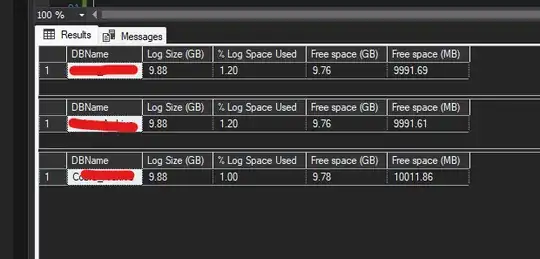
On the above pictures I used 3 different methods to get the log file size with the same results - one of them is
sys.dm_db_log_space_usage
The last one shows the sys.dm_os_performance_counters which seems to be the least accurate.
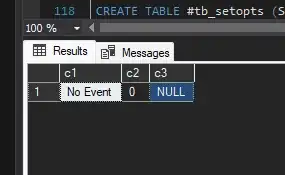
--Another is dbcc inputbuffer :-
if object_id('tempdb..#dbc','U') is not null
    DROP TABLE #dbc
create table #dbc(c1 varchar(15), c2 int, c3 varchar(255))
insert #dbc EXEC('dbcc inputbuffer(7)')
select * from #dbc
to get historic data you need to start saving monitoring info into a table so that you can refer back to it as required.


