13

Possible Duplicate:
How do I reduce the database size on AWS RDS MySQL?

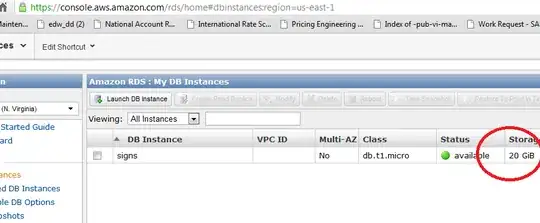
I have a mysql DB on Amazon. It is bigger than I need and I don't want to pay so much.

How do I make it smaller? Their site says you have to do it some magic way (from backups or such), but I don't want to mistakenly wack it!

RDS DB instance storage

aaaaaaa
  • 302
  • 2
  • 3
  • 10

3 Answers3

4

One idea (wholly un-researched, so there might be a better way, but this should work):

  1. Create a new RDS instance that is smaller in size.
  2. Dump the old one into the new one:

    mysqldump -h <old-RDS> -u <user> -p<password> | mysql -h <new-RDS> -u <user> -p<password>
    
  3. Whack the old one.

Of course, this assumes your total db size is smaller than 20GB, and that you're just looking to end up with a smaller instance. If you're trying to shrink the size of the database, in total, that's a different question.

Christopher
  • 163
  • 7
1

You can modify your instance to a minimum of 5 GB of storage.

Here is the related documentation.

ychaze
  • 119
  • 3
0

Use the PHP AWS SDK (http://docs.amazonwebservices.com/AWSSDKforPHP/latest/

See the RDS Section:

Something along these lines might work (extracted from example, slightly modified).

    $rds = new AmazonRDS();

$response = $rds->create_db_instance('myInstance', 5, 'db.m1.small', 'MySQL', 'dbUser', 'dbPassword', array(
    'DBName' => 'myDatabase',
    'DBSecurityGroups' => 'default',
    'PreferredMaintenanceWindow' => 'Sun:05:00-Sun:09:00',
    'BackupRetentionPeriod' => 1,
    'PreferredBackupWindow' => '03:00-05:00',
    'MultiAZ' => true,
    'AutoMinorVersionUpgrade' => true
));

// Success?
var_dump($response->isOK())

So that will create your new db, then simply follow the migration guide after downsizing your orginal DB at http://aws.amazon.com/articles/2933
cerd
  • 101
  • 3