From the documentation it's mentioned that "DMS collects changes to the database logs using the database engine's native API" and replicates to target. But, I didn't see anywhere that, at what rate it replicates from source to target in terms of number of records and is there any way we can control this settings or can I know each time how many rows it replicates?
Asked
Active
Viewed 2,750 times

2 Answers
1
The reason you didn't find any specific information in AWS's documentation on the replication rate is because it mostly depends on the source database. For example, in Microsoft SQL Server, there's a feature called Change Data Capture (CDC) which logs data changes in real-time. This means DMS will gather all logs from the CDC tables in the source Microsoft SQL Server database since the last time DMS ran.
Other database systems might log changes at slower rates, so there isn't once answer from AWS's perspective. Additionally, I believe you can schedule DMS Tasks to run at their own intervals as well.
But in general, the goal of AWS's DMS Tool is to replicate all changes since it last synced.

J.D.
- 40,776
- 12
- 62
- 141
1
When I used DMS, it was work with SQL Server Replication. But the general rule is the same. DMS does not read your CDC tables, it reads your data which is changed from the log file or log backup. But, it wants to take advantage of CDC or Transaction Replication for it does.
More info Part - 1
For Microsoft SQL Server, AWS DMS uses MS-Replication or MS-CDC to write information to the SQL Server transaction log. It then uses the fn_dblog() or fn_dump_dblog() function in SQL Server to read the changes in the transaction log based on the log sequence number (LSN).
More info Part - 2
During CDC, AWS DMS needs to look up SQL Server transaction log backups to read changes.
There are a few options but only work with full data load.
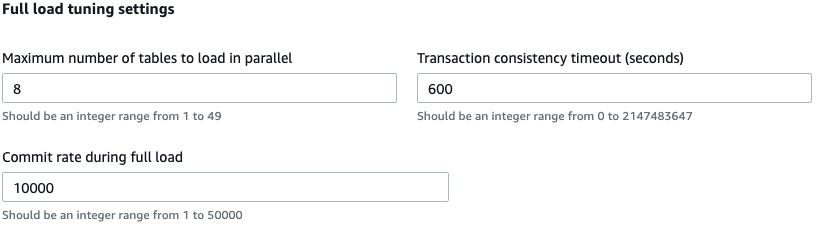
Also, you can track data changes with Task Monitoring - CDCIncomingChanges
CDCIncomingChanges The total number of change events at a point-in-time that are waiting to be applied to the target. Note that this is not the same as a measure of the transaction change rate of the source endpoint. A large number for this metric usually indicates AWS DMS is unable to apply captured changes in a timely manner, thus causing high target latency.

Yunus UYANIK
- 1,119
- 1
- 10
- 27