As has already been posted by David Browne - Microsoft, I would like to expand on the concept I was using in my answer form the comemnt.
If you have a database, you can use the WITH STANDBY... feature and have the database restore to a certain point-in-time (your last TLOG backup) and then have the database in Standby / Read-Only mode.
The steps you wold have to perform are:
USE [master]
RESTORE DATABASE [AdminDB2] FROM
DISK = N'C:\SQL\Backup\AdminDB2\FULL\AdminDB2_FULL_20210220_223019.bak'
WITH  FILE = 1,  NORECOVERY,  NOUNLOAD,  STATS = 5, REPLACE
RESTORE DATABASE [AdminDB2]
FROM  DISK = N'C:\SQL\Backup\AdminDB2\DIFF\AdminDB2_DIFF_20210222_223007.bak'
WITH  FILE = 1,  NORECOVERY,  NOUNLOAD,  STATS = 5
RESTORE LOG [AdminDB2]
FROM  DISK = N'C:\SQL\Backup\AdminDB2\LOG\AdminDB2_LOG_20210222_231512.trn'
WITH  FILE = 1,  NORECOVERY,  NOUNLOAD,  STATS = 5
RESTORE LOG [AdminDB2]
FROM  DISK = N'C:\SQL\Backup\AdminDB2\LOG\AdminDB2_LOG_20210223_001513.trn'
WITH  FILE = 1,

STANDBY = N'C:\SQL\BACKUP\AdminDB2_RollbackUndo_2021-02-23_15-22-54.bak',  NOUNLOAD,  STATS = 5
With the last transaction log restore you are telling the database to stay in standby mode (STANDBY = N'C:\SQL\BACKUP\AdminDB2_RollbackUndo_2021-02-23_15-22-54.bak') which allows you to apply additional TLOG backups to the database.
An additional restore of a TLOG backup is as simple as running the following command for the next TLOG Restore:
RESTORE LOG [AdminDB2]
FROM  DISK = N'C:\SQL\Backup\AdminDB2\LOG\AdminDB2_LOG_20210223_011512.trn'
WITH  FILE = 1,
STANDBY = N'C:\SQL\BACKUP\AdminDB2_RollbackUndo_2021-02-23_15-22-54.bak',  NOUNLOAD,  STATS = 5
As you can see from the time-stamps on the TLOG backup files I am constantly applying the newest hourly TLOG backup to the Standby / Read-only database AdminDB2.
...
AdminDB2_LOG_20210223_001513.trn
AdminDB2_LOG_20210223_011512.trn
...
Reference: RESTORE Statements (Transact-SQL) (Microsoft | SQL Docs)
After restoring the database the elements of the database stay accessibly, just in Read-only mode.
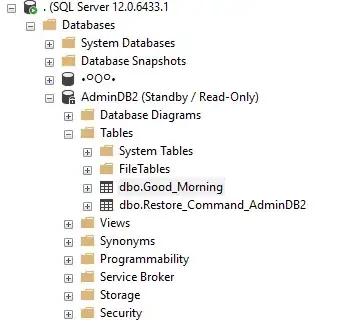
Disclaimer: The actual restore and screen shot were taken today. No production data was harmed during the process.
Answering Your Question
I would like to run a process that loads in the latest log file every hour and then run a full restore once a week (when we receive the latest bak file). Is there anyway of doing this? Say by only restoring the latest log file or by running a partial restore so we don't have to restore all the files every time?
As long as you keep on receiving TLOG backups on an hourly basis, you should be able to keep on restoring the latest TLOG backup to the STANDBY database, ad infinitum (without end or limit).
You would only have to apply a FULL restore after your TLOG chain breaks.
Possible Issues
If the restore to STANDBY fails, because of the error message you are receiving:
This backup cannot be restored using WITH STANDBY because a database upgrade is needed'
..then you can retrieve the version of the database from the backup file with:
RESTORE HEADERONLY
FROM   DISK = N'C:\SQL\Backup\AdminDB2\FULL\AdminDB2_FULL_20210220_223019.bak'
This will produce an output with a column SoftwareVersionMajor, SoftwareVersionMinor and the SoftwareVersionBuild.
(using my example backup file)
SoftwareVersionMajor  SoftwareVersionMinor    SoftwareVersionBuild
12                    0                       6433
You can then lookup the information on Microsoft's page:
Determine the version, edition, and update level of SQL Server and its components
...which in my case returns:
SQL Server 2014
CU4 + GDR for SP3 (12.0.6433.1 - January 2021)
Version Major : 12
Version Minor : 0
Version Build : 6433
So I would have to install SQL Server 2014 with Service Pack 3 and the CU3 with GDR to be able to restore the backup file. Your mileage my vary.


