1

I run the following before tar-ing up the data directory:

STOP SLAVE;
FLUSH TABLES WITH READ LOCK;
FLUSH LOGS; 

However, tar will sometimes complain that the ibdata* and ib_logfiles* files are updated during the process. What am I missing?

The slave machine is in a cold standby machine so there are no client processes running while tar is running.

CentOS release 5.6 64bits, MySQL 5.1.49-log source distribution.

RolandoMySQLDBA
  • 185,223
  • 33
  • 326
  • 536
Peter Gon
  • 11
  • 1
  • 2

2 Answers2

2

FLUSH TABLES WITH READ LOCK will not halt writes to InnoDB.

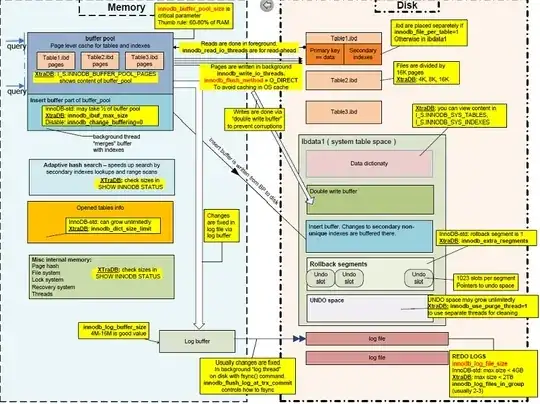
It may block access to writing to tables, but InnoDB will allow writes to ibdata1 to provide MVCC info for redo and undo logs.

Check out Map of InnoDB's Infrastructure

InnoDB Architecture

Please note the physical independence of a table from the ibdata1, and how log files are related.

Since the box is a Slave, you have two options :

OPTION #1 (Warm Backup)

  • Run STOP SLAVE;
  • Run FLUSH TABLES;
  • Run your Linux/tar
  • Run START SLAVE;

OPTION #2 (Cold Backup of Fully Committed Data)

  • Run SET GLOBAL innodb_fast_shutdown = 0;
  • Run service mysql stop
  • Run your Linux/tar
  • Run service mysql start

OPTION #3 (Cold Backup)

  • Run service mysql stop
  • Run your Linux/tar
  • Run service mysql start

EPILOGUE

Options #2 and #3 would be the better choices by far. What is the difference between them ?

  • OPTION #2 flushes all transactional changes out of ibdata1 and the transaction logs (ib_logfile0, ib_logfile1). This makes for a longer shutdown. However, you will have a faster mysql startup because InnoDB Crash Recovery would not need to be performed.
  • OPTION #3 lets you shutdown faster, leaving InnoDB in suspended animation (all transactional changes in ibdata1 and the transaction logs (ib_logfile0, ib_logfile1)). The transactional changes are applied on mysql startup during the InnoDB Crash Recovery phase.
Otheus
  • 654
  • 1
  • 4
  • 13
RolandoMySQLDBA
  • 185,223
  • 33
  • 326
  • 536
0

I believe you could accomplish it by freezing your filesystem.

LVM has support for snapshots, as described in CentOS documentation and in TLDP.

Some Storage models, like DELL Equallogic, provides snapshot support and access from Linux Command Line. You could benefit from those, too.