38

When I try to use \i on a file that is not in the psql.exe folder it says C:: permission denied. For example I have a file with SQL command at C:\Users\Work\Desktop\School Work\load_database.sql and when I type \i "C:\Users\Work\Desktop\School Work\load_database.sql" it says C:: permission denied. How can I fix this?

I found a work around here where you copy the .sql file to the same folder as psql.exe is in.

By the way, does \i stand for import?

Celeritas
  • 903
  • 3
  • 11
  • 17

2 Answers2

70

You've just run into a peculiarity of psql on Windows.

In my comment I just wanted to exclude the possibility that you really didn't have the necessary permission. Then it turned out that even on Windows, you have to use 'normal' slashes instead of backslashes, that is:

\i 'C:/Users/Work/Desktop/School Work/load_database.sql'

should work fine regardless which folder you start psql from. Notice that I used single quotes - with double quotes you'd got

"C:/Users/Work/Desktop/School Work/load_database.sql": Invalid argument
András Váczi
  • 31,778
  • 13
  • 102
  • 151
9

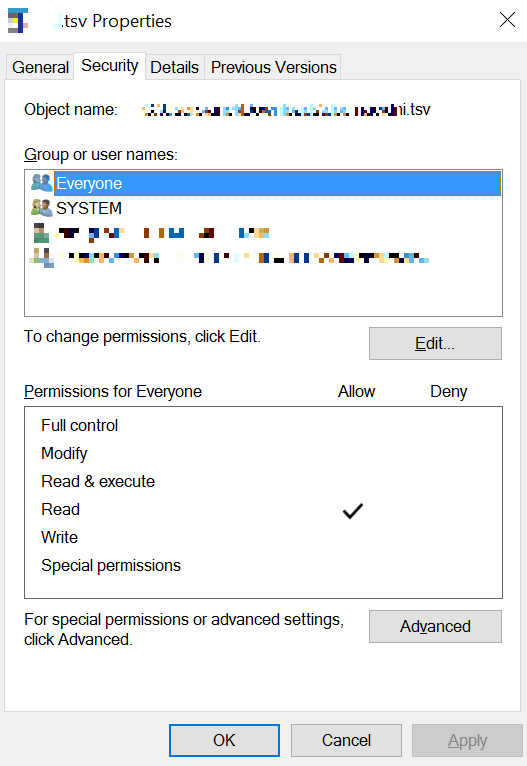
Put the file in some directory with full permission to everyone, like 'c:\tmp'

OR

Set read privileges to the file you want to import.

I put 'Everyone' reading permission.

After importing the file, you could revoke that permission.

windows file properties

user68006
  • 99
  • 1
  • 1