-2

I work in a large retail business with a decent SQL Server environment. We have SQL Server replication, Availability Groups, Data warehouse, and some cloud services. In this beautiful environment, we use desktop applications with limited features. The business always needs some extra reports that the application support team delivers them late most of the time.

As a senior DB Admin, they come back to me to try extracting the data form SQL Server to Excel files. As we grow larger and larger it has become almost like a daily task, I’ve managed to develop a C# tool to send most of those reports by mail to every one who needs them, but now it has become outdated and to be honest it takes a lot of time to be rewritten.

Is there a tool that can run SQL query and add the results to Excel file and mail it to specific emails list ?

Poseidon
  • 162
  • 9
magdi
  • 45
  • 2
  • 8

3 Answers3

2

I created a stored procedure that takes the data from any table and inserts it to CSV or Excel and send it to email or upload it to SharePoint, it works on SQL Server 2019, you can download it from here ExportToExcel.

here's an example on how to use it:

SELECT columna, columnb, "column c"
INTO ##anytemptable --must be a global temp table
FROM yourdb.dbo.yourtable
WHERE somecolumn = 'somecondition'

exec dbo.ExportToExcel @tablename= '##anytemptable' --must be a global temp table ,@filepath = 'c:\somefolder' ,@filename = 'MyDataInExcel.xlsx' ,@AttachToMail = 1, ,@MailList = 'yourboss@domain.com'

The beauty of this one specifically is that the file is already formatted and easy to read:
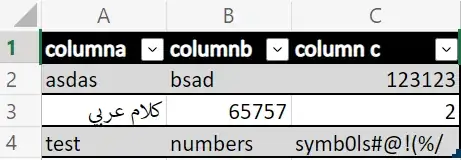
Excel report

There's an easy method of course to export data using CSV, but for some reports, the file becomes very large in size that it couldn't be attached to mail, so using Excel is the wise option here.

You don't need to specify @filepath or @filename, the code will create them automatically and will display the file full path at the end of execution.

You could also use parameter @MailSubject and @MailBody to specify body and subject of the email, the only limitation to that proc is not enabling PSGallery on the target server, if it exists, the code handles installing the module automatically.


If you by any chance do not like fancy formatted and beautiful Excel files, you could just do this:

exec msdb.dbo.sp_send_dbmail  
  @recipients = 'email@domain.com', 
  @subject = N'CSV Report', 
  @body = N'PFA', 
  @query='SET NOCOUNT ON SELECT * FROM db.dbo.table', 
  @query_attachment_filename = 'YourReport.csv', 
  @attach_query_result_as_file = 1, 
  @query_result_header = 1, 
  @query_result_width = 32767, 
  @append_query_error = 0, 
  @query_result_no_padding = 1, 
  @query_result_separator = '   '; --specify your column delimiter here
Poseidon
  • 162
  • 9
1

i was able to pull this off with PowerShell, i managed to create my data with stored proc then calls it from Invoke-Sqlcmd

$todayDate = Get-Date -Format "yyyy-MM-dd";
$fileName = $todayDate + "_OrdersReport.csv";
$AttachmentPath = "c:\temp\" + $fileName;
$QueryFmt = "exec [excel].[SelectHdOrdersTimeReport]";

Write-Output $AttachmentPath;

Invoke-Sqlcmd -ServerInstance databaseServerName -Database dbName -Query $QueryFmt -Username username -Password password| Export-CSV $AttachmentPath;

then i just sent this file using Send-MailMessage power shell module

Send-MailMessage -From "dbreport@myCompany.com" -To "ahmed.magdi@myCompany.com" -Attachments $AttachmentPath -Subject $fileName -Body "HYG" -SmtpServer "mail.myCompany.com";

and it worked like a charm :D

magdi
  • 45
  • 2
  • 8
1

If the reports are repeatedly similar in nature / structure (as opposed to one time use ad-hoc reports) this sounds like something SSRS may be helpful for.

It's the SQL Server native reporting feature and has a really simple wizard to create new reports from a database object / dataset. It has report subscriptions and scheduling out of the box (inclusive of dynamic data subscriptions if needed, if you're using Enterprise edition), which can attach the report as an Excel file.

J.D.
  • 40,776
  • 12
  • 62
  • 141