Microsoft states that:
[...You can also use the generic ODBC connector to connect to additional providers using third-party ODBC drivers.]
The reality is much far away form that.
I've been trying to follow several guides about how to query DB2 from PolyBase. I know this should be possible. I've also find guides about how to query SalesForce through the ODBC Driver so yes, you should be able to query a lot of things.
The only stable code I could create and execute successsfully is this:
-- Create a database
CREATE DATABASE Test_PolyBase;GO
-- Use that database
USE Test_PolyBase;GO
-- Create a database master key.
ALTER MASTER KEY ENCRYPTION BY PASSWORD = 'password';GO
-- Set DB2 user and password
ALTER DATABASE SCOPED CREDENTIAL Test_PolyBase
    WITH IDENTITY = 'db2inst1' --put here DB2's username
        ,SECRET = 'db2_password';--put here DB2's password
    GO
From there on is a no men's land where no one really knows what's the next move.
I've successfully created a System DSN using the IBM DB2 ODBC DRIVER - DB2COPY1 Driver:
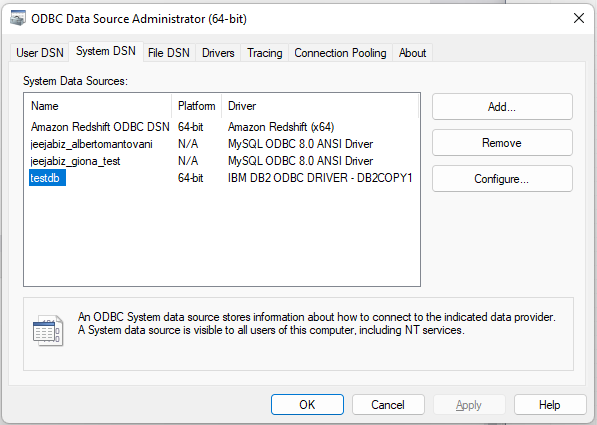
But then:
CREATE EXTERNAL DATA SOURCE Test_PolyBase
    WITH (
            LOCATION = 'odbc://192.168.1.44:50000'
            ,CONNECTION_OPTIONS = 'DSN={testdb}'
            --,PUSHDOWN = ON
            ,CREDENTIAL = Test_PolyBase
            )
Is not working.
I tried to use a more detailed setup and the Driver itself instead of the DSN:
CREATE EXTERNAL DATA SOURCE Test_PolyBase
    WITH (
            LOCATION = 'odbc://192.168.1.44'
            ,CONNECTION_OPTIONS = 'Driver={IBM DB2 ODBC DRIVER - DB2COPY1};PolyBaseOdbcSupportsSetDescRec=false'
            --,PUSHDOWN = ON
            ,CREDENTIAL = Test_PolyBase
            );
And I have also used a more detailed one:
CREATE EXTERNAL DATA SOURCE Test_PolyBase
    WITH (
            LOCATION = 'odbc://192.168.1.44:50000'
            ,CONNECTION_OPTIONS = 'Dsn={testdb};
                                    Driver={IBM DB2 ODBC DRIVER - DB2COPY1};
                                    uid=root;
                                    server=192.168.1.44;
                                    port=50000;
                                    database=testdb;
                                    PolyBaseOdbcSupportsSetDescRec=false'
            --,PUSHDOWN = ON
            ,CREDENTIAL = Test_PolyBase
            )
I'm using the PolyBaseOdbcSupportsSetDescRec=false option as described in the example but no joy, the error is always the same:
OLE DB provider "MSOLEDBSQL" for linked server "(null)" returned message "Cannot generate SSPI context".
Msg -2146893042, Level 16, State 1, Line 0
SQL Server Network Interfaces: No credentials are available in the security package
Why SQL Server is trying to use OLE DB provider "MSOLEDBSQL"? That should be for SQL Server, right? Not DB2?!
And why ...for linked server "(null)" (which means I'm not indicating the linked server)? I shouldn't been using linked server at all.
EDIT: After extensive investigation I'm even more certain hat this might be flagged as a bug.
The kb4552255 is in fact specifying that:
You can access configurations that ship with PolyBase when specifying a DSN in the CONNECTION_OPTIONS of a Generic ODBC External Data Source definition. The options are picked up by matching the driver name used in the DSN definition. This currently applies to the following drivers:
• IBM DB2 ODBC DRIVER
• HDBODBC
• Microsoft Spark ODBC Driver
So the examples provided in the reply should work. With DSN but also with Driver.

