3

Currently our server is on Microsoft SQL Server 2016 (SP3) (KB5003279) - 13.0.6300.2 (X64) Aug 7 2021 01:20:37 Copyright (c) Microsoft Corporation Enterprise Edition (64-bit) on Windows Server 2016 Standard 10.0 (Build 14393: ). This is secondary read-only AG replica. We installed SP3 on both Primary and Secondary replicas. However recently the 2ndary node states this in the Windows update

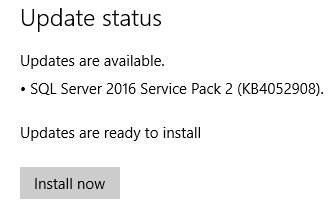
Updates are available: SQL Server 2016 Service Pack 2 (KB4052908)

If service packs are cumulative, why does the server says this. Any thoughts? Thanks.enter image description here
SP3 Installer

SP2_error

Kris
  • 452
  • 5
  • 15

1 Answers1

5

This can happen if you install a component on the same instance, after the instance has been patched. You have an unpatched RTM component (for example: full text search) and SP3 database engine.

If you were running SP3, and recently added a new component (Replication? Full text search? SSRS?) then only those components need patching. You can open the SP3 installer GUI, and step through it to see exactly what component(s) need upgrading. You can then cancel out on the installer without installing.

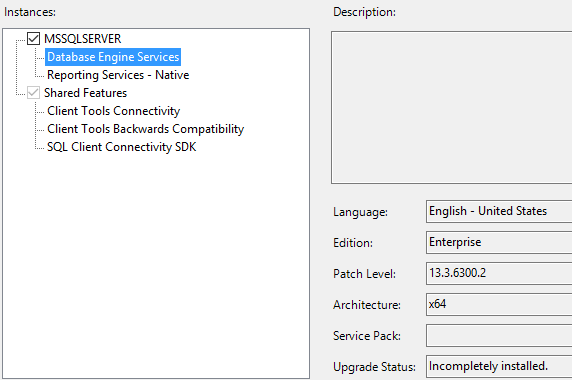
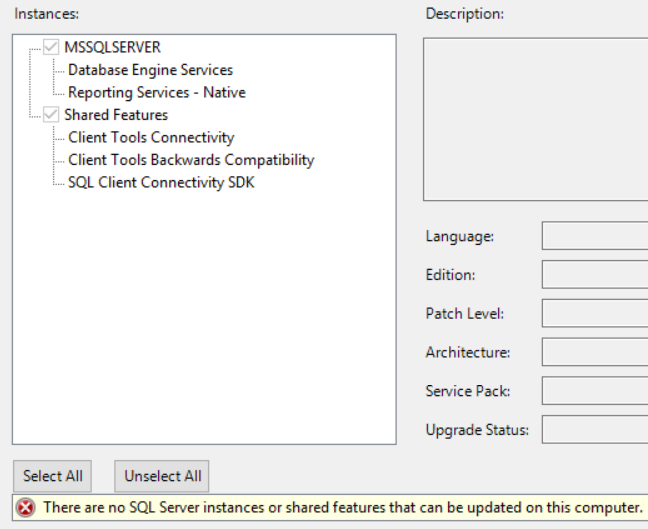
EDIT: based on the screenshot you uploaded, the "shared features" have been patched to SP3, but the service pack was not completely installed for the Database Engine & SSRS.

You can see the logs for every run of the installer, including incomplete installs. The detailed logs and summary output are located at %programfiles%\Microsoft SQL Server\nnn\Setup Bootstrap\Log\<YYYYMMDD_HHMM>\. These can be a lot of data to go through, but if you can identify the SP3 install logs from the previous install, that might help explain why the SP was incompletely installed.

AMtwo
  • 16,348
  • 1
  • 33
  • 64