A stored proc can't output to a file. A stored proc can be executed via the sqlcmd utility which can output to a flat file. This method is clunky on it's own, output to fixed width columns with no delimiter makes it a tad more fiddly, but it's do-able. The account that runs the sqlcmd needs to have the correct permissions to write a file to target directory. If you are setting it up in SQL Agent you'd set it up as an "Operating system (CmdExec)" step, and the SQL Agent account will need
permissions to write to the target directory.
Here's a very basic example, a query of a table with three VARCHAR columns with lengths of 20, 35, and 35 written out to a flat file with fixed width column lengths of 20, 10, and 15 respectively. Just for fun some leading white space thrown in. Total Fixed row length of 45 characters in the output file.
Example Table:
CREATE TABLE dbo.MyTableName
        (
            Col1 VARCHAR(20) NULL,
            Col2 VARCHAR(35) NULL,
            Col3 VARCHAR(35) NULL
        ) ON [PRIMARY];
GO
Insert some example rows:
INSERT INTO dbo.MyTableName VALUES
        ('1Character','1','A'),
        ('2Characters','2','bb'),
        ('3Characters','3','ccc'),
        ('35Characters','XXXXXXXXXXxxxxxxxxxxxxxxxxxxxxxxxxx','XXXXXXXXXXxxxxxxxxxxxxxxxxxxxxxxxxx'),
        ('LeadingWhiteSpace','   Text','   ddd');
GO
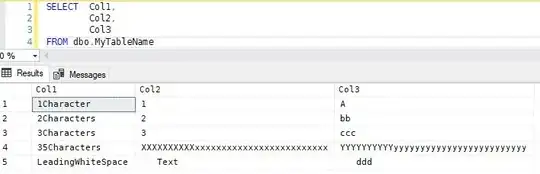
Quick peek at the table:
Create the stored procedure:
- By default the sqlcmd utility adds a dashed line below the column names to the output of the SELECT statement executed. We don't want that so we'll execute the sqlcmd using -k command option to remove the default header.
- We'll create our own fixed width header row using CHAR string function to set the column lengths to the required length and concatenate the columns together to form the header.
- The sqlcmd utility will capture any messages sent to the client using [PRINT] so we'll use that to output our header row to the flat file.
- In the SELECT we'll CAST each column using the CHAR string function to size the
columns to their required length.
GO
SET ANSI_NULLS ON
GO
SET QUOTED_IDENTIFIER ON
GO
CREATE PROCEDURE [dbo].[MyStoredProc]
AS
BEGIN
    SET NOCOUNT ON
    --Create the header row and PRINT it.
    PRINT CAST('Col1' AS CHAR(20)) + CAST('Col2' AS CHAR(10)) + CAST('Col3' AS CHAR(15))
    --CAST Columns to their required sizes.
    SELECT  CAST(Col1 AS CHAR(20)) AS Col1,
            CAST(Col2 AS CHAR(10)) AS Col2,
            CAST(Col3 AS CHAR(15)) AS Col3
    FROM dbo.MyTableName;


END
GO
Now call the stored procedure using the sqlcmd utility and have it create a flat file.
sqlcmd -S MyServerName -d MyDatabaseName -b -E -s"" -h-1 -Q "EXEC dbo.MyStoredProc" -o \\MyUNCName\MyFolderName\MyFileName.txt
Command options explained:
- -S Target SQL Server
- -d Target Database
- -b terminate if there is an error
- -E trusted connection
- -s column separator, empty double quoted string, no separator. (Not documented in SQL Docs).
- -h Rows per header, value of -1 disables the header and by default dashed line below it.
- -Q Run the supplied command line SQL and exit.
- -o The fully qualified name of the output file.
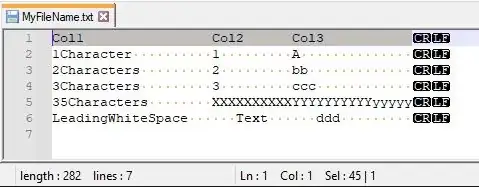
The output file contents.
Col1                Col2      Col3
1Character          1         A
2Characters         2         bb
3Characters         3         ccc
35Characters        XXXXXXXXXXYYYYYYYYYYyyyyy
LeadingWhiteSpace      Text      ddd
The output file in Notepad++