As a "fun" exercise I thought I'd see if I could get the push down working.
It is a shame that it isn't working correctly as the query execution time can drop quite a lot with this predicate pushed down as shown in the execution timings below.
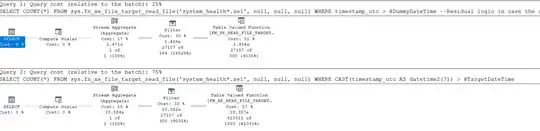
It is sometimes possible to get this working by
- First calculating the desired datetime value as a
filetime
- Constructing a
datetime2(7) value with the same binary representation as that.
- Using this dummy datetime2 value in place of the original one for push down (e.g. @TargetDateTime of
2024-10-13 22:10:02 ends up with a @DummyDateTime of 0334-01-05 22:30:24.5232896).
Not every possible binary value is a valid datetime2 however so step 2 sometimes isn't possible. In particular it is very possible to end up with a binary value where the number of ticks in the time portion exceeds the maximum number in a day. The code below just adjusts this down if it happens so the push down won't be as precise in this case and a residual non pushed predicate is still needed. Some such adjustment to the ideally pushed down datetime is needed around 21% of the time with the worst case adjustment amount being 23,551 seconds (06:32:31)
DECLARE @TargetDateTime DATETIME2 = dateadd(day, -1, GETUTCDATE());
DECLARE @TargetFileTime BIGINT = DATEDIFF_BIG(SECOND,'16010101',@TargetDateTime) * 10000000;
DECLARE @TargetFileTimeAsBinary BINARY(8) =  CAST(@TargetFileTime AS BINARY(8))
-- If the desired binary value would end up representing >= 864000000000 ticks in the time part when interpreted as a datetime2 this would be invalid
DECLARE @AdjustedTargetFileTimeAsBinary BINARY(8) = substring(@TargetFileTimeAsBinary,1,3) + LEAST(0xC92A69BFFF,substring(@TargetFileTimeAsBinary,4,5))
-- Notify if any adjustment was made
IF @AdjustedTargetFileTimeAsBinary <> @TargetFileTimeAsBinary
    SELECT CONCAT('Using adjusted file time for pushdown of ' , DATEADD(SECOND, (@AdjustedTargetFileTimeAsBinary - @TargetFileTime)/10000000.,@TargetDateTime))
--Now we have the desired binary value that should be acceptable as a datetime2(7) then construct one
DECLARE @DummyDateTime DATETIME2 =  ISNULL(TRY_CAST(0x07 + CAST(REVERSE(@AdjustedTargetFileTimeAsBinary) AS BINARY(8)) AS datetime2), '0001-01-01')
--Just for info
SELECT CONCAT('Using @DummyDateTime of ', @DummyDateTime);
-- version with pushed down dummy predicate
SELECT COUNT()
FROM sys.fn_xe_file_target_read_file('system_health.xel', null, null, null)
WHERE  timestamp_utc > @DummyDateTime
        --Residual logic in case the datetime that was pushed was adjusted downwards or
        --we didn't get a valid @DummyDateTime or the original pushdown bug has been fixed
        AND CAST(timestamp_utc AS datetime2(7)) > @TargetDateTime;
-- version with no push down
SELECT COUNT()
FROM sys.fn_xe_file_target_read_file('system_health.xel', null, null, null)
WHERE CAST(timestamp_utc AS datetime2(7)) > @TargetDateTime;
ProcMon shows that even with the pushed down predicate it still ends up reading the entire file for most or all of the available system_health*.xel files in my log directory so it doesn't seem to use this value for file elimination but at least it seems to save a lot of compute cost.


