I have created a SQLAgent Job and one of the job steps executes a procedure which is not under my direct control. The procedure has print statements in it and when it is executed, the output of all these print statement shows up under Job History->Log File summary->row details pane as a Message. This by itself is not an issue but these message obscure an error which can sometimes occur. How do I configure the SQLAgent (or the job step) such that it ignores these (informational) messages and only show error messages. Step to repro : Create a job step which has the statement : print 'hello world' and execute the job step. The history shows Message Executed as user: NT SERVICE\SQLAgent$MSSQLSERVER2019. hello world [SQLSTATE 01000] (Message 0). The step succeeded. Now if they are a series of these print statements amongst a SQL statement whose execution results in a divide-by-zero error, it will show up as a Message but it will be obscured by all these print statement outputs. But if these informational message can be suppressed, the error message will be easily visible.

1 Answers
The procedure has print statements in it and when it is executed, the output of all these print statement shows up under Job History->Log File summary->row details pane as a Message.
How do suppress informational messages generated by a SQLAgent job step?
I don't believe it's possible unfortunately. These aren't a specific category of messages, rather they're just output from the procedure that was executed.
What you can do instead, to improve your traceability on errors, is capture the full output / message to a separate source that isn't limited in character length, so that it doesn't get truncated.
Relevant info from Kin Shah for historical reference purposes:
You can achieve it in 2 ways - Go in job step and select the Advanced tab:
a. Output to a file (<== My preferred method)
b. "Log to table" and "Include step output in history" (<== You need to trim msdb..sysjobhistory in long-run as the messages are stored as nvarchar(max) instead of nvarchar(1024))
In order to see the additional logged information you need to use this stored procedure sp_help_jobsteplog or you could query the msdb.dbo.sysjobstepslogs table directly.
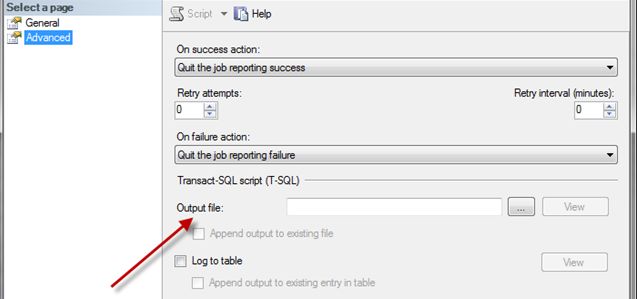
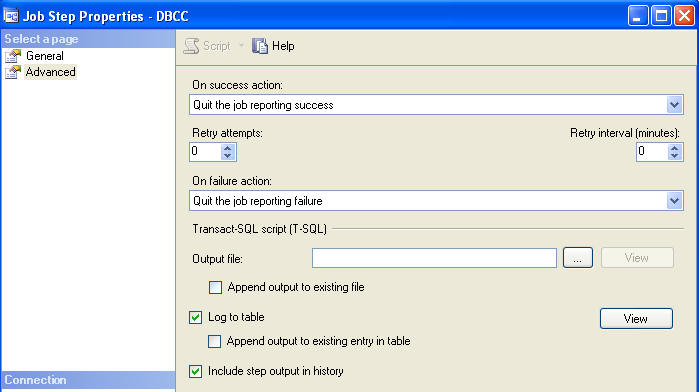
What this does is log the full message to another place than the default table msdb.dbo.sysjobhistory which has a character limit.
More information as per Kin's aforementioned answer.

- 40,776
- 12
- 62
- 141