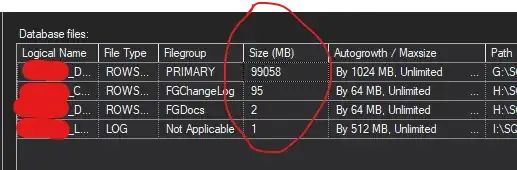
As Tibor mentioned you can use filelistonly to find the file size each database file that the restore command needs to create.
You could have that in a select. So you can match the drives in your server with your database files.
for this you need to enable the Ad Hoc Distributed Queries
this works on sql 2016 onwards.
SELECT
[LogicalName]
,[PhysicalName]
,[FileGroupName]
,[Size MB]=REPLACE(CONVERT(VARCHAR(50),CAST(    CAST([Size]/1048576 as DECIMAL(12,2))     AS MONEY),1), '.00','')
from openrowset('SQLNCLI','Server=(local);Trusted_Connection=yes;',
'SET FMTONLY OFF;
 EXEC(''
 RESTORE FILELISTONLY
 FROM DISK = ''''\\my_backup_server\master\FULL\my_db_backup.bak''''
'')
WITH RESULT SETS(
(
                     LogicalName    nvarchar(128)
                    ,PhysicalName   nvarchar(260)
                    ,[Type] char(1)
                    ,FileGroupName  nvarchar(128) NULL
                    ,Size   numeric(20,0)
                    ,MaxSize    numeric(20,0)
                    ,FileID bigint
                    ,CreateLSN  numeric(25,0)
                    ,DropLSN    numeric(25,0) NULL
                    ,UniqueID   uniqueidentifier
                    ,ReadOnlyLSN    numeric(25,0) NULL
                    ,ReadWriteLSN   numeric(25,0) NULL
                    ,BackupSizeInBytes  bigint
                    ,SourceBlockSize    int
                    ,FileGroupID    int
                    ,LogGroupGUID   uniqueidentifier NULL
                    ,DifferentialBaseLSN    numeric(25,0) NULL
                    ,DifferentialBaseGUID   uniqueidentifier NULL
                    ,IsReadOnly bit
                    ,IsPresent  bit
                    ,TDEThumbprint  varbinary(32) NULL
                    ,SnapshotURL    nvarchar(360) NULL
))') AS a
this would give me this result:
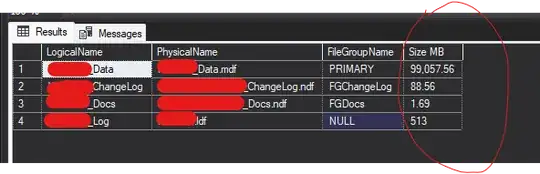
and the sizes from the database files are: