However, the table size is still reported as 156 GB.
Yes, this is expected.
Why?
The way space allocation works in SQL Server is as the data grows, space is allocated off disk to the internal file of that database within the SQL Server instance, in chunks that are the size defined in the database properties, under the File -> Autogrowth settings:
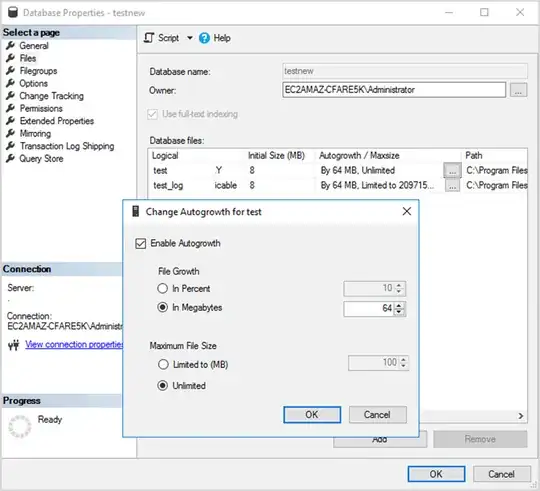
This reserves the data off disk proactively and ensures it's available as more data is added to that database in the future. File growth operations are fairly heavy operations, which is why it the database file doesn't just grow at the same rate and amount as the data growth itself.
This is true for file shrinking too. It is an expensive operation. The database is designed to not auto-shrink by default, when data is removed. The assumption is that space that was already claimed from disk will eventually be re-used. So instead of releasing it back to disk when data is removed, it is just marked internally to be re-used for future data to overwrite it. This may sound wasteful, but disk is cheap, and performance is not, which is what's implicitly gained by not continually growing and shrinking every time the data changes.
A useful tool is the system stored procedure sp_spaceused. If you run it within the context of a particular database, without any parameters, it'll tell you the total size of that database - database_size in the first result set, and how that disk space is currently distributed within the database file - reserved vs data vs index_size in the second result set. Previously you probably had around 156 GB of space in the data column which would now be showing in reserved and means it's ready to be consumed by future data growth.
Now, to solve your problem
SQL Server has a shrink command (which can also be executed via the SSMS GUI) which will release the reserved space from the database file back to disk (as much as it can, there's some if, ands, or buts to that). It's usually recommended against because again, shrinking is a heavy operation against the disk, and can impact concurrent database performance until it's done, and because the space being released will have to go through a heavy growth operation again once more data is added to the database. But in special one-off large data changes like your case, it's probably sensible to do, if you really need to.
Sidenote
Index rebuilds are usually a waste and a wasteful operation - causes file growth, which basically undoes some of the space released from shrinking. It's a vicious cycle. If you do them in hopes of performance gains, it's unlikely you're actually gaining anything from the rebuilds themselves (index fragmentation really doesn't matter anymore on modern hardware). The rebuilds trigger subsequent things that may be improving your performance such as clearing the plan cache and updating statistics. But you can run these things individually, more granularly and efficiently, without the need of the wasteful index rebuilds.


