there is something called sql server client network utility
it lives on
C:\Windows\System32 for 64 bits.
as you can see I have many aliases there, server, instance and ip address and port used for connectivity are all there.
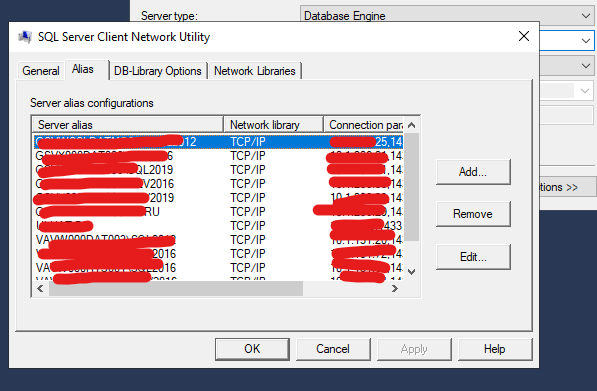
I have here a great script by Hanna Vernon, that I have been using a lot, however, the aliases above configured on (generally the client machine) shown above take precedence, so I would like a way to list those,best would be powershell, as in my case I dont even have sql server installed on that machine, it is a jenkins machine that connects to different sql server servers, but uses the settings defined on that sql server client network utility
/*
    Reads the instance's registry settings (via xp_instance_regread
    as opposed to xp_regread), to determine if the Dedicated
    Aministrator Connection is configured to use the desired TCP
    port number.
2022-11-29  Hannah Vernon

*/
SET NOCOUNT ON;
SET XACT_ABORT ON;
DECLARE @desired_dac_port   varchar(11)     = '1432';
IF NOT EXISTS
(
    SELECT
        1
    FROM
        [sys].[configurations] sc
    WHERE

        sc.[name] = N'show advanced options'
        AND sc.[value] = 1
)
BEGIN
    PRINT N'Enabling "Show Advanced Options" configuration.';
    EXEC sys.sp_configure
          @configname = 'show advanced options'
        , @configvalue = 1;
    RECONFIGURE;
END;
IF NOT EXISTS
(
    SELECT
        1
    FROM
        [sys].[configurations] sc
    WHERE

        sc.[name] = N'remote admin connections'
        AND sc.[value] = 1
)
BEGIN
    PRINT N'Enabling Remote Dedicated Admin Connections.';
    EXEC sys.sp_configure
          @configname = 'remote admin connections'
        , @configvalue = 1;
    RECONFIGURE;
END
ELSE
BEGIN
    PRINT N'Remote Dedicated Admin Connections are already enabled.';
END;
DROP TABLE IF EXISTS #dac_port;
CREATE TABLE #dac_port
(
      [value]   nvarchar(128)       NOT NULL
    , [data]    varchar(255)        NULL
);
INSERT INTO #dac_port
(
      [value]
    , [data]
)
EXEC sys.xp_instance_regread
      @rootkey = N'HKEY_LOCAL_MACHINE'
    , @key = N'SOFTWARE\Microsoft\Microsoft SQL Server\MSSQLServer\SuperSocketNetLib\AdminConnection\Tcp'
    , @value = N'TcpDynamicPorts';
IF NOT EXISTS
(
    SELECT *
    FROM #dac_port dp
    WHERE dp.[value] = N'TcpDynamicPorts'
        AND dp.[data] = @desired_dac_port
)
BEGIN
    PRINT N'Setting Dedicated Admin Connection to use port ' + @desired_dac_port;
EXEC sys.xp_instance_regwrite
      @rootkey = N'HKEY_LOCAL_MACHINE'
    , @key = N'SOFTWARE\Microsoft\Microsoft SQL Server\MSSQLServer\SuperSocketNetLib\AdminConnection\Tcp'
    , @value_name = N'TcpDynamicPorts'
    , @type = N'REG_SZ'
    , @value = @desired_dac_port;

END
ELSE
BEGIN
    PRINT N'The dedicated admin connection is already configured on port ' + @desired_dac_port;
END;
this script is also top:
--Mark Storey-Smith
DECLARE
    @StaticPort NVARCHAR(512)
    , @DynamicPort NVARCHAR(512)
EXEC xp_regread
    'HKEY_LOCAL_MACHINE'
    , 'SOFTWARE\Microsoft\Microsoft SQL Server\MSSQL.1\MSSQLServer\SuperSocketNetLib\Tcp\IPAll'
    , 'TcpPort'
    , @StaticPort OUTPUT
EXEC xp_regread
    'HKEY_LOCAL_MACHINE'
    , 'SOFTWARE\Microsoft\Microsoft SQL Server\MSSQL.1\MSSQLServer\SuperSocketNetLib\Tcp\IPAll'
    , 'TcpDynamicPorts'
    , @DynamicPort OUTPUT
SELECT
    @StaticPort AS StaticPort
    , @DynamicPort AS DynamicPort
Basically my question is:
how can I find out the aliases defined on sql server client network utility - reading the registry, either sql server or powershell?

