I am trying to restore a database on a daily basis from multiple bak files that I get from a vendor.
I tried using GUI, and it worked.
I basically followed the same procedure as shared on the this link.
But, I need to do this on a daily basis with new BAK files that I receive.
I get these six bak files, and I would like to run a script to run once a day to refresh whole data in that database.

I tried something like on the bottom:
I got the script from this link:
USE Master;
GO
SET NOCOUNT ON
-- 1 - Variable declaration
DECLARE @dbName sysname
DECLARE @fileName sysname
DECLARE @standby sysname
DECLARE @backupPath NVARCHAR(500)
DECLARE @cmd NVARCHAR(500)
DECLARE @fileList TABLE (backupFile NVARCHAR(255))
DECLARE @lastFullBackup NVARCHAR(500)
DECLARE @lastDiffBackup NVARCHAR(500)
DECLARE @backupFile NVARCHAR(500)
-- 2 - Initialize variables
SET @dbName = 'WH_BEE'
SET @fileName = 'WH_BEE_'
SET @backupPath = 'F:\NHFilesToday'
SET @standby = 'F:\backup\WH_BEE.bak'
-- 3 - get list of files
SET @cmd = 'DIR /b "' + @backupPath + '"'
INSERT INTO @fileList(backupFile)
EXEC master.sys.xp_cmdshell @cmd
-- 4 - Find latest diff backup
---SELECT @lastDiffBackup = MAX(backupFile)

---FROM @fileList

---WHERE backupFile LIKE '%.DIF'

   ---AND backupFile LIKE @dbName + '%'
   ---AND backupFile > @lastFullBackup
-- 5 - check for log backups
DECLARE backupFiles CURSOR FOR

   SELECT backupFile

   FROM @fileList
   WHERE backupFile LIKE '%.bak'

   AND backupFile LIKE @fileName + '%'
OPEN backupFiles
-- Loop through all the files for the database

FETCH NEXT FROM backupFiles INTO @backupFile
WHILE @@FETCH_STATUS = 0

BEGIN

   SET @cmd = 'RESTORE LOG [' + @dbName + '] FROM DISK = '''

       + @backupPath + @backupFile + ''' WITH STANDBY='''+ @standby +''''
FETCH NEXT FROM backupFiles INTO @backupFile
EXEC (@cmd)
END
CLOSE backupFiles

DEALLOCATE backupFiles
-- 6 - put database in a useable state
SET @cmd = 'RESTORE DATABASE [' + @dbName + '] WITH RECOVERY'
PRINT @cmd
I got this error:
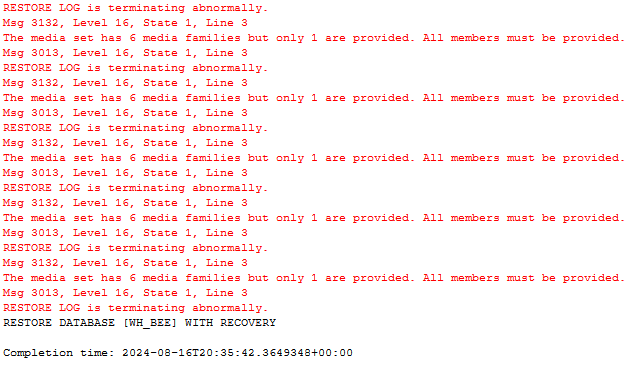
I am not sure these bak files are considered log backup files or something else..
Do I have to delete database and restore database?
I need some help with fixing the script or is there any simpler script I could use?
Update (8/18/2024):
I got this error after I tried the replaced part 5 (leaving all other parts (1,2,3 & 6) same from the original).

This is what the original db looks like (normal status):

This is where mdf and ldf files are located:

I am not sure where the standby file is/should be located:
I just created this line (without actually this file exists).
I am not sure what to do with this line of the script.
SET @standby = 'F:\backup\WH_BEE.bak'
Update (8/19/2024):
This is generated script:
USE [master]
RESTORE DATABASE [WH_BEE] FROM
DISK = N'F:\NH\WH_BEE_20240819_1.bak',
DISK = N'F:\NH\WH_BEE_20240819_2.bak',
DISK = N'F:\NH\WH_BEE_20240819_3.bak',
DISK = N'F:\NH\WH_BEE_20240819_4.bak',
DISK = N'F:\NH\WH_BEE_20240819_5.bak',
DISK = N'F:\NH\WH_BEE_20240819_6.bak' WITH  FILE = 1,
MOVE N'WH_Data1' TO N'F:\data\WH_BEE.MDF',
MOVE N'WH_Data2' TO N'F:\data\WH_BEE_1.NDF',
MOVE N'WH_Log' TO N'G:\log\WH_BEE.LDF',  NOUNLOAD,  STATS = 5
GO

