1

I use SQL SMS (SSMS) to perform all actions to my only one MS SQL DB. I'm only one administrator. I've never restore a backup.

When I do a full backup everything works. Afterwards, if I want to make a differential backup next day, I get an error where it cannot find backup:

Unable to perform a differential backup of the "PMI" database because there is no backup of the current database.

Sorry, I don't provide any more information. All errors appears in French (system language).

I don't have problem if I do differential backups just after the full backup.

This SQL request:

SELECT

msdb.dbo.backupset.database_name,
msdb.dbo.backupset.backup_start_date,
msdb.dbo.backupset.backup_finish_date, msdb.dbo.backupset.expiration_date, msdb..backupset.type, CASE msdb..backupset.type
WHEN 'D' THEN 'Full'
WHEN 'I' THEN 'Diff' WHEN 'L' THEN 'Log'
END AS backup_type, CASE msdb.dbo.backupmediafamily.device_type WHEN 2 THEN 'Disk' WHEN 5 THEN 'Tape' WHEN 7 THEN 'Virtual Device' WHEN 9 THEN 'Azure Storage' WHEN 105 THEN 'A permanent backup device' ELSE 'Unknown' END AS device_type_desc, msdb.dbo.backupmediafamily.physical_device_name, msdb.dbo.backupset.is_copy_only, msdb.dbo.backupset.is_snapshot,
msdb.dbo.backupset.first_lsn, msdb.dbo.backupset.last_lsn, msdb.dbo.backupset.database_backup_lsn, msdb.dbo.backupset.checkpoint_lsn, msdb.dbo.backupset.differential_base_lsn, msdb.dbo.backupset.fork_point_lsn, msdb.dbo.backupmediaset.name, msdb.dbo.backupmediaset.software_name, msdb.dbo.backupset.user_name, 'EOR'

FROM msdb.dbo.backupmediafamily
INNER JOIN msdb.dbo.backupset ON msdb.dbo.backupmediafamily.media_set_id = msdb.dbo.backupset.media_set_id
INNER JOIN msdb.dbo.backupmediaset on msdb.dbo.backupmediaset.media_set_id = backupmediafamily.media_set_id

WHERE 1 = 1

AND (CONVERT(datetime, msdb.dbo.backupset.backup_start_date, 102) >= GETDATE() - 7)

AND database_name IN ('PMI')

ORDER BY --2,

       2 desc,3 desc;

Return result:

database_name  backup_start_date       backup_finish_date      expiration_date         type backup_type device_type_desc          physical_device_name                                          is_copy_only is_snapshot first_lsn              last_lsn               database_backup_lsn    checkpoint_lsn         differential_base_lsn  fork_point_lsn  name  software_name         user_name           
-------------- ----------------------- ----------------------- ----------------------- ---- ----------- ------------------------- ------------------------------------------------------------- ------------ ----------- ---------------------- ---------------------- ---------------------- ---------------------- ---------------------- --------------- ----- --------------------- --------------------
PMI            2024-11-19 20:25:21.000 2024-11-19 20:25:33.000 2024-12-04 20:25:21.690 D    Full        Disk                      D:\SQL Backup\PMI\PMI_backup_2024_11_19_202521_6517704.bak    0            0           104302000000558300001  104302000000558600001  104222000001229700037  104302000000558300001  NULL                   NULL            NULL  Microsoft SQL Server  sa                  
PMI            2024-11-19 01:59:51.000 2024-11-19 01:59:53.000 2024-11-27 01:59:51.703 D    Full        Virtual Device            {960E26B9-BCB7-482C-BDAC-207548B83077}3                       0            1           104222000001229700037  104222000001231400001  104222000001228000001  104222000001229700037  NULL                   NULL            NULL  Microsoft SQL Server  AUTORITE NT\Système 
PMI            2024-11-19 00:59:26.000 2024-11-19 00:59:37.000 2024-12-04 00:59:26.060 D    Full        Disk                      D:\SQL Backup\PMI\PMI_backup_2024_11_19_005925_9360289.bak    0            0           104222000001228000001  104222000001228300001  104219000001378500037  104222000001228000001  NULL                   NULL            NULL  Microsoft SQL Server  sa                  
PMI            2024-11-18 01:59:47.000 2024-11-18 01:59:49.000 2024-11-26 01:59:46.977 D    Full        Virtual Device            {230EA0F3-9D31-4279-A5DB-D1E74A9F800D}3                       0            1           104219000001378500037  104219000001380200001  104219000001374100001  104219000001378500037  NULL                   NULL            NULL  Microsoft SQL Server  AUTORITE NT\Système 
PMI            2024-11-17 23:00:05.000 2024-11-17 23:00:05.000 2024-11-25 23:00:05.213 I    Diff        Disk                      D:\SQL Backup\PMI\PMI_backup_2024_11_17_230005_0981356.diff   0            0           104219000001377400001  104219000001377700001  104219000001374100001  104219000001377400001  104219000001374100001  NULL            NULL  Microsoft SQL Server  sa                  
PMI            2024-11-17 22:00:07.000 2024-11-17 22:00:19.000 2024-11-25 22:00:07.307 D    Full        Disk                      D:\SQL Backup\PMI\PMI_backup_2024_11_17_220007_1834384.bak    0            0           104219000001374100001  104219000001374400001  104219000001366900037  104219000001374100001  NULL                   NULL            NULL  Microsoft SQL Server  sa                  
PMI            2024-11-17 09:59:50.000 2024-11-17 09:59:53.000 2024-11-25 09:59:50.867 D    Full        Virtual Device            {04A6F783-F33B-4558-8DCE-53D7FEB0CAEC}3                       0            1           104219000001366900037  104219000001368600001  104219000001362500037  104219000001366900037  NULL                   NULL            NULL  Microsoft SQL Server  AUTORITE NT\Système 
PMI            2024-11-17 01:59:54.000 2024-11-17 01:59:56.000 2024-11-25 01:59:54.717 D    Full        Virtual Device            {13E16352-8EC7-48B9-9FEF-B4C486907099}3                       0            1           104219000001362500037  104219000001364200001  104219000001355000001  104219000001362500037  NULL                   NULL            NULL  Microsoft SQL Server  AUTORITE NT\Système 
PMI            2024-11-16 23:00:05.000 2024-11-16 23:00:06.000 2024-11-24 23:00:05.683 I    Diff        Disk                      D:\SQL Backup\PMI\PMI_backup_2024_11_16_230005_5608786.diff   0            0           104219000001361400001  104219000001361700001  104219000001355000001  104219000001361400001  104219000001355000001  NULL            NULL  Microsoft SQL Server  sa                  
PMI            2024-11-16 15:45:35.000 2024-11-16 15:45:35.000 2024-11-24 15:45:35.063 I    Diff        Disk                      D:\SQL Backup\PMI\PMI_backup_2024_11_16_154535_0369182.diff   0            0           104219000001359000001  104219000001359300001  104219000001355000001  104219000001359000001  104219000001355000001  NULL            NULL  Microsoft SQL Server  sa                  
PMI            2024-11-16 15:45:21.000 2024-11-16 15:45:22.000 2024-11-24 15:45:21.850 I    Diff        Disk                      D:\SQL Backup\PMI\PMI_backup_2024_11_16_154521_8283665.diff   0            0           104219000001358100001  104219000001358400001  104219000001355000001  104219000001358100001  104219000001355000001  NULL            NULL  Microsoft SQL Server  sa                  
PMI            2024-11-16 15:44:55.000 2024-11-16 15:45:06.000 2024-11-24 15:44:55.180 D    Full        Disk                      D:\SQL Backup\PMI\PMI_backup_2024_11_16_154455_1502171.bak    0            0           104219000001355000001  104219000001355300001  104219000001346600001  104219000001355000001  NULL                   NULL            NULL  Microsoft SQL Server  sa                  
PMI            2024-11-16 15:41:46.000 2024-11-16 15:41:58.000 2024-11-24 15:41:46.560 D    Full        Disk                      D:\SQL Backup\PMI\PMI_backup_2024_11_16_154146_5409243.bak    0            0           104219000001346600001  104219000001346900001  104219000001325800261  104219000001346600001  NULL                   NULL            NULL  Microsoft SQL Server  sa                  
PMI            2024-11-16 01:59:50.000 2024-11-16 01:59:53.000 2024-11-24 01:59:50.890 D    Full        Virtual Device            {404A5262-328C-46C9-B456-31D0B249A06D}3                       0            1           104219000001325800261  104219000001336600001  104213000001527500272  104219000001325800261  NULL                   NULL            NULL  Microsoft SQL Server  AUTORITE NT\Système 
PMI            2024-11-15 01:59:56.000 2024-11-15 01:59:58.000 2024-11-23 01:59:56.130 D    Full        Virtual Device            {B685428C-A7AE-4642-A17B-CC729BD16D77}3                       0            1           104213000001527500272  104213000001538700001  104203000000360300144  104213000001527500272  NULL                   NULL            NULL  Microsoft SQL Server  AUTORITE NT\Système 
PMI            2024-11-14 01:59:52.000 2024-11-14 01:59:55.000 2024-11-22 01:59:52.267 D    Full        Virtual Device            {BE641173-DEA0-400A-A31B-2658897D80B9}3                       0            1           104203000000360300144  104203000000366400001  104129000000461200270  104203000000360300144  NULL                   NULL            NULL  Microsoft SQL Server  AUTORITE NT\Système 
PMI            2024-11-13 02:00:05.000 2024-11-13 02:00:08.000 2024-11-21 02:00:04.993 D    Full        Virtual Device            {B7FE8CE1-83D0-4384-BBBC-B729A957527D}3                       0            1           104129000000461200270  104129000000472300001  104122000002730300037  104129000000461200270  NULL                   NULL            NULL  Microsoft SQL Server  AUTORITE NT\Système 

I can see a task at 02:00:00... I think is syspolicy_purge_history default SQL system task.

UPDATE : I've disable this task, same issue.

Do you have an idea?

1 Answers1

2

Your command to examine the backup information could be expanded by a couple of columns. Two that spring to mind are is_snapshot and is_copy_only and then the application performing the backup: software_name.

--------------------------------------------------------------------------------- 
--      Database Backups for all databases For Previous Week 
--------------------------------------------------------------------------------- 
SELECT

/* Columns for retrieving CommVault Backups DISTINCT SERVERPROPERTY('Servername') AS SRVNAME */

/* Columns for retrieving information */

-- CONVERT(CHAR(100), SERVERPROPERTY('Servername')) AS SRVNAME, msdb.dbo.backupset.database_name,
msdb.dbo.backupset.backup_start_date,
msdb.dbo.backupset.backup_finish_date, -- msdb.dbo.backupset.expiration_date, msdb..backupset.type, CASE msdb..backupset.type
WHEN 'D' THEN 'Full'
WHEN 'I' THEN 'Diff' WHEN 'L' THEN 'Log'
END AS backup_type,
-- msdb.dbo.backupset.backup_size / 1024 / 1024 as [backup_size MB],
-- msdb.dbo.backupmediafamily.device_type, CASE msdb.dbo.backupmediafamily.device_type WHEN 2 THEN 'Disk' WHEN 5 THEN 'Tape' WHEN 7 THEN 'Virtual Device' WHEN 9 THEN 'Azure Storage' WHEN 105 THEN 'A permanent backup device' ELSE 'Unknown' END AS device_type_desc, msdb.dbo.backupmediafamily.physical_device_name, -- msdb.dbo.backupmediafamily.logical_device_name, -- msdb.dbo.backupset.name AS backupset_name, -- msdb.dbo.backupset.description, msdb.dbo.backupset.is_copy_only, msdb.dbo.backupset.is_snapshot,

msdb.dbo.backupset.first_lsn, msdb.dbo.backupset.last_lsn, msdb.dbo.backupset.database_backup_lsn, msdb.dbo.backupset.checkpoint_lsn, msdb.dbo.backupset.differential_base_lsn, msdb.dbo.backupset.fork_point_lsn,

msdb.dbo.backupmediaset.name, msdb.dbo.backupmediaset.software_name, msdb.dbo.backupset.user_name, 'EOR'

FROM msdb.dbo.backupmediafamily
INNER JOIN msdb.dbo.backupset ON msdb.dbo.backupmediafamily.media_set_id = msdb.dbo.backupset.media_set_id
INNER JOIN msdb.dbo.backupmediaset on msdb.dbo.backupmediaset.media_set_id = backupmediafamily.media_set_id

/* ---------------------------------------------------------------------------- generic WHERE statement to simplify selection of more WHEREs
-------------------------------------------------------------------------------*/ WHERE 1 = 1

/* ------------------------------------------------------------------------------- statements to find Backups saved in standard directories ---------------------------------------------------------------------------------- */ -- AND physical_device_name LIKE '[dDhHfF]:%' -- STANDARD Backup Directory -- AND msdb.dbo.backupset.is_copy_only != 1 -- Copy Only Backups -- AND physical_device_name NOT LIKE '[nN]:%' -- STANDARD Product Backup Directory -- AND physical_device_name LIKE '%.%' -- STANDARD Backup Directory -- AND physical_device_name NOT LIKE '%$\Sharepoint$%' ESCAPE '$' -- Sharepoint Backs up to Share -- AND backupset_name NOT LIKE '%Galaxy%' -- CommVault Sympana Backup -- AND (msdb.dbo.backupset.is_copy_only = 1 AND msdb.dbo.backupset.is_snapshot = 1) -- ESXi Snapshot Backups

/* ------------------------------------------------------------------------------- Statement to find backup information for a certain period of time ---------------------------------------------------------------------------------- */ AND (CONVERT(datetime, msdb.dbo.backupset.backup_start_date, 102) >= GETDATE() - 7) -- n days old or younger -- AND (CONVERT(datetime, msdb.dbo.backupset.backup_start_date, 102) <= GETDATE() - n) -- n days old or older

/* ------------------------------------------------------------------------------- Statement to find backup information for (a) given database(s) ---------------------------------------------------------------------------------- */ AND database_name IN ('PMI') -- database names seperated with commas

/* ------------------------------------------------------------------------------- Statement to find specific backup type information ---------------------------------------------------------------------------------- */ -- AND msdb.dbo.backupset.type = 'D' -- full (D), differentail (I) and TLog (L)

/* ------------------------------------------------------------------------------- GROUP BY clause to group for special cases ------------------------------------------------------------------------------- */

--GROUP BY msdb.dbo.backupset.database_name

/* ------------------------------------------------------------------------------- Order Clause for DISTINCT Statement


ORDER BY SRVNAME */

/* ------------------------------------------------------------------------------- ORDER Clause for other statements ---------------------------------------------------------------------------------- */ ORDER BY --2,

       2 desc,3 desc;

As you haven't yet elaborated on your details, this is just a general recommendation to find out if you are possibly interfering with the 3rd-party solution or vice versa. You would see that maybe in the software_name column.

You might have a 3rd-party solution performing some funny backups and test restores, so have a look at the msdb.dbo.restorehistory table. It might be even another DBA.

select * from msdb.dbo.restorehistory;

Restoring a database can change the database_backup_lsn or any other of the ....lsn documented in the backup history. This could in turn hinder you in performing additional differential backups after a restore has occurred.

Recommendation: After a database restore always perform a full database backup.


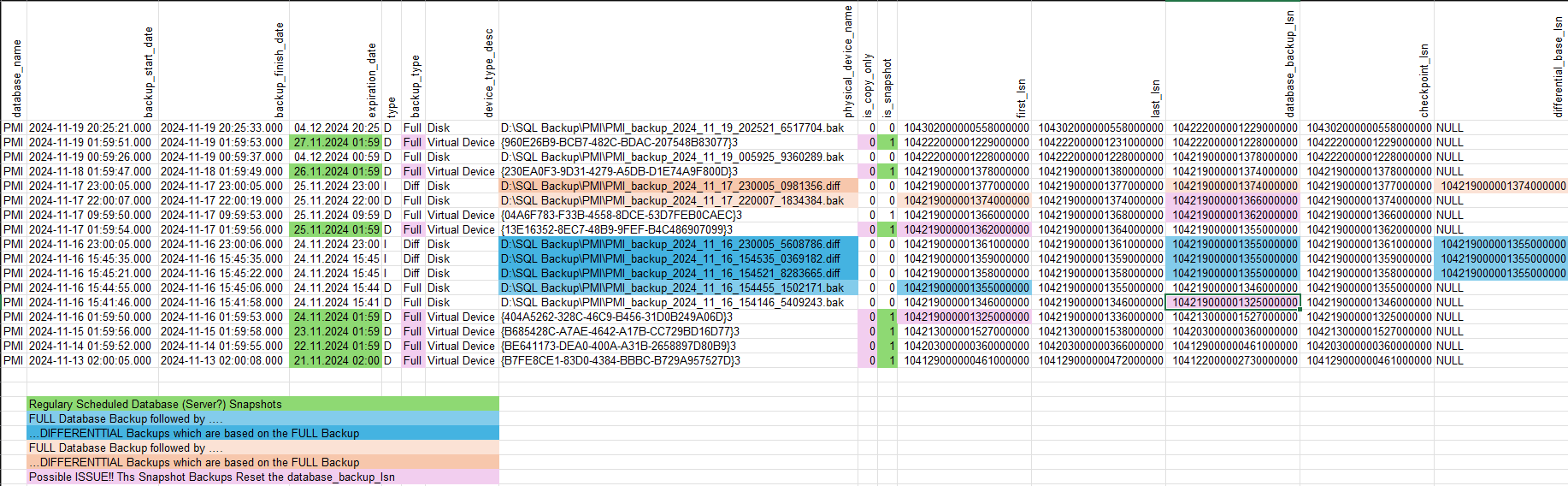
After studying the output of your backup history for the PMI database, I can make an assumption. Here is a colour-coded analysis of the backups being performed:

Colour coded analysis of backup sequence based on the LSN of the individual backups

Please CTRL + Click on the image to view in a new tab

As you can see in the blue colour-coded example the FULL Backup has a first_lsn (lsn = Log Sequence Number) of 104219000001355000000. This is the lsn the database was at as the FULL backup started.

The subsequent DIFF backups are all based on the first_lsn of the FULL backup. You can see this in the database_backup_lsn and in the differential_base_lsn columns.

The orange colour-coded example is similar. There is a FULL backup which occurs at 104219000001374000000 and this is the database_backp_lsn and differential_base_lsn for the subsequent DIFF backup.

ASSUMPTION

As you can see in the pink colour-coded elements, they kind of stick out. They perform a FULL backup every day at 2am (02:00). However, this FULL backup is not a backup like SQL Server would do, it is a snapshot backup. The I/O is frozen on the disks and the 3rd-pary solution performs a snapshot of the disks.

So, some 3rd-party solution or your virtualisation environment is performing a snapshot of the server. This snapshot is logged in the msdb database's backup history as a FULL backup. This is because the SQL Server Writer Service receives a request form the OS to freeze all I/O. Because SQL Server is involved it marks this snapshot as a FULL backup in the msdb database.

Even though this is a snapshot it will reset the first_lsn and the database_backup_lsn columns.

Let's look at the top pink example.

The Snapshot Backup at 2024-11-17 01:59:54.000 has a first_lsn of 104219000001362000000. This is then the database_backup_lsn for the second snapshot which is performed and for the FULL backup which war performed by yourself.

Your FULL backup will not break, because it does not have to rely on presence of the previous FULL snapshot backup. It just takes what it has from the pages in the *.mdf file and backs that up together with any committed transactions.

Looking at the backup history I would guess that you are having issues when you perform a DIFF backup after a SNAPSHOT.

Why?

The snapshot backup cannot be used to perform an additional DIFF backup of the database. This is because the snapshot is not a true FULL backup (SQL Server wise). It is consistent and can (in most cases) be used to bring a server back online, but it cannot be used as a base for additional restores (Think DIFF and TLOG Restores).

A snapshot backup will come back online and be recovered. You can't stop half way (WITH NO_RECOVERY) and then restore additional DIFF and/or TLOG backups.

Possible Solutions

  1. Tell your 3rd-party solution to add the COPY_ONLY option to the snapshot. With this option the database_backup_lsn is not reset and will always point to the last FULL backup which was not a snapshot backup. Subsequent DIFF backups will work!

  2. After the 3rd-party solution performs a snapshot, have your backup software perform a consistent FULL backup of your database.

  3. If you can set option 1. and you are performing real SQL Server backups with a backup solution, then there is no need to perform a FULL backup after the 3-rd party solution has performed a snapshot. Just perform a DIFF backup which should reference your last FULL SQL Server Backup (first_lsn) and all is well.


Additional information regarding snapshots

...based on comment: After thinking about it, I have a VM snapshot with Proxmox. I didn't know that VM snapshots could log a backup in SQL Server. How do I get around this ? I want to keep scheduled Proxmox snapshots.

You can't stop the automatism. This is explained in the article SQL Writer service (Microsoft Learn | SQL).

The SQL Writer service provides added functionality for backup and restore of SQL Server through the Volume Shadow Copy Service framework.

The SQL Writer service is installed automatically. It must be running when the Volume Shadow Copy Service (VSS) application requests a backup or restore. To configure the service, use the Microsoft Windows Services applet. The SQL Writer service installs on all Windows operating systems.

Further down in the article you will find the purpose of this framework:

Purpose
The Database Engine locks and has exclusive access to the database files. When the SQL Writer service isn't running, backup programs running in Windows don't have access to the data files, and backups must be performed using native SQL Server backup. Use the SQL Writer service to permit Windows backup programs to copy SQL Server database files while SQL Server is running and is maintaining exclusive locks on those files.

...which includes your Proxmox Snapshot.

Following on you have this information:

Volume Shadow Copy Service
The VSS is a set of COM APIs that implements a framework to allow volume backups to be performed while applications continue to write to those volumes. The VSS helps coordination between user applications that write data to disk (writers) and applications that back up that data (requestors).

Reference: SQL Writer service (Microsoft Learn | SQL)

In essence you cannot change how the SQL Writer Service assists in creating snapshots and also the logging of the snapshots. It is an essential part of how consistent snapshots are performed. IF you were to deactivate the SQL Writer Service then you would have a corrupt Proxmox snapshot.

A similar question was asked in the Use of third-party VSS backup plus native SQL backup (DBA Stackexchange) and was also answered by myself.

My conclusion was:

The 3rd-party backups should be marked as is_snapshot = 1 and is_copy_only = 1. These backups will not conflict with additional backup steps/procedures performed using native SQL Server BACKUP DATABASE..., BACKUP DATABASE ... WITH DIFFERENTIAL.... and BACKUP LOG... statements. The 3rd-party database backups are not part of an existing backup set.

More information about the VSS and SQL Writer Service was provided by myself in my answer to How can I backup an SQL Server database using Windows Server Backup? (Serverfault).

John K. N.
  • 18,854
  • 14
  • 56
  • 117