Setup
SQL Server 2025 is in Docker now, let's give it a go. I've used WideWorldImporters for a demo in the past that happened to also show how to spin up a SQL Server 2025 Docker container on the latest compatibility level, so I'll just link it here. Specifically, I have used its Sales.CustomerTransactions table. It is partitioned by TransactionDate right out of the box.
The problem
The best demonstration that I've ever seen of the problem with min/max queries was given by Kendra Little here. You may prefer the Microsoft documentation, but I found her way of showing the problem query and what a theoretical fix would look like much easier to absorb. In summary, you need a partitioned table and a non-clustered index on it. You must then write a min, max, or top query that ought to use the sort order of that non-clustered index. When you do this, you will find that the non-clustered index is scanned even though it logically only needs to be seeked. This fault does not occur if you are sorting on the partitioning column.
Example
EXEC sp_helpindex 'Sales.CustomerTransactions' returns
| index_name |
index_description |
index_keys |
| CX_Sales_CustomerTransactions |
clustered located on PS_TransactionDate |
TransactionDate |
| FK_Sales_CustomerTransactions_CustomerID |
nonclustered located on PS_TransactionDate |
CustomerID |
| FK_Sales_CustomerTransactions_InvoiceID |
nonclustered located on PS_TransactionDate |
InvoiceID |
| FK_Sales_CustomerTransactions_PaymentMethodID |
nonclustered located on PS_TransactionDate |
PaymentMethodID |
| FK_Sales_CustomerTransactions_TransactionTypeID |
nonclustered located on PS_TransactionDate |
TransactionTypeID |
| IX_Sales_CustomerTransactions_IsFinalized |
nonclustered located on PS_TransactionDate |
IsFinalized |
| PK_Sales_CustomerTransactions |
nonclustered, unique, primary key located on USERDATA |
CustomerTransactionID |
So we can presume that Sales.CustomerTransactions is partitioned on TransactionDate and we can see that FK_Sales_CustomerTransactions_CustomerID is an index with only CustomerID explicitly in its key list. We would therefore hope that this query
SET STATISTICS XML ON;
SELECT MAX(CustomerID)
FROM Sales.CustomerTransactions;
should be able to seek into each partition of FK_Sales_CustomerTransactions_CustomerID, read the biggest key of each, and finally return the biggest of the entire set.
Is this solved in SQL Server 2025?
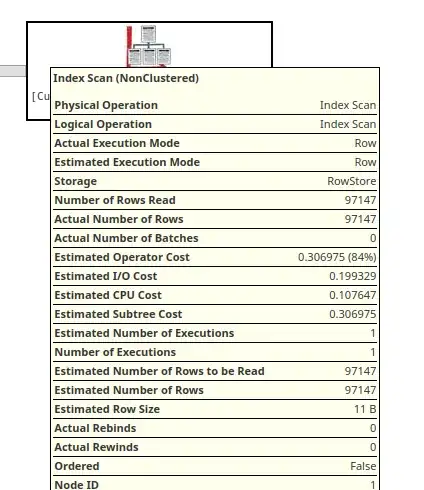
No. Instead of the seek we wanted, what we actually get is an index scan.
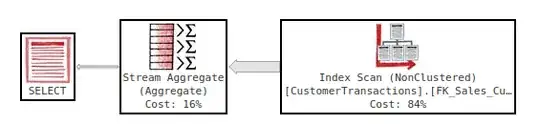
You can trivially find the same for min and top. Another giveaway is the actual number of rows read, which is much bigger than what it needs to be. 97,000 rows read for this is clearly silly.