The key to understanding why the Sort or Spool is needed is to think about how the plan works.
Strategy
The Top operator needs to limit the rows returned to some percentage of the potential full result. To know when to stop, it needs to know the total row count to calculate how many rows that percentage represents.
In this trivial example, that row count information could come from the known cardinality of the source table. In more complex cases with joins, filters, and aggregation, there would be no alternative to physically counting the rows at the right point i.e. just before the Top.
To ensure we count all the rows, we need a blocking operator. The two candidates SQL Server uses are a Sort or a Spool.
Costing
When the TOP PERCENT is associated with an ORDER BY clause, the optimizer considers the Sort first because ordered input is always a requirement. That sort might be eliminated later if a lower operator naturally provides sorted rows, for example as the result of an ordered seek or scan.
If the Sort option appears in a complete plan that is cheap enough, the optimizer won't bother trying to find anything cheaper. Otherwise, it will also generate a Spool alternative and cost that.
For very small inputs, the cost model produces a lower cost for a Sort than a Spool. This means that even if the optimizer costs both alternatives, it still might choose the sort.
We're talking about very small differences here, so it doesn't much matter. Still, the cost model assumes a slightly higher startup cost for a Spool than a Sort, while the Sort has a higher per-row cost.
Ordering
If the Sort is chosen as the cheaper option to obtain a total row count, there is no particular need to request ordering from its input subtree—correct results will be returned in either case.
Thus, the index scan has the Ordered:False property, which leaves it up to the Storage Engine to decide how to fetch rows. In this example, this almost certainly means rows will in fact be returned in clustered index order because the table is too small to qualify for an Allocation Ordered Scan.
The Spool option, on the other hand, cannot sort rows so its input tree is required to produce sorted rows, which the spool then preserves. The optimizer decides the cheapest way to get ordered data is to ask the Storage Engine for an ordered clustered index scan via the Ordered:True property.
The need to count rows and present them correctly ordered explains why the plan contains either a Sort or a Spool.
Internals
When Open() is called on the Top operator, it opens its subtree. The Sort or Spool consumes its entire input during the Open phase. By the time execution returns to the Top operator (still in its opening phase), the Sort or Spool is fully populated. Table access has ended (including its Close() call.
The next thing the Top does is to reset. It might do this multiple times for a Segment Top but in this case, it happens just once at the start. This is where the Top turns the specified percentage into a definite number of rows.
Cooperation
The only remarkable thing about this plan is the cooperation between the Top and its child Sort or Spool, when the Top asks its child operator for the total number of rows it has:
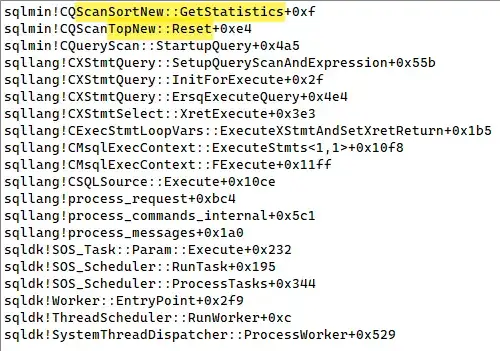
Top asking its child Sort for statistics
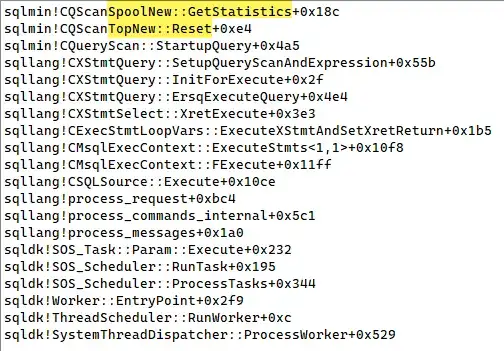
Top asking its child Spool for statistics
After turning the requested percentage into a definite number of rows (rounding up if the result has a fractional component), the Top continues processing as normal in its GetRow() phase, requesting one row at a time from the Sort or Spool until the target number of rows has been seen at the Top.
For completeness, note the Top also returns one row at a time. These result rows are packed into output buffers ready for transmission to the client.
It is interesting that if the optimizer considers the Spool option for this query, it generates this alternative using an exploration rule named EnforceHPandAccCard. There's no need for Halloween Protection (HP) in this plan, but we do need to Access (or Accumulate) Cardinality.
Any optimizer rule capable of producing a spool of any kind under the Top is also an option. For example, the following demo uses an Eager Index Spool:
DECLARE @T AS table
(
    TID integer NOT NULL PRIMARY KEY,
    GroupID char(1) NOT NULL
);
INSERT @T
    (TID, GroupID)
VALUES
    (1, 'A'),
    (2, 'A'),
    (3, 'B'),
    (4, 'B'),
    (5, 'B'),
    (6, 'B');
-- Retrieve half of the rows in each group:
-- Correct result is one row for group A and 2 rows for group B
SELECT
    Groups.GroupID,
    CA.TID,
    CA.GroupID
FROM
(
    VALUES
        ('A'),
        ('B')
) AS Groups (GroupID)
CROSS APPLY
(
    SELECT TOP (50) PERCENT
        T.*
     FROM @T AS T
     WHERE
        T.GroupID = Groups.GroupID
) AS CA;
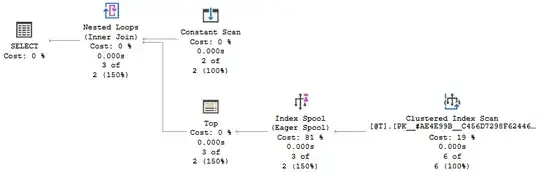
Note this demo produces incorrect results in all versions of SQL Server before 2019.


