3

I have a very simple query where I use a UNION ALL + ORDER BY over two queries that return pre-sorted data from respective indexes. For some reason, SQL will not use a Merge Join (Concatenation) for this, but a "normal" Concatenation, followed by a Sort. What could be the reason for that?

Here's a complete repro sample. (The INDEX hints are required to make SQL Server use the index despite the low number of rows in the table.)

CREATE TABLE T1(
    SequenceNumber bigint IDENTITY NOT NULL,
    TenantId uniqueidentifier NOT NULL,
    Object1Id uniqueidentifier NOT NULL,
    Payload nvarchar(max) NOT NULL,
    OtherNumber bigint NOT NULL,

CONSTRAINT PK_T1 PRIMARY KEY CLUSTERED (TenantId,SequenceNumber ASC) )

CREATE INDEX IX_TenantId_Object1Id_OtherNumber ON T1(TenantId, Object1Id, OtherNumber)

CREATE TABLE T2( SequenceNumber bigint IDENTITY NOT NULL, TenantId uniqueidentifier NOT NULL, Object2Id uniqueidentifier NOT NULL, Payload nvarchar(max) NOT NULL, OtherNumber bigint NOT NULL,

CONSTRAINT PK_T2 PRIMARY KEY CLUSTERED (TenantId,SequenceNumber ASC) )

CREATE INDEX IX_TenantId_Object2Id_OtherNumber ON T2(TenantId, Object2Id, OtherNumber)

DECLARE @tenantId UNIQUEIDENTIFIER = NEWID() DECLARE @object1Id UNIQUEIDENTIFIER = NEWID() DECLARE @object2Id UNIQUEIDENTIFIER = NEWID()

SELECT OtherNumber, Payload FROM T1 WITH (INDEX(IX_TenantId_Object1Id_OtherNumber)) WHERE TenantId = @tenantId AND Object1Id = @object1Id UNION ALL SELECT OtherNumber, Payload FROM T2 WITH (INDEX(IX_TenantId_Object2Id_OtherNumber)) WHERE TenantId = @tenantId AND Object2Id = @object2Id ORDER BY OtherNumber

DROP TABLE T1 DROP TABLE T2

And this is a screenshot of the execution plan: Execution plan of aforementioned query

When I add the MERGE UNION option, SQL Server will explicitly pre-sort the individual query results (on OtherNumber and Payload, for some reason).

Now an interesting twist: When I add a UNIQUE constraint on the OtherNumber columns, SQL Server will suddenly choose the Merge Join (Concatenation) operator. Why?

I've tested this both locally on SQL Server 2016 and on Azure SQL.

Fabian Schmied
  • 597
  • 1
  • 5
  • 10

1 Answers1

3

This is essentially answered by Order and nature of columns in select list of sorted UNION query affects performance, which links to the complete and complicated explanation in my article, Avoiding Sorts with Merge Join Concatenation.

The main point to appreciate is that the SQL Server query optimizer does not perform an exhaustive search of available strategies in order to avoid sorts. This is a pragmatic decision because the search space grows quickly.

As a result, you will sometimes see an avoidable sort in an execution plan. There is a method to determine how SQL Server currently derives sorting requirements for Merge Concatenation, and how it can sometimes take shortcuts (given a unique index or constraint, for example). Still, this is observational; there are no published behavioural guarantees.

To that extent, the answer to this type of question is always the same and involves following the logic the optimizer uses.


The answer to your particular flavour of the same underlying question is covered in my article section, Problems with non-unique indexes:

The way the optimizer reasons about the sorting requirements for merge concatenation can result in unnecessary sort problems, as the next example shows:

CREATE TABLE #T1 (c1 int, c2 int, c3 int, c4 int, c5 int);
CREATE TABLE #T2 (c1 int, c2 int, c3 int, c4 int, c5 int);
CREATE CLUSTERED INDEX cx ON #T1 (c1);
CREATE CLUSTERED INDEX cx ON #T2 (c1);

SELECT * FROM #T1 AS T1 UNION ALL SELECT * FROM #T2 AS T2 ORDER BY c1 OPTION (MERGE UNION);

DROP TABLE #T1, #T2;

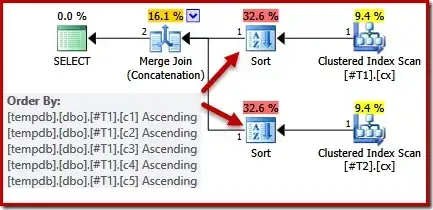
Looking at the query and available indexes, we would expect an execution plan that performs an ordered scan of the clustered indexes, using merge join concatenation to avoid the need for any sorting. This expectation is fully justified, because the clustered indexes provide the ordering specified in the ORDER BY clause. Unfortunately, the plan we actually get includes two sorts:

Plan with two sorts

There is no good reason for these sorts, they only appear because the query optimizer’s logic is imperfect. The merge output column list (c1, c2, c3, c4, c5) is a superset of the ORDER BY, but there is no unique key to simplify that list. As a result of this gap in the optimizer’s reasoning, it concludes that the merge requires its input sorted on (c1, c2, c3, c4, c5).


Providing one more illustration to cover the importance of the projection list:

DECLARE 
    @tenantId uniqueidentifier = NEWID(),
    @object1Id uniqueidentifier = NEWID(),
    @object2Id uniqueidentifier = NEWID();

SELECT SequenceNumber, -- added OtherNumber, Payload FROM T1 WITH (INDEX(IX_TenantId_Object1Id_OtherNumber)) WHERE TenantId = @tenantId AND Object1Id = @object1Id

UNION ALL

SELECT SequenceNumber, -- added OtherNumber, Payload FROM T2 WITH (INDEX(IX_TenantId_Object2Id_OtherNumber)) WHERE TenantId = @tenantId AND Object2Id = @object2Id ORDER BY OtherNumber;

Merge Concatenation with no sort

Adding SequenceNumber to the start of the projection list has resulted in simplification of the sorting requirement due to the (primary) keys on (TenantId,SequenceNumber), with TenantId constrained to a single value by the equality predicate in your query.

Paul White
  • 94,921
  • 30
  • 437
  • 687