I have two Microsoft SQL Server database files named "xxx.mdf" & "xxx.ldf" and I want to import that database into MySQL so I can run queries against it using phpMyAdmin. How would I go about doing this?
Asked
Active
Viewed 1.2k times

2 Answers
3
The first thing to note is that an .sql file is not a MySQL database. It is a script file containing SQL statements. You would run such a script against the database platform for which it was written (using the SQL dialect for a specific SQL database engine) to create the actual database.
Assuming that you are planning to do this all on a desktop machine with no software already installed, here is an overview of the steps to accomplish what you stated in your question. To describe every step in detail would make for a very long answer, so take this as a "roadmap" and start working through the steps. If you run into any particular difficulties that create a new question for that specific issue.
(Also, see the "Notes" at the bottom for a couple of possible alternatives.)
Install Microsoft SQL Server
If you are reasonably certain that the database in question is no larger that 10 GB and uses no Enterprise-level features (thanks, Jon!) then download SQL Server 2008 Express from here (thanks, Ashian!) and install it. Otherwise, download and install the (180-day trial) SQL Server Enterprise Evaluation Edition.
Attach the SQL Server database
Once SQL Server is installed, you need to "Attach" the existing database (.mdf/.ldf files) to the instance of SQL Server that you just created.
Install MySQL Server
To create and manipulate a MySQL database you need to have the MySQL Server software installed.
Install Internet Information Services (IIS)
phpMyAdmin is a web-based administration tool for MySQL, so it needs a web server environment in which to operate.
Install PHP
phpMyAdmin runs under PHP, so your IIS install must have that available, too.
Install phpMyAdmin
You need to install it if you're going to use it.
Install MySQL Workbench
MySQL Workbench will do the actual conversion from Microsoft SQL Server to MySQL.
Notes:
Of course, once you have SQL Server installed and the database attached, you could always "make multiple quer[ies]" against the database in SQL Server itself.
If the database really needs to be in MySQL (e.g., if you already have MySQL queries written or provided to you) but you only need to query the database locally, then a tool like HeidiSQL might allow you to avoid installing IIS, PHP, and phpMyAdmin.
In fact, HeidiSQL might be able to do the conversion for you (e.g., by doing an export from SQL Server and an import into MySQL), in which case you could use it instead of MySQL Workbench.

Gord Thompson
- 1,277
- 9
- 13
1
my fav app for manage my databases is http://www.heidisql.com/
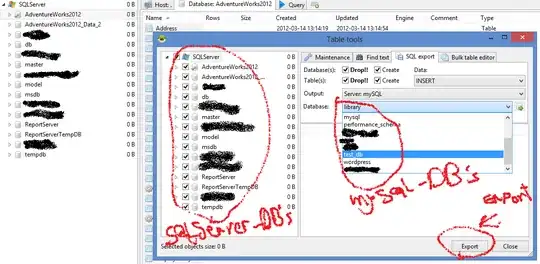
and you can also Exporting databases as SQL Query then run query in mysql.

mehdi
- 196
- 1
- 1
- 9