7

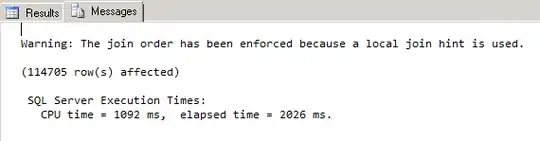
By "Messages" I mean the Messages tab in the following figure, which includes "Warning", "n rows affected" and in the figure below, the execution time. In JDBC, ResultSet class is used to retrieve the "Results". Is there any way to get all the information in the "Message" tab through JDBC?

enter image description here

zli89
  • 917
  • 2
  • 11
  • 18

2 Answers2

10

You can get most of those messages, but unfortunately not all. See my question on Stackoverflow regarding that.

In general those messages (e.g. messages from a PRINT statement) are returned as warnings on the Statement object by the JDBC driver. To retrieve them use Statement.getWarnings() in a loop:

Statement stmt = ...;
stmt.execute("some_procedure");

SQLWarning warning = stmt.getWarnings();

while (warning != null)
{
   System.out.println(warning.getMessage());
   warning = warning.getNextWarning();
}

I have seen some messages also being returned on the Connection instance rather than the Statement. If you don't see anything, try the above code with your Connection instance.
2

I was looking for a way to do this (except the execution times) and I have managed to achieve this using the version 7.4.1 of their JDBC driver.

do {
    resultSet = statement.getResultSet();
    updateCount = statement.getUpdateCount();
    printWarnings(statement.getWarnings());
    statement.clearWarnings();
    if (resultSet != null) {
        printResults(resultSet);
    }
    if (updateCount != -1) {
        printError(updateCount + " row(s) affected/returned");
    }
}
while (statement.getMoreResults() || updateCount != -1);
printWarnings(statement.getWarnings());

Where printWarnings handles the warning chain. It works for the cases I have tested. You can get the execution time by sending SET STATISTICS TIME ON before the given query, then it will come in the form of an SQLWarning. Generally you want to disable it after using SET STATISTICS TIME OFF.

coladict
  • 123
  • 3