3

I have a backup of my database as a TestDatabase.bak file but I am unable to restore it.

When I try to restore I receive the following error message in SSMS:

RESTORE could not start database 'FieldopsDevDynamic07042013'
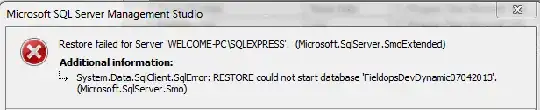
SSMS error message

The error log shows:

Database 'FieldopsDevDynamic07042013' cannot be started because some of the database functionality is not available in the current edition of SQL Server.

Error log message

How can I restore this database?

Mark Storey-Smith
  • 31,860
  • 9
  • 90
  • 125
user2586685
  • 41
  • 1
  • 3

3 Answers3

5

Your backup is from a database that is using Enterprise Edition features. You are trying to restore it to an Express Edition server. That will not work.

The message in your error log is telling you exactly that:

Database 'FieldopsDevDynamic07042013' cannot be started because some of the database functionality is not available in the current edition of SQL Server.

The error log even tells you which feature is causing the problem:

Database 'FieldopsDevDynamic07042013' cannot be started in this edition of SQL Server because it contains a partition function...

Try restore to an Enterprise or Developer edition server. If it still fails update your question with the result of your attempt.

Mark Storey-Smith
  • 31,860
  • 9
  • 90
  • 125
2

You have to execute below t-sql in a query window :

--recover the database:
RESTORE DATABASE db_name WITH RECOVERY;
GO

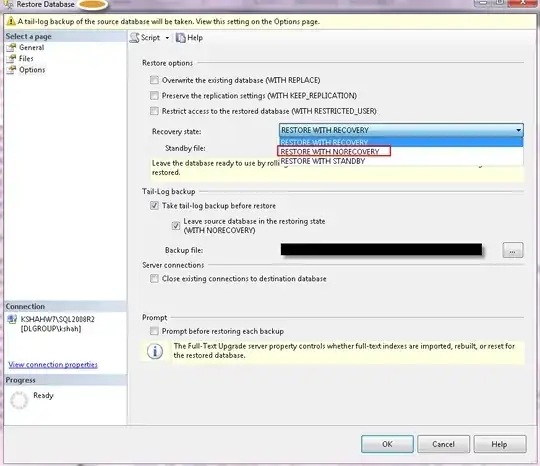
You might have selected "restore with NORECOVERY" as below. You have to select "RESTORE WITH RECOVERY" to bring the database out of restoring state.

enter image description here

Kin Shah
  • 62,545
  • 6
  • 124
  • 245
-4

I dont know if this will help or not...but with some of the older versions of SQl if you had a file still open, it would keep processing until all files were closed. Make sure you have closed all files/connections. That might help you.